NotePlan
NotePlan
Nov 2

Add better pencil support

I use NotePlan on my iPad (Pro and Mini) on a very regular basis and would love to see better Pencil support While I can add initial note text, doing any of the advanced editing features such as deleting words, inserting words, carriage returns... are not supported For myself and another avid NotePlan User (feel free to chime in my friend), this would be a "game changer"
PendingPending

Mar 1, 2022

I would love if there were replacement suggestions for words when writing with Pencil. I see this in some apps and not in others, but it's where you can tap a word with the Pencil and get suggested replacements. Huge time-saver for words that are not recognized correctly, switch upper/lower case, etc. It works in DayOne in the screenshot below but in NotePlan and Bear I don't get the black bubble with replacements, not sure why

Dec 6, 2021

This would be HUGE for me too.

Nov 18, 2021

I think the most helpful change would be enabling the long-press with scribble to add more space. I try to use that and it doesn't currently work in noteplan. It would help out a lot since my difficulty using scribble is mostly trying to write things where there isn't an easy way to make space for handwriting

Nov 9, 2021

On a probably-related but slightly separate iPad note...I was reading and marking up a PDF in GoodNotes today, brought up the QuickNote (lower right corner with the pencil), made some notes and then clicked Share. I thought I'd be able to share the note contents into Noteplan, but when the Share Sheet came up, most text-related apps on my device were there but no Noteplan. If there were a way to easily embed a note/drawing, that would be a short-term fix to at least the drawing bit of my needs.

Nov 9, 2021

Eduard Metzger well interesting, I never see the scribble menu? So, what you are demonstrating is something I would expect happens? Curious why I don’t see this?

Nov 9, 2021

Mike Erickson I just tried the Scribble features like deleting words, making space in a word, etc. (carriage return is available as a button in the pencil menu) and it seems to be all available, not sure if we see something different. See the video attached, do you experience something else? That's what confuses me a little... http://transfer.sh/MnEM0P/RPReplay_Final1636484711.MP4

Nov 2, 2021

You mean “Scribble”, but that’s supported! At least when I try, I can erase words for example by scribbling above them, add new words by writing into empty space, etc. You don’t see that?

Nov 8, 2021

Eduard Metzger: think about more full PencilKit support https://developer.apple.com/documentation/pencilkit

Nov 9, 2021

David Wertheimer: In this case "Sketching" is meant? See: https://noteplan.canny.io/general-feature-request/p/apple-pe… If yes, I would merge these requests.

Nov 2, 2021

Guilty as charged. Yes it would be amazing. I end up using other apps on my iPad not because I want to. Eduard Metzger do you have any stats on the pct of iPad users?

Nov 3, 2021

David Wertheimer: Sorry, I meant to say it seems to me „Scribble“ already works. So I‘m not sure what I should do about Pencil support, other than adding a way to add drawings as images.

Nov 3, 2021

Eduard Metzger: I will let Mike Erickson comment on specifics, because he knows the pencil limitations better than I do. But a) yes, you need to be able to draw pictures in the note, and b) My ideal would be to have the written notes and the OCRd version of them (e.g. after Scribble), and you can delete the written notes if you want. I find that Scribble works about 50% for my writing, and so coming back later to try to figure out what I meant by that is hard. In the end, it's not reasonable to ask you to create GoodNotes inside of NotePlan, but maybe Mike has some ideas on a reasonable middle ground.

Nov 8, 2021

David Wertheimer: For basic pencil support, it works fine while I am entering text to start a note. However, it gets very difficult fast to continue using after I have started. - I am not able to continue where I left off - I am not able to start a new paragraph - Editing existing text is difficult I am not as concerned with drawings (it would be nice, but not a deal breaker) I just want normal editing functionality to work better.

Nov 9, 2021

Mike Erickson: I have also faced similiar issues with multiple apps not being optimised for scribble. They support it yes, but the UI doesn't lend it self well. My pain points: - New lines as you said, scribble allows new lines by writing a certain distance below the actual line... but not in all cases. - Scribble in fields with buttons or screen edge to close make it difficult to write. - Markdown with scribble... doesnt always get recognised. Adding '# Title' works, but as there is no 'space command' between # and Title, it doeesnt get converted (in many apps). I believe this can be replicated by pasting a 'space', as scribble seems to convert text to a clipboard then pastes words.

Nov 9, 2021

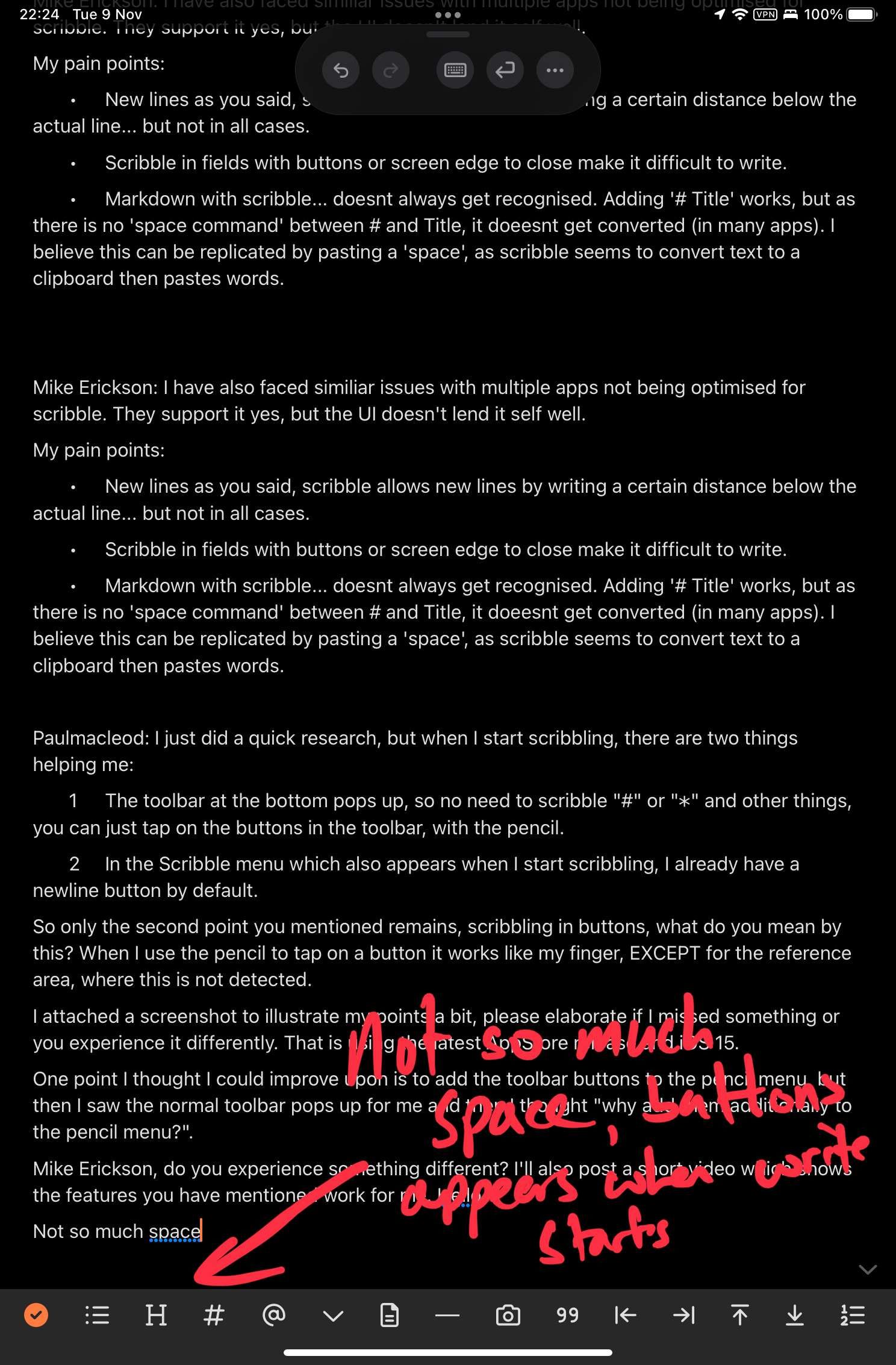
Paulmacleod: I just did a quick research, but when I start scribbling, there are two things helping me: 1. The toolbar at the bottom pops up, so no need to scribble "#" or "*" and other things, you can just tap on the buttons in the toolbar, with the pencil. 2. In the Scribble menu which also appears when I start scribbling, I already have a newline button by default. So only the second point you mentioned remains, scribbling in buttons, what do you mean by this? When I use the pencil to tap on a button it works like my finger, EXCEPT for the reference area, where this is not detected. I attached a screenshot to illustrate my points a bit, please elaborate if I missed something or you experience it differently. That is using the latest AppStore release and iOS 15. One point I thought I could improve upon is to add the toolbar buttons to the pencil menu, but then I saw the normal toolbar pops up for me and then I thought "why add them additionally to the pencil menu?". Mike Erickson, do you experience something different? I'll also post a short video which shows the features you have mentioned work for me.

Nov 9, 2021

Eduard Metzger: So basically to add since I voted for this issue. Scribble is not supported in my language. For me functionality like in for example nebo, which supports a lot of languages, would be fantastic.

Nov 9, 2021

Eduard Metzger: thanks for taking the time to check. Last time I used iPad Pro my experience with scribble was sub optimal. With iOS 15 and mini, it does work better. Totally useable with the tool bar. Other apps lack Toolbar which leads to more issues. Very minor (and perhaps personal preference). Physically it's easier to write on top half of screen for me. When starting to write at end of a note there is little space. But I will use work around with blank lines. I hope that scribble is updated to better manage adding line breaks. I know we can use pop up menu, but that is poor user experience.. not related to your app.

Nov 10, 2021

Eduard Metzger: Good morning Please see the attached video which shows that the scribble toolbar never appears. As you can see, I am able to add text to the note, but I dont see any of the additional editing features you have shown?

Nov 10, 2021

Paulmacleod: In regards to the space, I can add some more on iPad. I have already added some bottom padding on Mac where it's also not very nice to type near the bottom of the screen. I hope you have seen the floating toolbar at the top with the newline button? It blends in a little with the dark mode theme.