NotePlan
NotePlan
Oct 23

Additional standard text formatting: strikethrough, highlight, and superscript/subscript

I love NotePlan and I would like to see some additional text formatting added to the baseline Theme: strikethrough, highlighting, and superscript/subscript. I know that some of these can be added by building a custom Theme. I haven't seen any yet that handle subscript/superscript. Ideally, I would like to see Markdown itself standardize and include these formats. The next best thing would be for NotePlan to make them standard formats. Please give this some consideration as a way to make NotePlan more useful to a wider community. Thanks! dF
PendingPending

Feb 9, 2024

I really need subscript/superscript support. I am teaching chemistry, physics, and mathematics. This support is critical for me.

Feb 14, 2024

Eduard Metzger Do any of the Themes support subscript and superscript? If not, is it possible to add this to theme? If so, how?

Mar 17, 2024

Terry Hatmaker At the moment it's not possible

Mar 17, 2024

Eduard Metzger Will you be adding subscript/superscript support directly into NotePlan?

Oct 25, 2021

And underlining please! Thanks

Oct 25, 2021

Thanks for your feedback! Just wanted to say „check out the custom themes“ :D. The theme Apple Dark has it, but I agree, adding them to other themes makes sense.

Dec 9, 2021

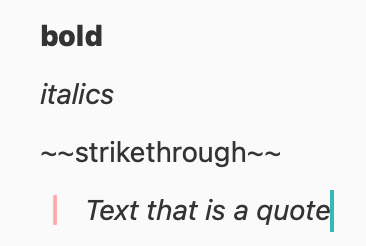
Eduard Metzger: Hi Eduard, when you say the theme "Apple Dark" has it - are you saying that if we switch to use that theme then Markdown for ~~strikethrough~~ works in the daily notes in the same way that it does for bold, italics, and text that is a quote? Thanks! :)

Dec 9, 2021

Rosemary Lynch: Exactly, this and much more, see the screenshot! You can copy that theme and modify it -> or visit this repository of user themes: https://github.com/brokosz/NotePlan_Themes, many of them also support strikethrough and more.

Dec 13, 2021

Eduard Metzger: Thank you! That's great. I love the use of !important in this theme. I don't understand why the themes don't support the same Markdown options... is it because they are contributed by different individuals? When I am looking at the GitHub repository, is there an overview / way to compare themes? Lastly; in your screenshot above - what markdown triggers ==highlight== ^^highlight^^ please. :)

Dec 13, 2021

Eduard Metzger: Thank you - this is great. I have switched themes and love the use of !important in this example. I don't understand why the themes don't all support the same set of markdown options. Is it because they are contributed to GitHub by different individuals? Is there a way in GitHub or elsewhere to see an overview of what each theme supports? Lastly - in your screenshot above, what markdown did you use to trigger the highlight option? Thanks again. :)

Dec 18, 2021

Rosemary Lynch: It's `::highlight::` Yes, it should be supported by all themes. I wasn't sure if the performance would drop significantly of typing. Though I don't notice anything when I use the dark theme. It's probably about time I update it for all themes.

Dec 18, 2021

Rosemary Lynch: On GitHub, if you scroll down (to the description) you see screenshots of a short example of each theme. It's not showing everything, but you get an idea.

Dec 20, 2021

Eduard Metzger: Thank you! Appreciate you taking the time to answer.