
Jul 21
Align indented paragraphs with tasks and bullets
I’d like to propose a small adjustment of aligning indented paragraphs with tasks and bullets.
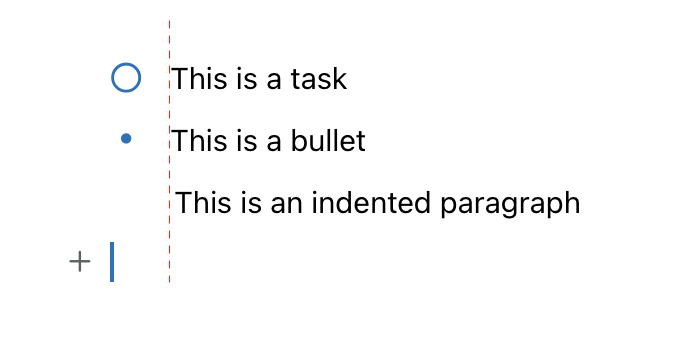
Pending
Thanks for sharing. I’m not 100% sure about this one. It looks like a preference (depends on the “taste” of each user). You could possibly achieve this my modifying the theme: https://help.noteplan.co/article/44-customize-themes#headind… Did you have a look at custom themes yet, I can help if needed.
Eduard Metzger: Bear does that, and please let's not go this route.
Marcin Ignac: Agree, I hate this one in Bear. Need to indent list items every time.
Anton Sklyar Marcin Ignac I personally also prefer the current indentation, it’s easier to see the block of tasks this way.
Marcin Ignac Anton Sklyar I believe my example was not so clear. I am not asking for hanging bullets and checkboxes like in Bear, but for the size of the “tab” character to be adjusted to align with tasks and bullets. The image below will make it clearer. Eduard Metzger I tried creating a custom theme but I couldn’t make headIndent to work. Maybe I am missing something here.
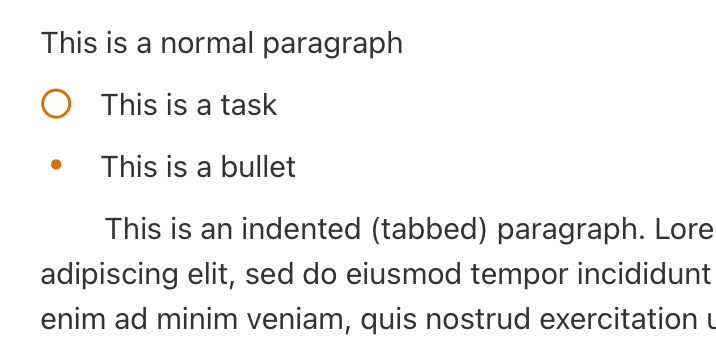
Henrique Beier: Ok, you mean in this screenshot the “T” is not 100% aligned?
Henrique Beier: Can you describe what you want to achieve with headIndent or send me what you tried? Is it regarding fixing the alignment? You would need to change or apply it to quite a few types of paragraphs, like tasks, bullets (are also under “todo”) and the body. Only applying it to the body is not enough.
I would like to seoncd Henrique Beier's request. The indentation is inconsistent. Of course I exaggerated by using vertical bars.