
Mar 8
Auto Rename [[Note Links]] when Note Title was Changed
When the note was renamed.
Closed
Excellent, thank you! Will check it out 👍
Download the update from the AppStore, should be available now. :) Uploading Setapp too now.
Eduard Metzger: HOORAY!
It's almost done!
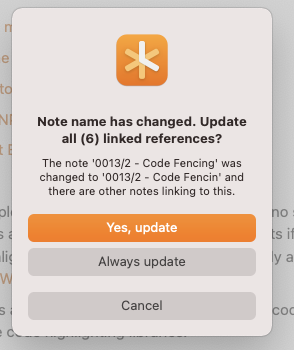
Testcase: **Duplicate note names** I have two notes. One is named "Apple" the other "Orange". I have 5 notes with links to `[[Apple]]` and 7 notes with links to `[[Orange]]`. What happens when I change the first line in the note "Orange" to "Apple"? Will the note's name change to "Apple"? Will 7 links be renamed from `[[Orange]]` to `[[Apple]]`? Which note will open, when I click on `[[Apple]]` in any of the 12 notes? The old "Apple" or the new "Apple", formerly known as "Orange"?
Rhubarb: One thing I would note in relation to what Rhubarb has said. Currently it is possible in Noteplan to have multiple notes with the SAME addressable [[name]] if they are stored in different folders. Perhaps a warning dialog or something similar if creating a note with a title that is a duplicate and already [[wikilinked]] to a different note?
Eduard Metzger: Great news!
Andrew Ford: Realistically I have never ran into such an issue (I don't need notes with duplicate titles), but I've just tested how Bear app deals with that. The thing they do in case when you have a wiki-link to a note name is just looking globally for the note with the *latest modification date*. So, when you have a wiki link with a note name that corresponds to multiple notes, Bear always takes you to the one that has latest modification date. And when you rename one of the duplicate notes, the references to it of course are updated immediately, as when you edited the note it became the "latest" one. All this happens without ever bothering the user with any popup confirmation dialogs.
Anton Sklyar: I hear you. In my own experience of using Noteplan, creating a duplicate is NOT desirable or intended, it was an accident on my part. Therefore a confirmation dialogue to check if that was intended could be helpful. Similar is how Noteplan treats Folders as [[Wikilink]] targets, so if I have a folder named the same as a note, it sometimes goes to the folder rather than the note. Noteplan does not give the user any warning of this conflict. Again, once I know this as a user, I can rename the appropriate note/folder and go from there (although this does require a restart for Noteplan to work correctly after this). But if Noteplan already recognises the conflict, it could warn me and let me choose to rename the note or the folder.
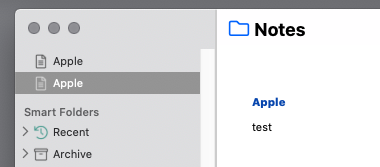
Andrew Ford: Actually it is even possible to have notes with the same name in the *same* folder. Before I wrote my post, I double-checked the behavior in NP 3.0.19 Mac. See screenshot for a sidebar containing two Notes named "Apple" at root level. Eduard Metzger seems not to properly test for consistency of file names (OS), note names (sidebar) and note titles (first line of note). I think that might be one of the reasons why the sidebar occasionally get's messed up for some users. (See [Reddit](https://www.reddit.com/r/noteplanapp/comments/mbivny/potenti…).) Anton Sklyar: I frequently have duplicate names, at least temporarily, because I - create notes with generic names - create notes with no particular name at all - create notes with copy-and-paste from some template - create notes with cut-and-paste from some larger note - frequently change names and folders of regular notes until they make sense (bottom-up thinking) - prefer tags to links, because for many use cases tags are much faster to create, update and locate. I care about the appearance of note titles in a day's "references". Uniqueness of note titles is not relevant for tags. - consider note titles, note names and filenames as fluid not static - don't think of **note titles** as unique identifiers. Title and identifier are not the same thing. Obsidian gets it right! Obsidian clearly distinguishes between note names and note titles, similar to "slugs" in blog software I manage notes like I manage files in a physical or electronic file system. I think of notes hierarchically, much like Getting Things Done or Bullet Journaling. I'd guess that I'm not the only one who approaches notes that way. ;-) I'd guess that only a small fraction of Noteplan's users builds an elaborate Obsidian-Roam-Bear-Wiki-Zettelkasten-associated-graph in Noteplan with uniquely named atomic notes. For the rest of us, duplicate note names happen. Auto Rename must not assume that note names in Noteplan's namespace are unique. (See screenshot.) Auto Rename must not assume that for every note in Noteplan's namespace filename, note title and note name are perfectly consistent. (Both notes in the screenshot have the same note name, but different file names. The note formerly known as Orange kept its filename `orange.md` after I changed its title to "Apple".)
I'm hoping for a **confirmation** dialog with a very detailed **preview**: - File name: What files will be renamed? From what to what? (Actual filenames and note names displayed in Sidebar are not always identical.) - Notes: How will the first line of affected note(s) change? Including all Markdown and special characters. - Links: How will the text blocks that contain the links change? Including all Markdown and special characters. This command changes file names *and* file content. It has the potential to mess up *many* notes with one click. ;-) See also Reddit: [Feature request? Note links - bi-directional renaming.](https://www.reddit.com/r/noteplanapp/comments/lvdfag/feature…)
To clarify, do you mean [Auto Renaming](https://noteplan.canny.io/knowledge-management/p/auto-rename…)? Though yours is slightly different. You want to update all links when you just change one instance of it, not the original note? This could potentially be destructive if you just want to use a different link and not actually rename it? Wouldn't it make more sense to go into the original note and rename this? Then all links be updated?
Eduard Metzger: Refer here: Auto-update links to headers on header title change (https://forum.obsidian.md/t/auto-update-links-to-headers-on-…). Obsidian and Bear (and the to-be-released nvUltra) do this -- which is a wonderful feature that means you don't have to hunt down every instance of the link if you have, say, changed the root note title within from NotePlan from [[This is a note]] to [[this is a note with further elaboration]] (which breaks links I've discovered) **"Wouldn't it make more sense to go into the original note and rename this? Then all links be updated?"** This is what I'm angling for -- but not seeing my notes update? Is this a current feature, or something in the works? I've also noticed, the physical filename (as viewed in Finder) do not always auto-update to the correct name of the note. Example: I create a note -- don't immediately give it a title with a content header, leaving it as untitled -- fill the note with what I require -- but in finder it remains 'New Note - 07.0090.md' even after I have given it a new note title. My suggestion would be that NotePlan (for Notes), on a coded level, would parse the first line on each note (which is the title of the note indicated by a H1, H2, H3) on a change and rename the .txt or .md file to ensure they are the same. Then, as per my auto-update of [[links]] request -- update the changes across my notes. It would be awesome if NotePlan could take the burden of that additional legwork away from a user 🤘🤘but in the meantime if a user could right-click to rename a note manually within NotePlan hierarchal panel that would also be great! Just my thoughts 😀
ShandeN: Thanks for elaborating. It's not a feature yet, I mean this exists as feature request already, but I wanted to clarify before merging. I'm merging it with [this request](https://noteplan.canny.io/knowledge-management/p/auto-rename…). It seems the same, let me know if not.
Maybe change the title or description of this to be: ‘Automatic renaming of linked notes on note title change’. Which is a truly handy feature by the way when one has a significant note library. While waiting for this feature in Noteplan, it is possible to open your Noteplan library in Obsidian and rename any notes there, it will automatically rename your linked notes.
Andrew Ford: Good point, have updated it.
Andrew Ford: I did attempt this in Obsidian (thinking the same) but filenames containing a period (1.3) were changed to (13). I had to go back to Finder to revert my filenames and swiftly removed Obsidian (previous user btw). I too have an extensive note library, into the 1000s and am hoping NotePlan will finally scratch my itch after trying Craft, Obsidian, The Archive, Bear etc -- so keeping fingers crossed for some behind the scenes help maintaining my notes in NotePlan.
Eduard Metzger: 😁🤘
Great!!