Submission
avatar
Eduard Metzger
Mar 2, 2021
Board
Features
Status
Planned
Get Updates
Powered by UserJot
Choose note references: filename or first line (in [[note]], CMD bar, sidebar...)
Change which name NotePlan should use to reference notes: Filename or First-line (=note name). At the moment it uses the first line of the note as a reference. This is used in [[links]], as names in the sidebar, command bar, search results, etc. To make it work better with other apps like Obsidian, give the option to change this. Similarly, days are linked using the ISO format `YYYY-MM-DD`, but the filenames are `YYYYMMDD` (pointed out on [Discord](https://discord.com/channels/763107030223290449/763112434181341194/859203705417105408)). One more idea: Instead of either/or, rather use checkboxes to **add** a recognition format. So that we can work with note titles **and** filenames**.
avatar
Eduard Metzger
Mar 2, 2021
35
AF
Andrew FordMar 8, 2021
Along similar lines, I like Obsidian's ability to allow you to colloquially name your wikilinks. So: [[Linked Note Name|Displayed Title]]. This gives you some flexibility when linking to a note in a paragraph where the text needs to be tweaked to fit the sentence syntax or where the note title is ugly or long and you need it to be abbreviated.
avatar
Eduard MetzgerMar 8, 2021
Andrew Ford: Interesting! I didn't know about this feature. Just wondering how to implement it. There is no preview mode in NotePlan, so it needs to hide the "real" name live.
AF
Andrew FordMar 9, 2021
Eduard Metzger: I wonder if it would be possible to use Regex to detect ‘|’ inside of a [[]] and to hide the text before the | when not selected, as with other Noteplan markdown elements? At the same time you’d code Noteplan to ignore anything Inside a wiki link that includes and comes after a | when it comes to assembling the internal Noteplan URL.
avatar
Eduard MetzgerMar 10, 2021
Andrew Ford: Yes, I had the same thought. Could be definitely done. But this would be a different feature.
avatar
Eduard MetzgerMar 8, 2021
Related: [Rename Note Links](https://noteplan.canny.io/knowledge-management/p/rename-note-links)
avatar
RhubarbMar 22, 2021
Will the sidebar show file names or the first line of a note? Will there be a command to change the filename independently of the note's first line?
AF
Andrew FordMar 29, 2021
Rhubarb: After trying out Johnny Decimal, I have strong opinions about wanting the left-sidebar to display note filenames (and these being editable) rather than the note title and for users to be able to choose between note title or filename for wiki linking. In Johnny Decimal files are named with a Category and Number prefix. Something like: 11.01 Tasks. This makes sense in the left side-bar, to ensure that notes are organised in numerical precedence. However, it's annoying for wikilinks which become more visually complicated and require more mental parsing as they interrupt the text flow. Think: I like [[Noteplan]] vs I like [[11.02 Noteplan]]. Having the left sidebar show filenames and the ability to choose to wiki link based on note title or filename would allow for getting the best of both worlds. Alternatively, as mentioned below, if users can customise the displayed wiki link text [[Wikilink|Displayed Link Text]] this would also serve the same purpose in possibly an even better way.
avatar
Aleem Shaun AliApr 16, 2021
Eduard Metzger - will this also be addressed with this feature? Using metadata in notes (supported by apps such as iA Writer) requires the metadata to be at the top of the note and 'blocked out' by --- (three hyphens top and bottom). Consequently, the name of any note in the sidebar displays simply as '---' - this presents obvious problems.
avatar
Eduard MetzgerApr 17, 2021
Aleem Shaun Ali: If you choose filename as reference, then it doesn't matter if you have meta data at the top. NotePlan will display the filename in the sidebar, command bar, etc. Right now the first-line title is blocking usage of meta data at the top. An additional step might be to define a variable in the meta data to use as reference and if none given, fallback to filename or first-line.
avatar
Jonathan ClarkMay 31, 2021
Eduard Metzger: yes, and just mentioning YAML here as I couldn't find it explicitly mentioned. I'd like an option here to use YAML 'title:' field if present before first line or filename.
avatar
Jonathan ClarkJul 2, 2021
And I've now added a specific YAML request: https://noteplan.canny.io/interoperability/p/allow-yaml-frontmatter-in-notes
MS
Maria ShinotoJan 8, 2023
Eduard Metzger: Yes, a YAML header seems the way to go. A keyword might be "alias", that could be even an array of aliases (see devonthink aliases and wikilinks), another may be "filename" wth the options "alias", "firstline", and whenever a new note is created the default option is set and can be chenged individually in the yaml block. I like Noteplan because of the simple and sensible linking (among others), because its avoiding of markdown specialities like the aliases solution in Obsidian. A yaml block is standard in Markdown and Quarto, therefore natural in scientific research.
si
silopDec 31, 2023
Jonathan Clark: +100 for this; since all of my notes have YAML frontmatter I'd like to have this feature
avatar
Seva PoliakovJul 16, 2021
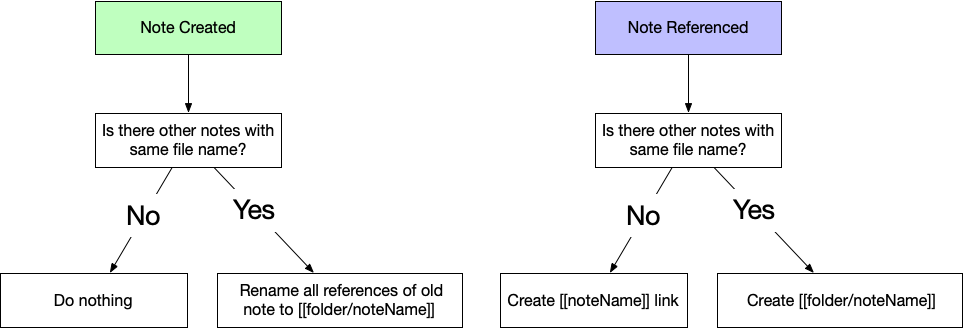
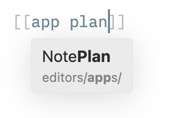
Just want to point, that filenames as references may include directory name as well. It helps in two different cases: 1. You can use the directory name as part of a search query. As example: Let's imagine you have older structure `/projects/proj1/` and notes in this folder. When you want to mention any note `wiki` in this folder, you can write something like `wikiproj1`, because proj1 will be treated like the prefix 2. You have two files with the same name in different folders If the filename is included as a prefix, you can specify which note you want reference to. Also, I included graph about how obsidian deals with notes with the same name. Hope it will be useful.
JH
Jeremy HarrisonJan 31, 2022
I would realy like this. One of the great selling points of Noteplan is the fact that the underlying files are not hidden. You can navigate your way around your notes using standard tools. But if the file name no longer represents what the note is about that really degrades the benefit. I like the idea of having the file name field top left as suggested in another feature request. It gives users the flexibility, for example, to create shortened file names if they so desire. If the sidebar could be hot-key toggled between note name and file name that could be useful.
avatar
Alison BrackMar 15, 2022
Just wanted to mention that I really want to put my NotePlan files in my obsidian vault with my zettelkasten but this issue is really the main thing preventing that. I’d really love an option in preferences to pick which one so I don’t have to manually duplicate the title every time I make a new note
NS
Nathan SnelgroveApr 13, 2022
This is the biggest thing that holds me back, personally, from a subscription. I think about it a lot. I posted about it on Reddit today, not knowing it was here. I need to know what my file names are, if the whole purpose is plain text and owning my files. It’s important to me that they’re visible and accessible, and that they’re portable. I want my notes to outlive my job, my note taking app, and maybe even my own life. Anyway. Not to sound melodramatic.
avatar
AndreaJun 1, 2022
YES. I am contemplating moving from Onsidian to Noteplan and this is the big thing preventing me from subscribing and making that move. Add this and you have a customer.
avatar
DefakeJul 27, 2022
I'm sorry if I didn't understand it correctly, but it looks to me like I will have either the ability to have nice [[First Line Title]] in the notes or the ability to use Obsidian but having [[actual_file_title]]. I would like to have both abilities! Maybe internal link representation will use filenames, but the appearance will remain the same (maybe using Andrew Ford's suggestion) ?
DC
David CoyerNov 11, 2022
Agree with others. Need this feature to migrate from Obsidian.
AR
A RNov 21, 2022
David Coyer: could also be a good feature for those who want to use both Obsidian and Noteplan. I would love to use these apps together but can’t because of this file and issue. Hope it gets fixed soon.
avatar
Graham WheelerDec 8, 2022
David Coyer: I recently migrated from NotePlan to Obsidian, because of the performance of NotePlan when rendering larger markdown files, but missed Exchange calendar integration, so just came back, and got rudely reminded about the lack of table support, so yep, going back to Obsidian. Between the two they have everything I need; it's frustrating that neither one does (yeah, I know you can open Noteplan folder in Obsidian, but that's still a kludge).
KA
Kenneth AggerholmFeb 6, 2023
This has been planned for years. Is there any chance it’s coming anytime soon?
no
nopiFeb 7, 2023
yes adding the recognition format would be great. I just reinstalled Noteplan on a newly set up computer and got the "let Noteplan update links" option. If there is another checkbox to "let Noteplan update file names as well", the links would stay compatible for now. Of course the current page would be lost, but if it appears on top of a list to click, that would be ok for me.
Da
DavidMay 4, 2023
This is drawing me away from beloved NP more and more, find myself looking for calendar plugins in logseq and obsidian. I love NotePlan. But managing / keeping two places of notes in sync is exhausting after a while. So I just re-added my vault to noteplan only to find all search results spoiled by excalidraw sketches (svg & json basically). Standard Filename Links would make NotePlan the Masterbrain Application and moving files around would be a breeze (from/to IAPresenter&Writer, logseq,obsidian, git folders you name it). I know you have a lot on the plate , butbut somehow it feels like some basics like folding lists and linking by filename are being pushed back by nice but somehow fancy options since years. Maybe you know we won't leave because your app is just too good. damn :D Thanks for your work Eduard & Team
Ju
JulienSep 12, 2023
Now I see it would be the perfect combo with Obsidian. But I may not even start something because of this. I don't think you realise that with this feature, I will cancel Obsidian sync to subscribe to NotePlan. I believe people commenting on this topic are high-end customers that value privacy and this features should be taken seriously cause it will drive a lot more people to NP. Now that we have E2EE on iCloud and no intention on using Obsidian community plugins, this combo task-calendar-note-project will be the more productive and safest place on Apple ecosystem. Anyway, keep me posted ASAP when it's done. I'll write an article about it.
Jo
JohnSep 26, 2023
my daughter just wrote my a script that renamed all my note files to the first line in the note. This worked really well. it made a list of all the files which had invalid filenames which were easy to fix. Now i can use Obsidian and Noteplan together with the exception of the daily notes.
avatar
Edwin Jr.Jan 3, 2024
It's 2024! Let's make this happen in the new year! Please!
KA
Kenneth AggerholmMay 29, 2024
Is there any update on implementing this? I am eager to make the switch to Noteplan, but I don't want my notes locked in (to my knowledge it is not possible to migrate to other apps like Obsidian later if the file names do not correspond with the titles/links). Thanks!
NS
Nathan SnelgroveSep 6, 2024
Went googling for this again when I was checking out the app after a couple years away. Found my own comment here. Still waiting for this! Eagerly, I might add.
avatar
Alexandre GJan 6, 2025
This is the thing that blocks me from migrating my tasks and notes from Obsidian. I don't want to add a useless title inside my note. Good to see this planned.
KA
Kenneth AggerholmJan 20, 2025
Eduard Metzger with this feature 'planned' for over 4 years, could you please let us know if you actually have plans for implementing it?
DD
Daniel DanilovJan 28, 2025
Came here to say the same. 🙏
avatar
Cees De QuaastenietApr 11, 2025
Just wanted to give my vote to this. Noticed after moving my obsidian notes in, the titles where all wrong :(
JJ
Jason JenningsJun 16, 2025
requesting this feature as well!