
Aug 16
Choose which calendars create dots in the sidebar-calendar
What?
Please make it so that not all calendars create dots in the sidebar calendar.
How?
One way of implemnting this would be to add another column of checkboxes in the Settings -> Calendar tab. The one column indicates which calendar events should be shown in the timeline, the other one shows which calendar events should be shown as dots in the monthly view.
Why?
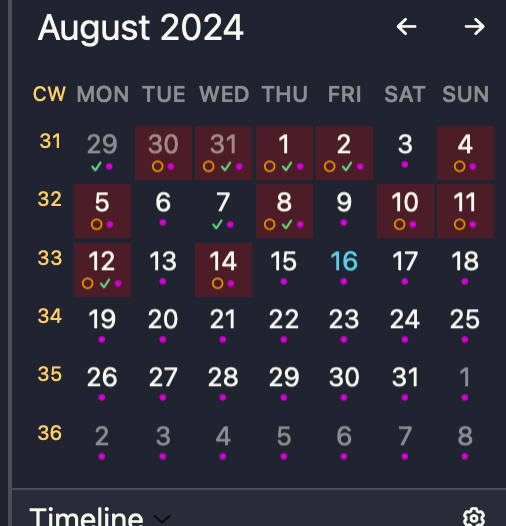
I have multiple calendars subscribed in Noteplan, including my private calendar and the family calendar, because when I plan my day, I need to see all of those events in my timeline, for obvious reasons. Currently, this entails that my month-view (the one right above the timeline in the right sidebar) is cluttered with dots which are not relevant for my task management beyond that I need to see them in the daily timeline).
If it's not clear why, maybe I can explain it like this: I look at the month view from a task perspective: It indicates when tasks are scheduled, i.e. when have to do something. Not all of the events in the family and private calendars are events that I need to attend or even do something, so it is misleading that they produce a dot.
While I'm at it, I might add that a similar problem occurs with all-day events, especially when they are spread out over several days (e.g. a conference). Currently, each day that has an all-day task will get a dot, which adds to the visual clutter. So, ideally, I would like to also prevent all-day events from producing dots, even when other events from that calendar should produce dots. But I can see that the settings for this might become a bit confusing if you could select for each calendar, how all-day events should be handled, but a viable compromise might be to have a global setting (for all calendars) whether all day events should be shown (a) in month view and (b) in the timeline.
Pending
Stacey This is similar to this post: https://noteplan.canny.io/general-feature-request/p/optional…