I rather like the colour differentiation of the calendar dots on both mac and iOS. It already shows complete vs open. So I'm not sure what you mean by "only highlights overdue tasks"? I didn't think it did highlight these differently? Are you thinking about one platform specifically?
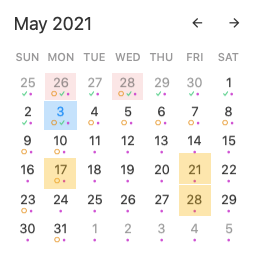
Jonathan Clark: ok. I don't see the dots well enough. The highlighting is much more visible for days with overdue tasks than days with upcoming tasks. For overdue tasks, the whole day is red, for upcoming deadlines I need to look for tiny orange circles.
Jonathan Clark: like this: upcoming deadlines or ontime things on the 17th, 21st and 28th. catch up with 26th and 28th of last month. The get milk-task on the 5th doesn't need a color. There might be several sub-tasks to do until the deadline, they don't need a color either. But I have the big things in view, not the small stuff.
nopi: Ah, I'm with you now: the highlighting of *days* with overdue tasks (not the tasks themselves).
nopi: I see more what you mean. The question is then how do you define the big things, or deadlines? Currently I use '>date' to indicate dates with deadlines. I often have 15 of these a week (sigh), and so at least for me all the future days (apart from my one day off a week) would have this colour. There's an emerging convention to start high priority tasks with `!`, and I have this to highlight things through my theme ... but of course that doesn't show up in the calendar. Maybe this would be a candidate for it, though?
Jonathan Clark: yes, labeling all tasks is only useful if you write down the bigger things only. For people who write down small stuff, a tag-based label would be better. ! could work as well. The logical label in the small calendar would be different anyway: orange circles, red circles, green checks. Problem is that tiny red circles don't stand out enough to remind me that there is something overdue. I guess that's how the whole calendar box got red in the first place. I'm saying now, orange circles don't stand out enough either. I'd like to not only see clearly what I missed but what's lying ahead. It's a different way of working and it helps me to stay on top of things with a myriad of small stuff to do. This is not to lose sight of the the forest for the trees.
edit: the original request mixed up tasks and deadlines. Coloring days with tasks would quickly color all days, but coloring days with deadlines in the mini calendar would be a useful visual together with a deadline syntax from here https://noteplan.canny.io/general-feature-request/p/due-dead….