Anton Sklyar: thanks for mentioning this. It annoys me also a little. I always tap into the area outside to close.
Very good point. I have this also in my notes to open the command bar instead of the event dialog. Though it means we need to move the event dialog somewhere else, maybe behind the plus button? That's the only unclear point holding me back.
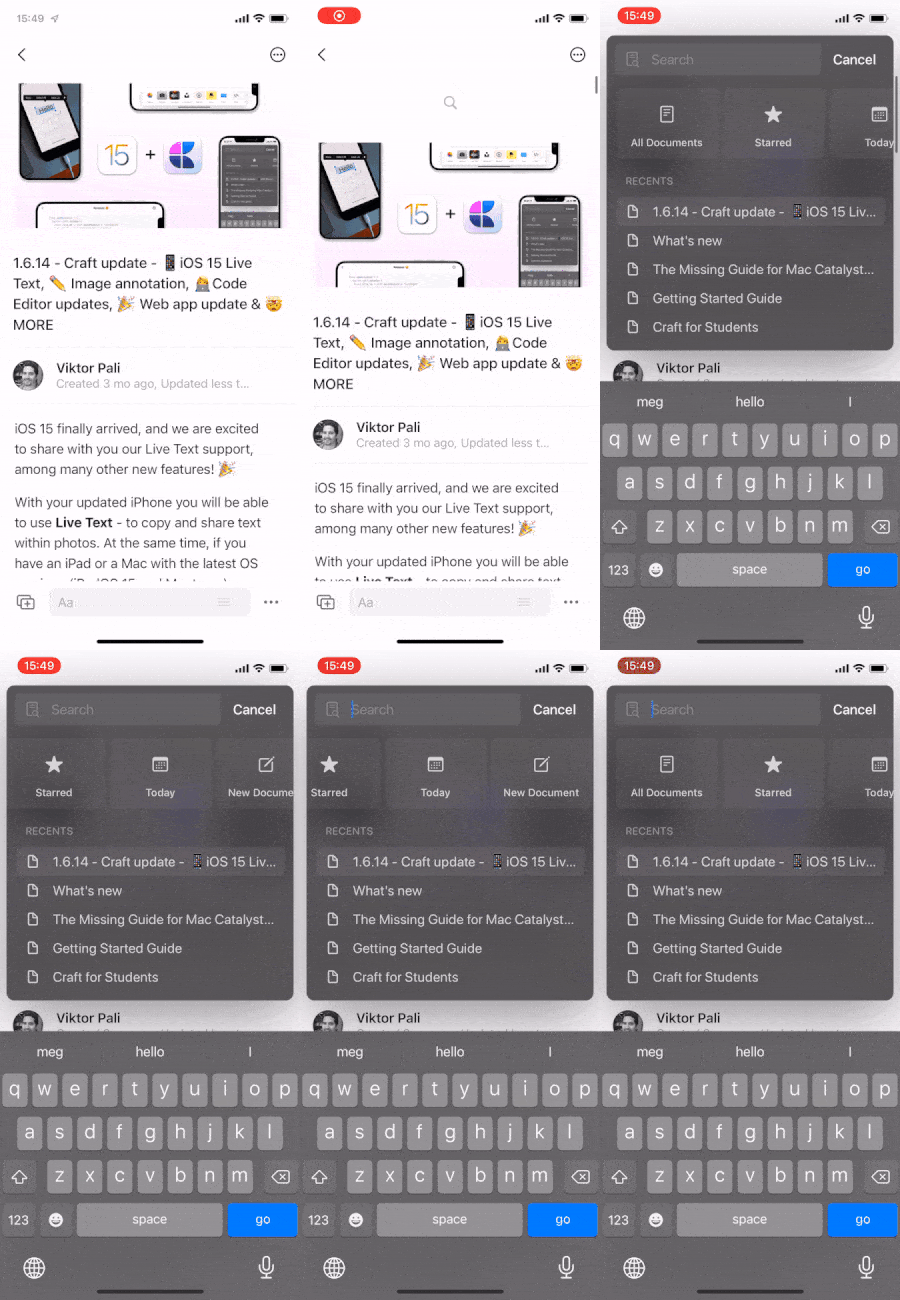
Eduard Metzger: maybe when you pull down the top item is "new event." Craft provides buttons at the top of its search window; so maybe something similar. Another request is to move the dialogue up higher on screen so you can see more items. There is not much screen showing with the keyboard showing so might as well take advantage of the screen at the top. Thanks, Eduard!
Eduard Metzger: I like Christopher M. Barrett's suggestions (especially including the request to raise & enlarge the search modal!), but note that New Event / Reminder is already the top item in the "…" menu in the upper right. I personally find that more than enough.
Jonathan Ragan-Kelley: This. Surely the frequency of wanting to get to the command bar is much greater than needing to add a new event ...
Jonathan Ragan-Kelley: Perfect, I agree with that. That would be the easiest way to make this work.
I second that! I almost never use swipe down right now (mostly because calendar / reminders integration is very limited anyway) but I find small search icon at the bottom to be too small to tap it. Swipe to open search (e.g. command bar) would be *very* convenient.
This would be a huge improvement for my workflows! I find search much more useful but harder to get to than adding an event. And I have strong muscle memory for this gesture from Drafts which also uses it to bring up global search / quick open.
I’ve just started using NP3 and find myself trying to do this constantly because I’ve become so used to this pattern from other apps (Things, Craft)
Yes! This is great. I like the idea of pull down functionality like Drafts 5. I don’t make events or reminders nearly as often as I search so pull down to search would be a very useful change.
Thanks for sharing this, I planned to make it a pull down gestures as well. But it needs some more changes to be easily accessible, because in long notes, you have to scroll quite a bit to get the pull down. In this case we need a button which stays at the top somehow.
Yes, that is exactly what I mean.
are you meaning like you would pull to refresh in other applications, but that action would display command bar?
Eduard Metzger as this is already implemented, I'd like to report a small usability issue without opening a separate bug report: namely that the command bar is not hidden right now when I tap outside on my iPad. Right now I need to reach the small "x" button to close it (or use keyboard hotkeys if I have a hardware keyboard). As closing the command bar is not a "destructive" action (it even is smart enough to remember what I have entered before), would you please consider adding reaction on tapping the background area on the left and right of the command bar to close it? Swiping down in the background area to close the command bar would also work I think (because this is the gesture that we use to open the command bar, swiping for the second time to hide it seems quite intuitive), so any of those two, or both of them, would be very much appreciated.