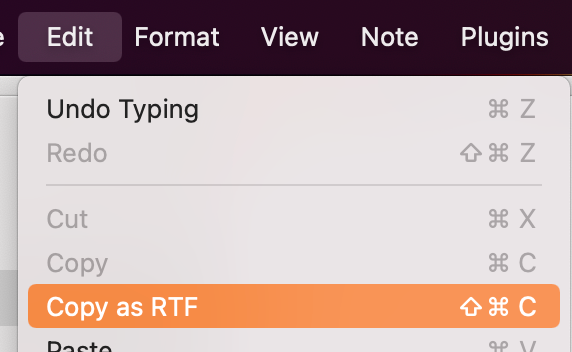
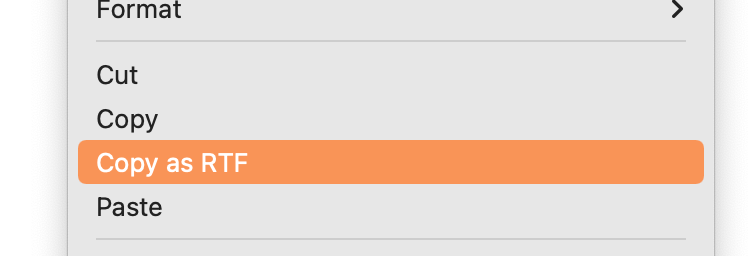
Eduard Metzger: Fantastic, thanks Eduard. Can you assign this to Cmd-Shift-C please? I guess I can do this myself in the system Keyboard Shortcuts in the meantime. [Edit]: It looks like "Copy as RTF" is in the context menu for the note, but not in the main menus under Edit or Note, so I can't assign a shortcut from System Prefs -> Keyboard -> Shortcuts.
Daniel Terhorst-North: Good point, have added it.
Copy (and export) as RTF is added in the alpha version supporting tasks, bullets, etc and images. File attachments are still missing and testing.
Thanks for sharing, do you mean copy as RTF, or HTML? You have an idea how iA Writer is handling this? Copy as RTF is coming to v3.5.
I definitely would like to have this. I like creating document outlines in notes and then want to export to Google Docs formatted, so that I can edit a document to share with others.
Hi Todd — this is one of my biggest requests, too! I made a similar request here if you'd like to vote that up: https://noteplan.canny.io/plugins-scripting/p/export-options…
Stacey: Oh, wow -- nice! Upvoted. :)
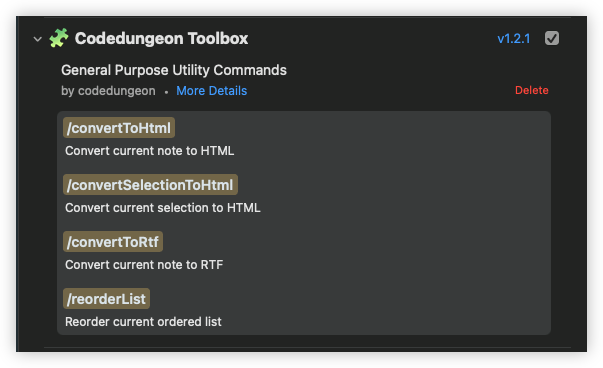
For those of you who want this now, you can use the `copyToHtml` or `copyToRtf` command in codedungeon.Toolbox
Perhaps this should be a feature request somewhere else but I would be fine with a right-click option to open in default app. (I use Marked 2, which offers a lot more export options than you are likely to be able to integrate into NotePlan, and right now I have to right-click to show in Finder, then open the doc in Marked 2.)
Damian Roskill have merged your request with this one. Then you could copy as rich text and paste it in word. I think this would solve the problem?
Eduard Metzger: Yup - thanks!
Damian Roskill: Cool thanks
PDF is working, if you use the print function, but then say "Save as PDF". Word needs Rich text support, I think.
HTML with DataURI for images would be my preferred solution. One self-contained file. No external references. No additional formatting, just the Markup created with Markdown. - https://en.wikipedia.org/wiki/Data_URI_scheme - https://caniuse.com/datauri But I haven't tested it yet with Google Docs or MS Word or LibreOffice.
This is a minimum requirement for a note taking app. The export needs to be able to support Images also. Bear does this very well, has the ability to copy text as HTML/Markdown/Rich Text - which includes images.
User36843: How does Bear handle images in HTML?
Rhubarb: Bear handles images similarly - they show up in-line and not resizable, much like NP3. But it does have Copy As -> Rich Text option which does what it says, images and all formatting get copied as-expected. There's a Paste From option with similar options - this has been extremely useful for interoperability with other applications/formats. Edit: HTML copy has an img src tag pointing to 'images/unique-id.png'
User36843: I don't miss this functionality on my Mac, because I access Noteplan's files directly with my other favorite Markdown tools: Marked for quick rendering and export, iA Writer for complex editing, Obsidian for complex linking. iOS is a different story.
Rhubarb: This is interesting - are any of the tools able to render the inline images? I tried Marked 2 but it didn't render the images.
This seems closely related to the request to be able to copy/paste rich text.
Or a simple `export` option on each note which lets you choose from `html`, `rtf`, `docx`, etc as options. This is similar to what Bear Notes and others already do.
Naman Goel: Both export and copy are useful. Exporting and then attaching/copying is an extra step if you just want to copy "what you see" in NotePlan into an email or doc, say.
Will be available in the next update. Already available as beta on Discord!