Submission
avatar
Alison Brack
May 27, 2021
Board
Features
Status
Planned
Get Updates
Powered by UserJot
Drag and drop tasks (within the note, into calendar/timeline/other notes)
- ✅ Drag and drop paragraphs on the same note to move them up/down and reorder (select also multiple paragraphs). - ✅ Drag backlinks into the note. - ✅ Drag into a calendar day to move the task to another day. - ✅ Drag into a note in the sidebar - ✅ Drag from Review into the calendar to assign a date and time. - ✅ Drag from References into the calendar to assign a date and time. - ✅ Drag tasks from the note into the timeline to automatically add a time to the task, so it appears on the timeline. - ✅ Drag tasks into the timeline to create an event - ✅ Drag tasks into the backlink panel to move them into another linked note. - ✅ Dragging on iOS - ✅ Enable CMD+Z to undo a drag - ◻️ Drag into a note link inside the editor [mentioned on Discord](https://discord.com/channels/763107030223290449/763112434181341194/932687719698694184) - ◻️ Dragging on iPad from search/filters/references to the calendar
avatar
Alison Brack
May 27, 2021
49
avatar
Rob GraceMar 23, 2021
This suggestion was focused on mobile (iPhone) but *could* translate to desktop. However, on desktop the visual indicators in the margin might be more useful, since the side of the NotePlan window may not be the side of the physical screen, and drag-and-drop is not such an expected operation there
avatar
Jonathan ClarkMar 23, 2021
On iPad or iPhone I’d prefer not to have any screen space taken up by permanent drag handles. But if it can be done for those platforms without drag handles then I’d upvote. For macOS it’s a different equation. Personally I prefer the existing keyboard shortcuts, as they work for several lines at a time (if pre-selected). I’d not want to lose that.
avatar
Rob GraceMar 24, 2021
Jonathan Clark: agree. I'm thinking it would be better if the UI elements show up only on a tap-and-hold in the right margin on iOS. Sort of like how iOS handles drag-and-drop of selected text nowadays, as a "word bubble" that could be dragged around. But I also like the idea of turning the text into a horizontal line during the drag (TaskPaper might have done this?)
avatar
Eduard MetzgerMar 24, 2021
Rob Grace: In NotePlan 1 times we had a press & hold mechanism which activated the drag & drop, but this was written in C++. Will need to experiment a bit. If anyone has references of other apps doing it well, please share!
avatar
RhubarbMar 24, 2021
Jonathan Clark: I agree on keyboard shortcuts. They even work with collapsed headings. That's all I need. Eduard Metzger: I prefer Noteplan's Markdown editor to be light-weight. There's no need to go all Bear or Ulysses. There's no need for yet another outliner. I'd prefer Noteplan to become the best "calendar driven" Markdown app.
avatar
Frank GMar 24, 2021
Bliss! I realize now that for reordering has become essential
avatar
Nigel PetersApr 9, 2021
I would love to see this feature in iOS & Mac OS. I have been using Craft, but I am moving due to lack of project management tools. The Drag and drop UI makes for quite a fluid experience when constructing documents. However I also love markdown.
avatar
Andrey ArefievApr 26, 2021
For my taste, Notion has the best user experience with Drag & Drop
avatar
Eduard MetzgerJun 1, 2021
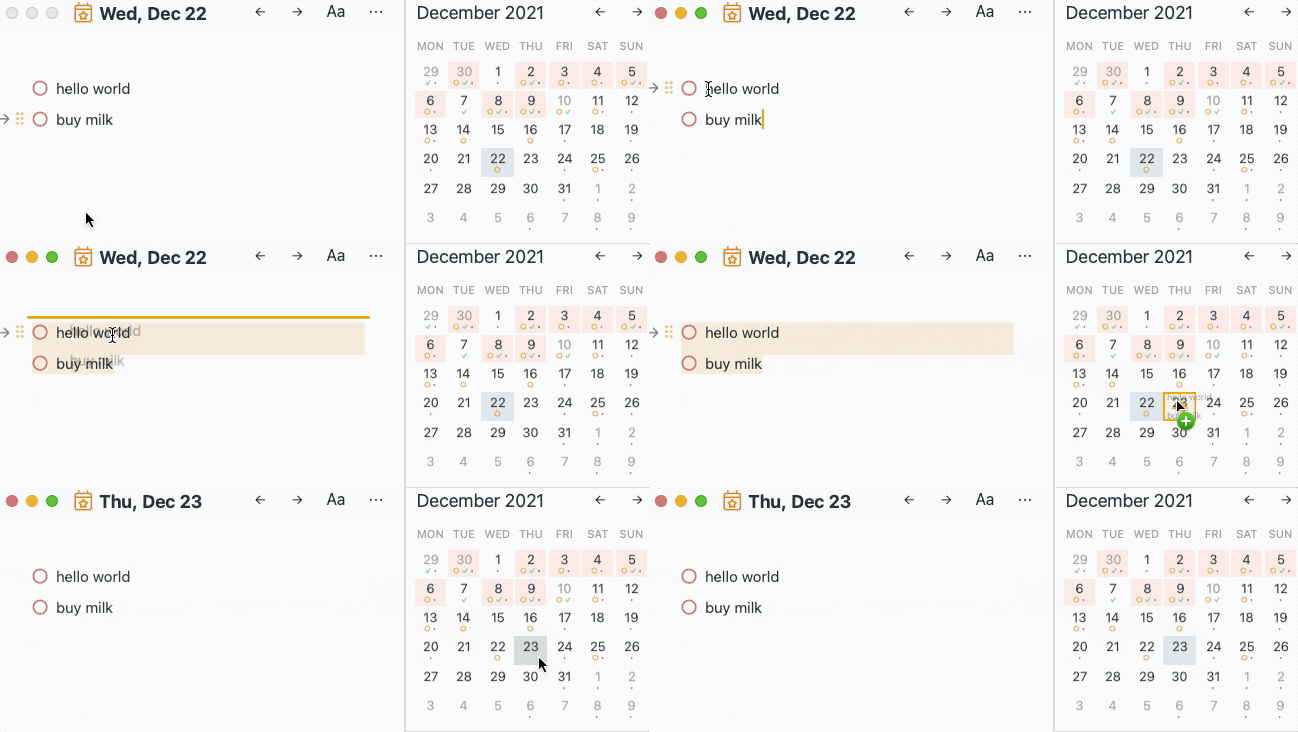
See attached gif, this feature is work-in-progress, though probably ready not for this, but the next update.
avatar
Alison BrackJun 1, 2021
Eduard Metzger: that’s fantastic, thank you! Do you plan to add this to mobile too?
DD
Daniel DanilovJun 3, 2021
Eduard Metzger: that's looking really great, looking forward to it! I imagine this works when selecting multiple items/lines, right?
avatar
Eduard MetzgerJun 10, 2021
Alison Brack: Yes!
avatar
Eduard MetzgerJun 10, 2021
Daniel Danilov: Yes, multiple lines also work. Definitely on Mac, but on iOS I'm not sure.
avatar
Rob GraceJun 12, 2021
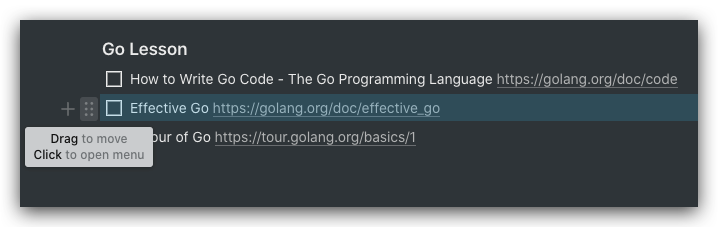
Eduard Metzger: on mobile, it is more natural to slide your finger along the edge of the screen, to drag. Would you consider swapping the drag-handle and the "+"?
avatar
Eduard MetzgerJun 18, 2021
Rob Grace: On iOS there is no + and no drag handle, you mean swapping on Mac? On iOS you can just drag the paragraph without using a drag handle. It works already, I also want to make multiple selected paragraphs draggable though.
DD
Daniel DanilovDec 29, 2021
Eduard Metzger: That's fantastic! Just one thing to highlight that I noticed: if you drag a task or line from the references into a given daily note, and then click on undo (or CMD+Z), the line or task disappears, BUT IT DOES NOT GO BACK TO THE ORIGINAL NOTE. I think this is a serious downside which can result in loss of information, too. Here's a GIF: https://cln.sh/rucZWQ0fWQ2ubPZPTWFi
avatar
Eduard MetzgerDec 29, 2021
Daniel Danilov: Thanks for mentioning this. Yes, I'm aware. Worst case you can use "View Revisions" in the note where the task has been dragged out (using the note menu) at the moment. I'll add undo in the next major release.
avatar
Paul SydneyJun 4, 2021
Can you drag to days on the month calendar?
avatar
Eduard MetzgerJun 10, 2021
Paul Sydney: This would be the next step!
avatar
JJun 12, 2021
Was wondering if we could also adjust priority in the linked todos. I tend to create task in my notes, schedule it for a date, i see everything in the daily notes page. But it is hard to prioritise the list by dragging and dropping my notes todos and the embedded todos.
avatar
Eduard MetzgerJun 14, 2021
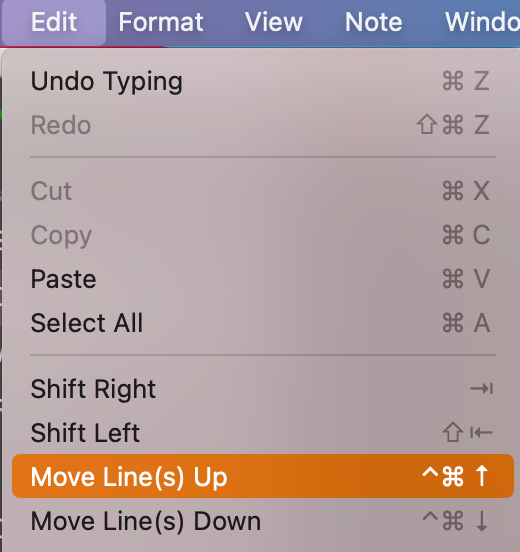
JT Have merged it. You can, however, use a shortcut to move tasks (and multiple tasks inside a selection) up and down as a workaround until dragging is integrated. See Edit menubar.
avatar
JTJun 14, 2021
Eduard Metzger: thank you!
avatar
Boris AnthonyAug 27, 2021
This is super powerful and brilliant. 👏👏👏
avatar
Eduard MetzgerDec 11, 2021
Quick update, dragging between daily notes and into the sidebar is done so far!
avatar
Mike EricksonDec 11, 2021
Eduard Metzger: this is looking nice. However, what is the thought process where notes are placed when dropped onto a given date in calendar? I am assuming it will always placed the dropped item at the top of the given day and it will be up to the user to move in daily note to appropriate section.
avatar
Jason HeydaschDec 11, 2021
Eduard Metzger: looking good!
avatar
Eduard MetzgerDec 18, 2021
Mike Erickson: It will be appended (cut & paste at the end) at the moment if you just drag it.
WL
Will LiuDec 19, 2021
Eduard Metzger: is it been released? i cannot do it on my noteplan 3
avatar
Eduard MetzgerDec 23, 2021
Will Liu: As beta on TestFlight, yes, but not on the AppStore yet and in this version just for macOS, will add it on iOS in the next version after that! I'm in the process of releasing it on the AppStore, should be available by tomorrow.
avatar
Kevin HMar 9, 2022
Eduard Metzger: Is there a plan to offer option of pasting the task somewhere else in the note when you drag, such as at the top or beneath a specific heading?
avatar
Eduard MetzgerMar 20, 2022
Kevin H: Good point, how could this look like? We would have to add a context menu upon dropping or so, which adds an extra step. Or some shortcut?
avatar
Kevin HMar 20, 2022
Eduard Metzger: Yeah, not sure. A context menu would have to be the answer if you are going to have option to select a header in a note but maybe it could be optional -- like only if you hold a certain key down while you are dragging, then the context menu will pop up after you drop the line on the new note? Just a thought.
avatar
Eric TJun 20, 2022
Eduard Metzger: I have been thinking about this and perhaps we could have a way to do this through templates. An additional concept of "replace" would allow us to accumulate tasks onto a day. When we arrive on the day, we can hit the "replace" template which would allow us to dump the "contents" under a particular heading. I haven't thought of a way to handle those who are adding headings to their daily notes in advance or handling the backwards case without adding some metadata (tag or something) to the note or some other setting, which is heading in a fiddly direction.
avatar
Eduard MetzgerJun 22, 2022
Eric T: Thanks for sharing! Not quite sure how a template would play a role here during dragging? An easier option might be the macOS way of dragging files. You can hover over a window, it blinks and focuses it. We could do the same with days or notes. Hovering for a few seconds over a day/note would blink and open the note. From there you can drag the task wherever you want to have it. Would also mean we change the view though. Or instead, hover for a few seconds and a dropdown of headings could be shown.., something like this?
avatar
Eric TJun 22, 2022
Eduard Metzger: Well, it's more that after you dragged, when you arrive on the day, you have just a list of tasks and can invoke a template there, if you supported such an idea. My goal is to have a way to have these tasks go where I want them in my daily note, which is a template. Ideally, I don't have to do anything because they're going to the same place everyday. If you're pre-formatting your daily note, it's different situation to be sure, and that's the case where it seems tricky w/o some more opinionated method. The template parameter idea seemed un-opinionated to workflow to me, but it helps fewer people who don't want to mess with the details. Right now, everyday, I insert my template below the tasks, then select them with standard macOS keyboard nav, and use CMD+Ctrl+Down to drop them below my heading. I would like to not have to do anything. If there's some way my workflow can fit with your roadmap, I'd be delighted. I understand this is a specialization of the more general case here.
avatar
Eduard MetzgerJul 27, 2022
Eric T: I think I know what you mean and this could be done with a template. Check out this article, at the end there's an example doing exactly that: https://help.noteplan.co/article/148-run-javascript-code-in-your-templates
avatar
Eric TJul 27, 2022
Eduard Metzger: Thanks! I swear I looked through the docs before, but I guess I needed fresh eyes.
avatar
Alison BrackMar 22, 2022
Would it also be possible to add dragging and dropping reminders and events to change the time? It'd be much friendlier than opening the popup window and typing the new time.
avatar
Julien DimastromatteoSep 8, 2022
Drag tasks up and down in the 7-Day view ?
avatar
Eduard MetzgerJan 2, 2023
Julien Dimastromatteo: Sorry for the late reply, this should work? It's just a bit more tricky, you need to keep the mouse cursor inside the text area.
avatar
Eduard MetzgerJan 2, 2023
The basics for dragging, moving and resizing are working already. Doing some polishing and then releasing the beta!
avatar
Eduard MetzgerJan 31, 2023
✅ Dragging from the references to create a timeblock
avatar
Eduard MetzgerJan 31, 2023
✅ Dragging from the references to re-schedule.
avatar
Eduard MetzgerJan 31, 2023
✅ Dragging from the search / filter results to re-schedule and to timeblock
avatar
Rod ChristiansenJan 31, 2023
Bring this all to iPad next! Please 🥹
avatar
Eduard MetzgerFeb 9, 2023
Rod Christiansen: Good point!
avatar
Eduard MetzgerFeb 17, 2023
New beta with dragging from filters, search results, and references is up: https://testflight.apple.com/join/fm9q4OjE
CH
Connor HicksOct 9, 2023
I would love to add a variant here: when iOS reminders lists are shown in noteplan, it would be SO excellent if they could be dragged into a note and automatically “migrated” i.e. deleted from iOS reminders and added to the note where it’s dropped. This would allow me to use Siri for intake but still have NotePlan as the source of truth for everything.
OS
Owen SchultzNov 8, 2025
Would also be nice to be able to drag and drop tasks onto the tags in the side panel and have the tags applied to the task. This is how it works in Omnifocus and it is great for clearing one's inbox