
NotePlan
NotePlan
Apr 8

Hanging indent is incorrect with custom fonts and bullet lists

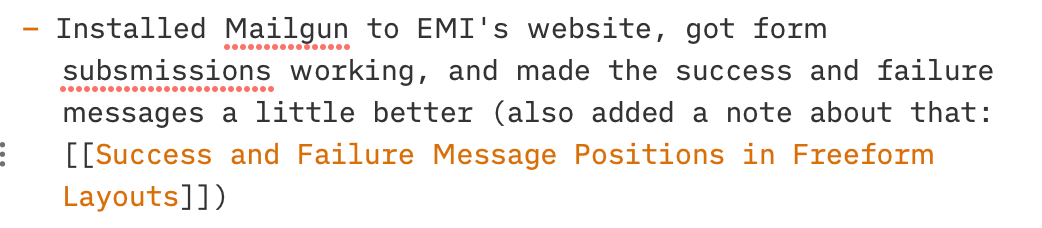
Took a screenshot of this behaviour so you can see this, but there's a slight alignment problem with custom fonts when they're used in a basic list. All the text in the second, third, fourth, and fifth lines are indented just a few pixels too far. I can reproduce this in iOS as well. This problem disappears as soon as you enable "Render Markdown" in the preferences pane. But I kinda like how Markdown looks, and would love to have the option to turn it on and off. (If you are having a hard time reproducing, the custom font in question is iA Writer Duo S.)
PendingPending

Apr 16, 2022

Might be that the dash has a different width with this font?

Apr 16, 2022

Eduard Metzger: That's quite possible! I'm coming from a CSS background, but wouldn't it make more sense to sit a fixed width for both bullets and dashes so indentation always matches? That way you could mix dashes and numbers and you'd know everything is always going to line up on every line. (I don't think this would be easy; it's just my inclination.)

Apr 16, 2022

Nathan Snelgrove: Yes, that's done when you enable rendering. Then the task icon is always the same and fixed. Not sure if I can fix the width for every font though. To be honest, it was just a guess, I'm not sure if this is even the issue.

Apr 16, 2022

Eduard Metzger: And to be honest, this is a pretty small problem, so I wouldn't expect a fix for it. Just a note on it. Everything otherwise looks great and lines up with Render Markdown enabled, but this is just the one bugaboo with basic Markdown.