
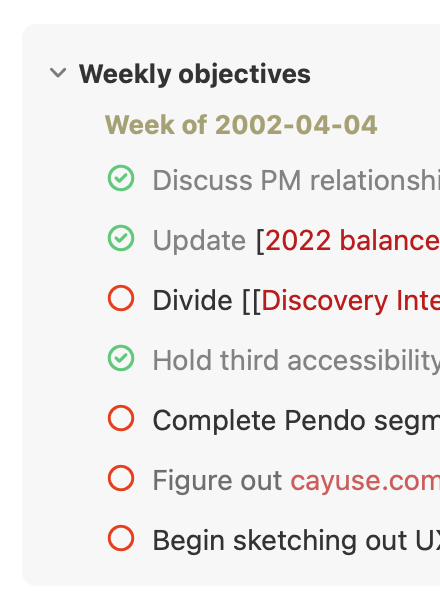
(macOS) Unexplained to-do colors in references area
Checked items are grey, unchecked are black. But some unchecked are grey. Why?
Pending
Eduard Metzger: Navigating to other notes and then back did not improve things. I suppose it might depend on what you mean by "reload?"
Jon Plummer: Yes, that's what I meant. I couldn't reproduce it though. Does it happen consistently? Is there something in the text maybe which makes it appear?
Eduard Metzger: it’s not consistent. It *is* frequent. It seems to happen only with tasks. I’m not sure what else might be operating here.
Jon Plummer: Hi Jon, did this issue improve meanwhile? I might have added something to reset the color of the task, but I can't recall exactly, however, I haven't seen this in a while.
Eduard Metzger: I haven't noticed it lately, so I suspect you can consider it done.
Should be fixed if you reload the note?