NotePlan
NotePlan
May 3

Pasting URL over highlights text makes URL

A really handy little feature I use all the time in Obsidian would be useful in Noteplan: If you paste a URL "onto" selected text, it automatically converts the text to a markdown link. If the clipboard isn't a URL, it pastes over as normal. If the you paste a URL with no text selected, you get a Markdown URL ready for a title to be entered.
CompletedCompleted

Sep 22, 2024

CMD+K does this!

Sep 22, 2024

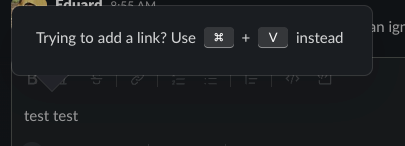
Eduard Metzger why have to learn a second command when CMD+V is well-learned from elsewhere?

Sep 22, 2024

Jon Plummer Obsidian doesn't do it for example. I thought CMD+K is the standard for this. Seems to depend where you learned it initially.

Sep 22, 2024

Eduard Metzger slack, notion, confluence, google docs I think

Sep 22, 2024

Jon Plummer All things Google use CMD+K for hyperlinks. Apple Notes, too.

Sep 27, 2024

Jon Plummer Slack gives a warning when trying to use CMD+K. I think both are used differently in various apps, doesn't seem to be a "standard" as such.

Oct 7, 2022

Seconded. This appears in lots of places (Confluence, Slack, Wordpress to name a few popular ones) and it would be a big help.

May 6, 2021

That seems like a duplicate of https://noteplan.canny.io/markdown/p/pasting-urls-and-keepin…

May 7, 2021

Marcin Ignac: It looks like it. I missed that one!

May 4, 2021

Nice suggestion!