
Apr 28
Project-(tag)-based visuals and rescheduling
I'd like to be able to use the highly visible "overdue color mode" in the calendar overview to visualize more things. A project overview would be nice: clicking any #project1 tag could suppress the overdue color and instead color (in something other than red) those dates that have a #project1 tagged task in the calendar note. The Today color could stay for orientation. Dates referred to from notes could also be colored, so that it doesn't matter where the tagged line sits as long as it has a >yyyy-mm-dd reference in addition to the tag. This would help a lot with planning projects that span several weeks or months and need work only on certain days.
In addition, what would help tremendously is being able to reschedule all tasks with a #project1 tag from a certain day on by x days, while keeping the structure, ie the number of days in between tasks. Rescheduling such sets of tasks if something didn't work as planned it is very time consuming. I often wished I could link and move ical entries together when plans get delayed.
At the end of a project, the tag-colored calendar view would provide a nice overview of how long things eventually took.
Pending
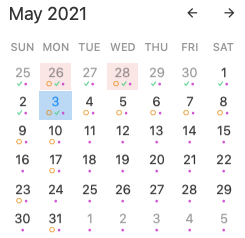
On your first paragraph, I'm having trouble visualising what you mean, partly because (as with your other recent request here) I'm not sure what the "overdue color mode" is. Can you sketch an example, or at annotate a screen shot? On your second paragraph, this could be possible through the plugin mechanism, which is currently in alpha testing. It would be easier if this were done on a particular project's note, rather than potentially having to look over all notes for one with a #project1 tag.