
Jun 26
Quick prepend to daily note
It’d be great to be able to quickly prepend something to the daily note via a 3D Touch interaction from the home screen on iOS and iPadOS! Kind of like how you can add a new event through 3D Touch.
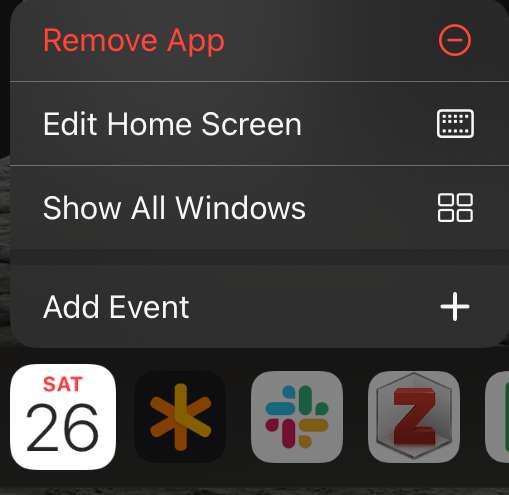
Pending
It looks like this is a request to add "new note" and/or some specific notes (daily, weekly, perhaps user selected) and make them available by long-pressing the app icon on iOS
There's already ⌘N shortcut for new note. If you add some plugins you get more options, as you can set keyboard shortcuts on them. For example new note from selection (/nns). So perhaps I'm not understanding your suggestion? Can you give more details?
Jonathan Clark: I think they mean something like Ctrl+Space for Things 3’s quick entry (even if the Things app isn’t active at the moment). That would be a neat feature to have. With maybe something like an input that begins with `/td`, `- [ ]` or `*` creates a task in Today’s note and anything else without that in the beginning becomes just a bullet point pre-/appended (that could be a setting in the preferences) to the Today’s note. (personally, I’d prefer appended, but o get that this might not be a popular opinion)
Dan: This is possible today in two ways. It can be done through the existing command bar (which of course has a global shortcut key): if your text doesn't match a note title but does include a date, it will offer to add it to that date. And/Or ... Use my Quick Helpers plugin, and set up keyboard shortcut for whichever /qa... commands are most useful. See https://github.com/NotePlan/plugins/tree/main/jgclark.QuickC… for more details.
Jonathan Clark: 😱 This is amazing! Thank you!
Yes would be a great feature
Something like this on macos too, but via shortcut key if possible