NotePlan
NotePlan
Apr 17

Show undated reminders in sidebar

At the moment NotePlan exclusively filters for dated reminders, because they can be displayed in a daily note in the right sidebar. Undated reminders have no logical place. But an extra Sidebar entry on the left called "Reminders" could be one.
CompletedCompleted

Sep 8, 2024

Improved Reminders Integration: https://youtu.be/xlwjh8axJ7Y?si=_Zd6M5UecfMhFH9f

May 4, 2024

Implemented https://youtu.be/xlwjh8axJ7Y

Mar 6, 2023

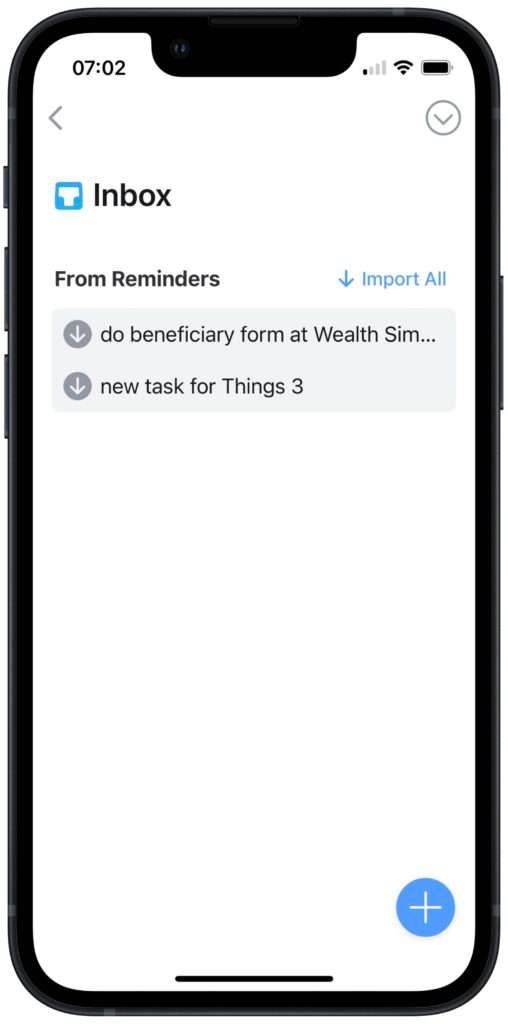
I use undated Reminders for quick-capture on the go, even on my Android phone (with the web UI). It's too fiddly to put date and time on them. Rather than another Sidebar, a possible integration here would be like Things, where you import them into Today (your Daily Note) as plain to-do items, and they disappear from Reminders.

Aug 10, 2022

I agree. In iOS you can see a list of reminders that are due today and past due in one view. I think that type of view is helpful in prioritizing your day.

Jun 11, 2021

The ability to see undated Reminders rolled into NotePlan’s Review would be huge for those of us who rely on Siri to add ideas to Reminders “on the go.” For example, if I have a screenplay or business idea while cooking dinner, I’ll add it to Reminders via Siri on my Apple Watch. I don’t necessarily want to assign a due date then and there, but it would still be great to see them in NotePlan so I’m not having to monitor two apps (Reminders and NotePlan).

Jun 8, 2021

Taking this an entirely different direction, what about adding the ability to filter these into "Review" so that I could set up a review for for undated reminders based on other criteria. Ideally reminder would honor the status so no-status and reminder for "search in" would yield undated reminders. When combined with the other capabilities in Review, this would almost replace GoodTasks for me with Noteplan.

May 9, 2021

What about collecting them in a dedicated note file, named like „Undated reminders“?