Would be great to be able to set a 'minimum width' for each split view window. I would use this to ensure a window isnt squished smaller than the 'Line width' setting in the preferences.
Alpha version is up: ➡️ TestFlight alpha = NOT tested (iOS & Mac): https://testflight.apple.com/join/Cwb6UmfY ➡️ Mac AppStore: https://noteplan.co/download/NotePlan-3-Beta-727-AppStore.… ➡️ Mac Setapp: https://noteplan.co/download/NotePlan-3-Beta-727-Setapp.zi…
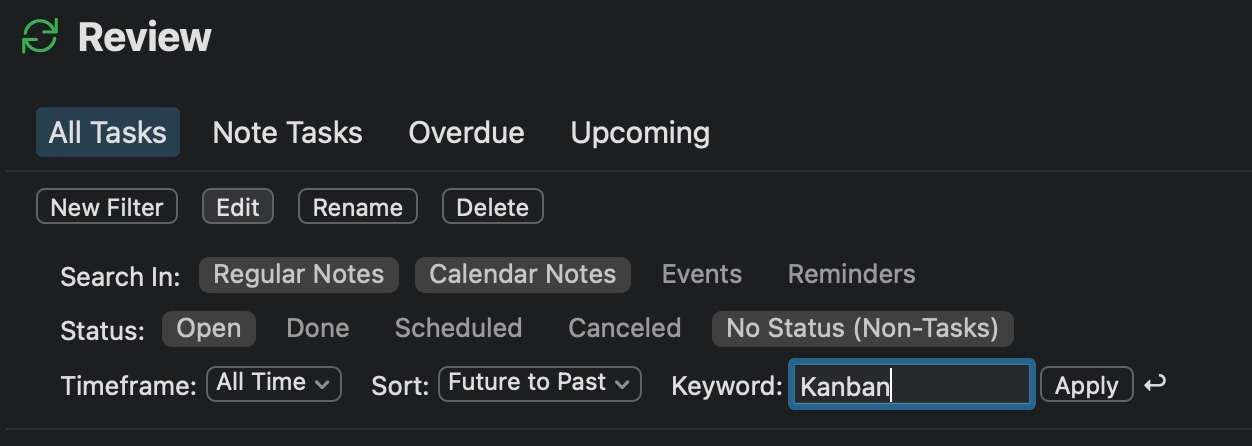
- [ ] Save open panes as a preset - sounds like a lot of work, but... Eduard Metzger I have a bit of a hack-y idea that might just work for this. What if you use the existing "Review" (which I've heard other people say maybe should be renamed). If you added one setting down near "Timeframe" and "Sort" like: "Open Results Side-by-Side", you could maybe use the exact infrastructure you've got for saving the presets and then loading them from the sidebar. Of course, a) there would have to be a limit to how many results/panes load; and b) a user would have to title the "columns" with a name that is unique in the search, like: "Kanban-ToDo", "Kanban-Doing", "Kanban-Done" (the "Keyword" would be "Kanban-")
David Wertheimer: Ah I see where you are going with presets. Could be also a plug-in at first and we use the config UI to add the notes you want to open? Or you list the notes in a “template” note. It basically loops through each line in the note and opens the note links.
Eduard Metzger: Yes when you give us the API we could do it that way. But thinking about how a plug-in would get the right info from the user gave me an even better idea. What if you (Eduard Metzger) made it so that it’s in the context menu when you right-click a folder (or when you opt-click the folder)? “Open notes in folder in panes”. II would also recommend the right-click menu on the file gives you the “open in a new pane” option. Not everyone is going to read the documentation to know the opt click on a file
David: Ah, beautiful idea! So simple. Now I already initiated the build, but I'll add it to the one after that.
- [ ] Add filter (by title) for notes in the sidebar ;)
David Wertheimer: Ok, ok, that one is a new request unrelated to this one! Though I have to admit a good one. I use that all the time in XCode.
David Wertheimer: I have impersonated you here: https://noteplan.canny.io/general-feature-request/p/filter-s…
https://noteplan.canny.io/general-feature-request/p/add-filt… (please upvote if you agree)
💡 I had an epiphany how I could implement opening notes in the split view. 🤦♂️ It was so simple I don't believe I didn't have the idea before! You can open a note in split view in the next beta by `opt+click` on a note in the sidebar! More coming..., please post requirements and feedback in this thread.
this seems like a necessary step towards making drag-and-drop useful across notes. Sidebar would be a good first step towards true multi-pane view (in fact, I'd prefer sidebar alone`*`) but would it conflict with the evolving concept for sidebar use in https://noteplan.canny.io/task-management/p/weekly-planning ? Maybe not - user selection of a note for the sidebar could be transient; it would at first replace the week/month/year notes viewed there. But then the user could click the calendar view to get them back (removing the transient note) `*` sidebar alone: the multi-pane concept can be problematic - it's easy to lose your place. My biggest Frustration with Obsidian, VScode, etc is Notes popping up in a different multi-pane location than I expect, then having to constantly shuffle things around. If you do go with multi-pane, I think always opening the new note in a *right-hand* pane is most intuitive and consistent.
Rob Grace: Eduard Metzger Allow for drag-and-drop between panes. As stated in AHIG: "If appropriate, allow people to drag and drop content between columns. Because split views provide access to multiple levels of hierarchy, people can quickly move content from one part of the app to another by dragging and dropping items between the columns. For related guidance, see Drag and Drop." [AHIG] Drag-and-drop[ should probably should be a separate/follow-on Canny ticket after you get the split-view MVP done
Rob Grace: Split View (multi pane) is absolutely optional. You have both options: new window (CMD) or new pane (OPT). And yes it opens on the right side. Basically appending a note to the existing panes. Though that could be easily changed.
David Wertheimer: Drag & drop works so far. But there's surely a case I missed :D
+1!
For now I prefer the current "separate windows" approach on macOS. I use an external window manager (Rectangle) to organise my screen layouts. Since split-view and separate windows are not mutual exclusive, this potential feature would not hurt. On iPad this would be more useful (for my use-case). I always struggle with the multitasking implementation there.
Michael Huettemann: same here. I like separate windows, because I can have several of them open at the same time.
Yes, please! On iPadOS it would also be great
Available in the latest beta release: https://testflight.apple.com/join/fm9q4OjE and soon as update on the AppStore.