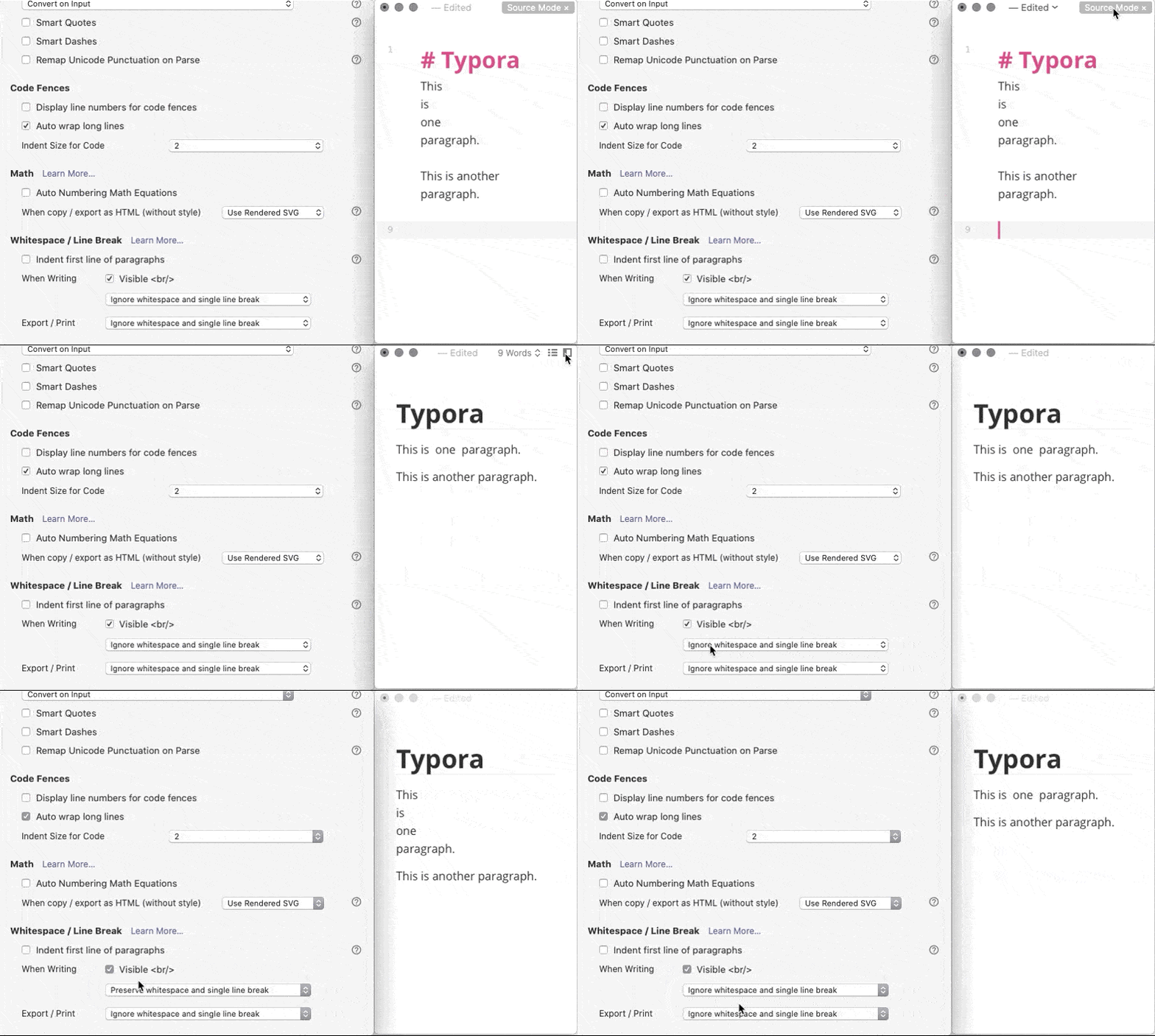
Just following up on this. Changing the paragraph spacing in the theme achieves 99% of what I wanted: ``` "lineSpacing": 1, "paragraphSpacing": 0, "paragraphSpacingBefore": 0 ``` in each of `body`, `todo` and `tabbed` styles. I did this with the Orange theme and called it Orange Squash (see what I did there? :) ) and it looks great.
Copying to the clipboard isn't the issue, or at least is only one aspect of it. In Markdown, a single line is a "soft line break" (e.g. [CommonMark](https://spec.commonmark.org/0.30/#soft-line-breaks)). Some Markdown editors will render newlines as hard breaks and show a newline, but treating a single newline as a paragraph break, i.e. </p><p> in HTML, is always incorrect. This leaves me with an inconsistent toolset: - Typora (correctly) interprets Enter as "new paragraph" and puts two newlines in the raw Markdown, which it renders as a paragraph break. (I can get a single newline with Shift-Enter, or switch to Typora's "raw" mode and use Enter to get a single newline, but I rarely do this.) - NP sees two newlines as an empty paragraph, it produces a single newline when I press Enter, and *it treats a single newline as a paragraph break*. - If I publish to e.g. WordPress or Hugo from the "Markdown" that NP produces, it will render as a wall-of-text in HTML because the parser treats all the single newlines as soft breaks (which is correct). So if I want to use NP as a blog editor for either WP or Hugo (which I'm planning to move to), to get an actual paragraph in NP means I have to hit Enter twice, and NP renders this with too much vertical space because it thinks there is an empty paragraph in between two regular paragraphs, which is also incorrect. So the only solution I can see is to have a "strict" mode (kinda like Typora has) which does exactly that: - Typing Enter is a paragraph break, which is two newlines. - A single newline is a soft break, which renders as a space (or could render as a <br> based on a setting, but is never a new paragraph). - Other conformance with e.g. commonmark. It could even be that relaxed mode applies to one suffix (.md, say) and strict mode to another (.mkd or .markdown). That could get complicated though. So I think it's a bigger and more fundamental deal than what happens when I copy. It is about what NP thinks a Markdown file looks like vs what other tools, and especially publishing/rendering tools that produce PDF or HTML, or publish to blog platforms, think Markdown is (based on a now widely-adopted spec). (By the way, the ignore/preserve whitespace setting that Rhubarb found in Typora is about whether to treat a single newline as a space or as a <br>. It is still never a paragraph break, and a paragraph is still always two newlines.)
Daniel Terhorst-North: Thanks for explaining this. It makes sense. In this case I think the easiest way to implement it is to double every newline, when NotePlan is saving the note and replace double newlines with a single newline when the note is being loaded into NotePlan - which can be turned on using a preference. Would this work?
Eduard Metzger: It would be pretty close, yes, but it is lossy because there are gotchas. You don't want every single-newline to be replaced with a double-newline on save, e.g. a newline before a list, or within a list, would create "wide" lists where each <li> is in its own <p>. Other single-newlines would "grow" extra newlines every time you saved, etc. As a fellow programmer, I can imagine that the list of edge cases for convert on load/save would rapidly outgrow just having a slightly different behaviour for "strict mode"! I think the following cases cover it: For typing: - Enter within a list (i.e. on a line with a bullet/number) produces a single newline - Enter within code picket fences produces a single newline - Enter anywhere else produces two newlines - Enter on an empty list item closes the list, i.e. removes the leading bullet/checkbox/number and adds the extra newline to denote a new paragraph (note: this is current NP behaviour) - (I may be missing some :) ) For rendering: - Two newlines are a paragrpah break - One newline before a list item is a newline (but not a new para) - Other newlines are just whitespace, e.g. within the flow of text in a paragraph
I just thought, it would be useful to have a one-time convert option too, to migrate an existing NP notebook to strict / CommonMark mode. WDYT?
Daniel Terhorst-North: That's what I wanted to avoid. Rendering a newline not as a newline, but do render two newlines as one newline - is the difficulty. I have no idea how to do that except removing it altogether from the text and adding it back upon saving. I was hoping it could be simplified to two newlines or none. Obsidian for example, makes it simpler by having a preview mode and ignoring the whole topic in the editor. How is Ulysses handling this? Or a single newline could be replaced with a special spacing character. I run out of ideas :D
Another option, we could use a "carriage return" `\r` somehow for this? https://www.compart.com/en/unicode/U+000D
Eduard Metzger: Without seeing how you are doing rendering I'm afraid I can't offer much! Are you updating on each keystroke? If so it should be a case of just looking at the beginning and end of the current line. For the initial render from Markdown, converting \n\n into a para break, [list-item]...\n into a list item, and any remaining newlines into spaces *in that order* should be sufficient. I don't know what you are using for a runtime representation of the document. I'm sure it's pretty sensible though - most of your other design choices in NP are :) To keep us focused on the goal, though, the on-disk representation of the document should be "correct" markdown, with double-newline representing a paragraph break. So we definitely don't want to introduce a *different* incompatible representation!
Daniel Terhorst-North: I’m using native Swift NSTextView, etc. One idea could be to hide single line breaks. I’m already hiding markdown characters for example, I’m just not sure how hiding a line break behaves. Need to try it out. This might be the easiest trick, if it actually also moves the next line back, as if the line break doesn’t exist. Then the text doesn’t have to be changed at all.
Eduard Metzger: I've been thinking about this. Not sure how NSTextView does styling, but you could find newline pairs trivially like `\n\n`, and single newlines with a lookahead regex like this: `(?<!\n)\n(?!\n) ` Then you render a newline pair as a paragraph break (as you are currently doing for single newlines) and render single newlines as either a space or a `<br>` based on user preference/theme. Then making `Enter` produce two newlines, and `Shift-Enter` do one newline (again this can be user preference), then you are pretty much there.
Referencing the *extensive* discussion about this in discord’s #Themes channel today (21.5.2021). Hopefully we can find a way through this without making either @tastapod or myself "sad pandas". Perish the thought.
As in Typora or Obsidian.
A strict(er) Markdown handling *in* NotePlan is not an option (at least as optionally)? Personally I’d prefer that, not only separating paragraphs by blank lines but also inserting lines breaks by adding two spaces at the end of a line. (Would need “native theme support”, too, though. Ie. versions of the default themes without the added paragraph spacing.) But an option to copy a strict(er) version would help, too.