
Sep 29
"Today" button in the Calendar
Having a "Today" or a "o" button in between the forward and backward arrows in the calendar would make easy to come back to today's note in one click.
Pending
You can just click on the Month and you are immediately at the today note. https://dropover.cloud/70bf51 When you are in a normal Note (not Calendar Note) Click the Notetitle in the header of your note ( the path like 01-Projects > Project 1 > Note XY) Click Note XY and you're in the Today view. Works on iPhone as well. BR
It brings me to the last day note I had open, which may or may not be today's note.
Disappointed this still hasn't been implemented. It's such a tiny modification
Kimberly Nissen: It has been there since day 1. You can hit CMD+T on Mac, or click on the date top left. On iOS tap on the date at the top in the center.
Eduard Metzger date clicking top left doesn't work for me if I'm not in another "Day" view :(
Max Syabro That's right, because the folder is displayed. In this case CMD+T does the job or clicking on the day in the calendar?
Eduard Metzger yup, day in calendar or cmd+t works could you please tell why clickin top-left day works in different ways depending on view? Maybe I'm missing something...
Max Syabro It depends, if you are in a regular note, it shows the folder name, so what should happen if you click on it? It seems it makes more sense to open the folder and not today's note, since you click on the folder name?
Eduard Metzger wait! I think we're talking about different things I mean clicking on May 2024 here. If I'm in a day view it leads me to today. If I'm on note view then it doesn't, just switch the calendar to today
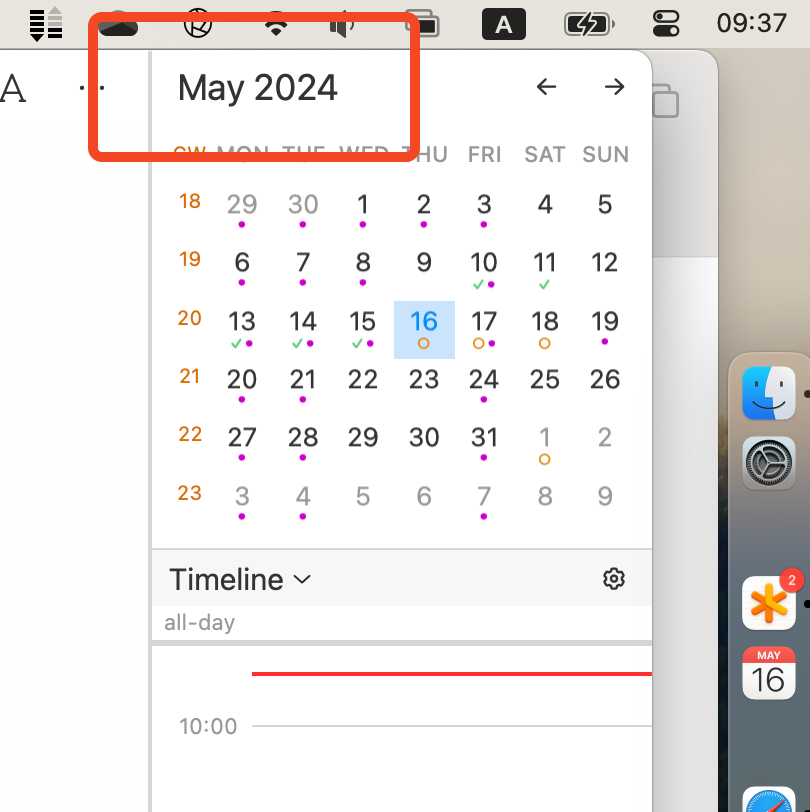
Max Syabro Ok, yes that's different. I'm still not sure about this one. How would you jump to today's month if you are in a project note and want to schedule things?
Eduard Metzger I think I'm frustrated by inconsistency. Maybe remove "go to today if date note selected"?
Just as tips until this is implemented: On iOS, where Cmd-T is hard, tapping the date at the top of a day view will jump you to today
By the way, you can use CMD+T or click on the date at the top left to jump back to today, but I must agree, it's not as standard as the "o" button.
I like this idea! Thanks for sharing.
This would make the UI more familiar to people who have used just about any calendar application. Familiarity is a good thing.
I agree. I want a button I can click on immediately to get me to today's note, no matter where I am in the app. And having to search in the calendar for today's date is not the same at all.