NotePlan
NotePlan
Aug 28

Typing [[ or (( should automatically wrap the word into [[ ]]

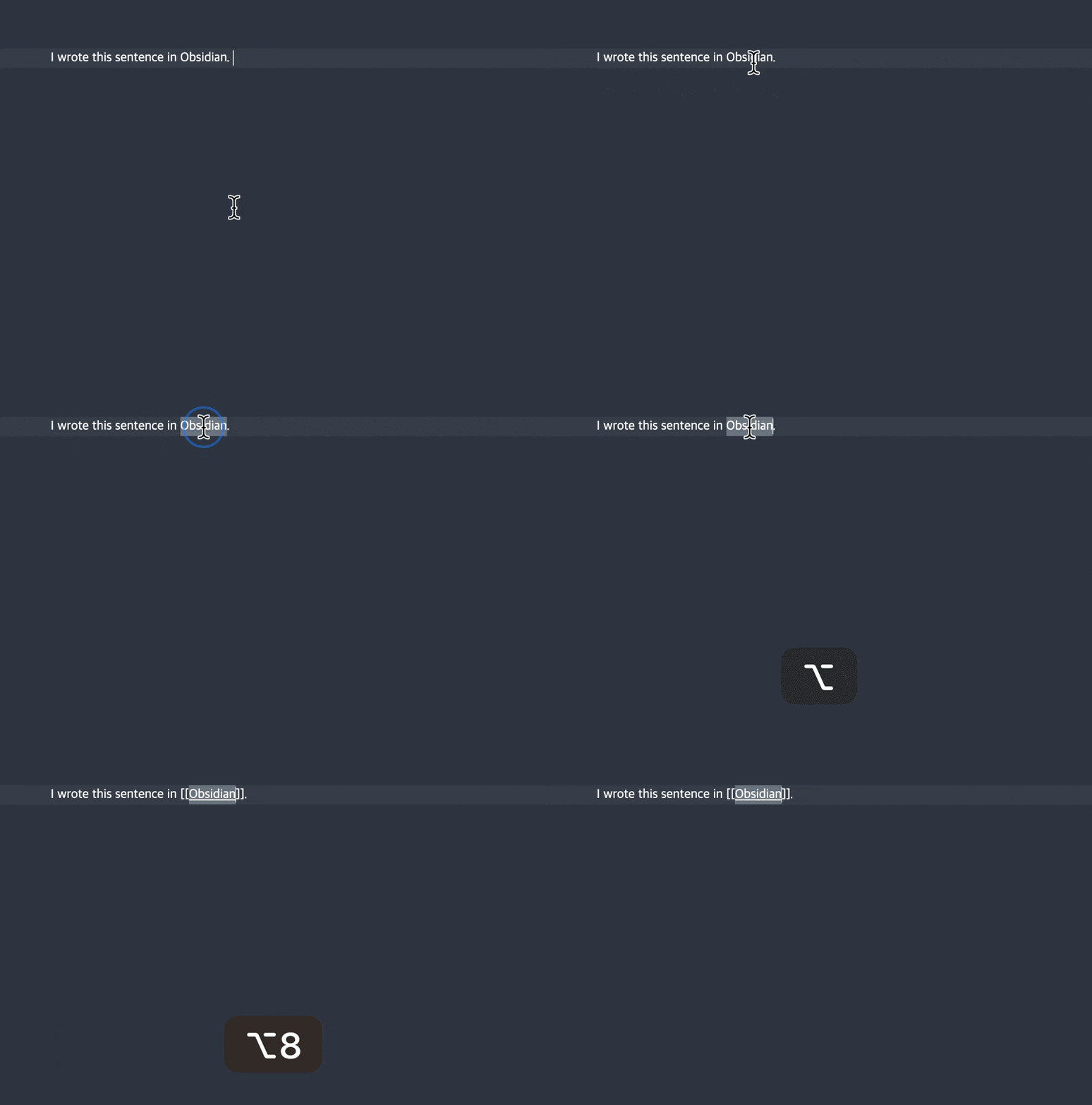
1. To make internal linking quicker/easier, typing `[[` when text is selected should wrap the selected text in ``[[…]]`` (c.f. Obsidian. This also comes from programming text editors and is called "auto surround.") 2. `[[…]]` links should be treated like other Markdown and disappear until hovered or selected. 3. Add a shortcut to surround a selected work with `[[...]]` to create a link or select a typed out link name and hit `[[` to surround the selection automatically. Problem at the moment: If you type a link today, it presents you with auto-completion results which you might not want because this is for a new note. It's easier then to type the link name first and then surround it with `[[...]]` Attached GIF demonstrates how neither of these currently work.

CompletedCompleted

Dec 15, 2023

I think we got here 80% of the way now. The "[[" and "]]" are still showing up, but that might be worth a new request. Also I'm not sure if a shortcut is needed when you have the word selected as typing "[" twice is basically the shortcut. Hope that works! Releasing soon as beta and then public release.

Dec 15, 2023

Eduard Metzger: This is fantastic! Thanks for always improving the app! 🙂

Dec 15, 2023

Eduard Metzger: is this just for square brackets? Or for parenthesis () and quotes "", '' as well?

Dec 15, 2023

Aric Crosson Bouwers: Hope nobody will complain about this, goes a bit more "techy" than the [[ ]], but lets see.

Dec 22, 2023

Eduard Metzger: amazing, I appreciate your hard work!

Nov 13, 2023

Any chance this can be added soon? Pls Eduard 🙏🙏. Even the slow moving dev team behind Bear 2 has included this functionality…

Oct 24, 2023

PLEASE, THIS. I moved temporarily to Obsidian, and coming back to NotePlan is driving me nuts because I keep losing my selected text when typing brackets, parenthesis or quotes... I think Obsidian basically nailed auto-pairs. They do it for quotes, brackets, Markdown syntax... with a couple of preferences (on by default if I remember correctly) to disable them if you don't enjoy the behaviour.

Oct 18, 2023

Yes, this would be great to have. Here is what it looks like in Obsidian:

Feb 5, 2023

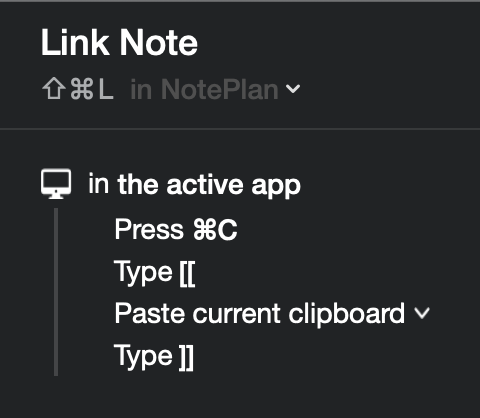
I need that one so badly. Please also useable for mobile. My use case is that I quickly throw all tasks from my brain into daily notes. From there, I want to quickly create a note linked to a specific task for further infos on that task. Edit: Found a workaround. If you use Setapp, install Keysmith and create a macro for NotePlan. I made one, that automatically wraps the selected text in [[]]. Unfortunately, this works only on desktop.

Nov 27, 2022

This would be a big step in improving the editor experience!! Please make special characters for note links and code blocks non destructive - it’s standard in most linking notes apps (Obsidian, Logseq, etc) and greatly improves the workflow!!

Sep 6, 2021

Another important request to this: **display bracketed terms in search even if the page hasn't been created yet.** This is especially useful when thinking about something you know you'll reference later. Otherwise, it can really stop the flow of typing if you refer to the same term before elaborating on it in a separate note. For example: Here I am writing some text about a concept, and I realize I'm familiar with a framework that can help: [[The ABC Framework]]. This doesn't exist yet in my database, but I know I'll reference this again soon. **The next time I need to reference this, typing out [[The ABC...]] does not bring up any results to select from.** I must first click on the original item, come back to this document, and only then will it come up in search. This is a major pause in one's flow. Instead, this should work as tags do: linked items should also show up as soon as they are mentioned in a text.

Aug 30, 2021

This was something I wanted to request for a while, too. Thanks for adding it in! Adding onto this, it just makes typing more efficient, saves at least 2 keystrokes, and generally speeds up typing and thinking. In NotePlan: - You must add the final ]] in order to complete the line. In Roam and Obsidian (gif): - When you open up a bracket (either single or double), the closing bracket is automatically added. - Clicking enter moves you beyond the closed brackets, allowing you to continue typing. Suggestion: - Automatically add a closing bracket when either [ or [[ are entered. Text will be added in between. This should maybe be expanded to ( and { perhaps? I don't use { as much so no strong preference here. - Make sure there is an easy way to close the bracket to continue typing, e.g. by using 'Tab' or 'Enter' (I recommend both).

Aug 30, 2021

Thinking about this, in essence what I am asking for with general auto-wrapping is to allow leveraging applying markdown "textually" rather than with "system keyboard shortcuts". part of the point of Markdown, and I believe what happens naturally as you get used to it, is that basic formatting can be applied "in flow of writing, using text marks", as opposed to cognitevely "popping out" to system affordances (e.g.: CMD+B for bold…) Of course, both are keyboard input, but for a Markdown user, ``**`` is "in flow", "in text"…

Aug 28, 2021

Yes, I agree. Hiding the brackets like you do on markup sounds like an obviously great idea. Making this more like VSCode in the selection regard would be great as well. Further to that point, Eduard Metzger someone mentioned in another thread that CMD-] to indent would be better, more consistent with VSCode and many others. Maybe we can find another key combo for the forward and back in documents. The way Chrome does it is pretty cool: (^Tab -- try it)

Aug 30, 2021

David Wertheimer: hah that someone… was me… :D

Sep 8, 2021

David Wertheimer: Yes, I remember, it sounds good to me :)