I propose enhancing our planning system with weekly, monthly, quarterly, and yearly calendar notes, tailored to our MRI & CT Scan services at Maxresolutionimaging.com. This approach streamlines task management, ensures clarity, and enables seamless transitions between daily and long-term objectives. Let's optimize our operations and deliver exceptional service!
Nice job, Eduard!
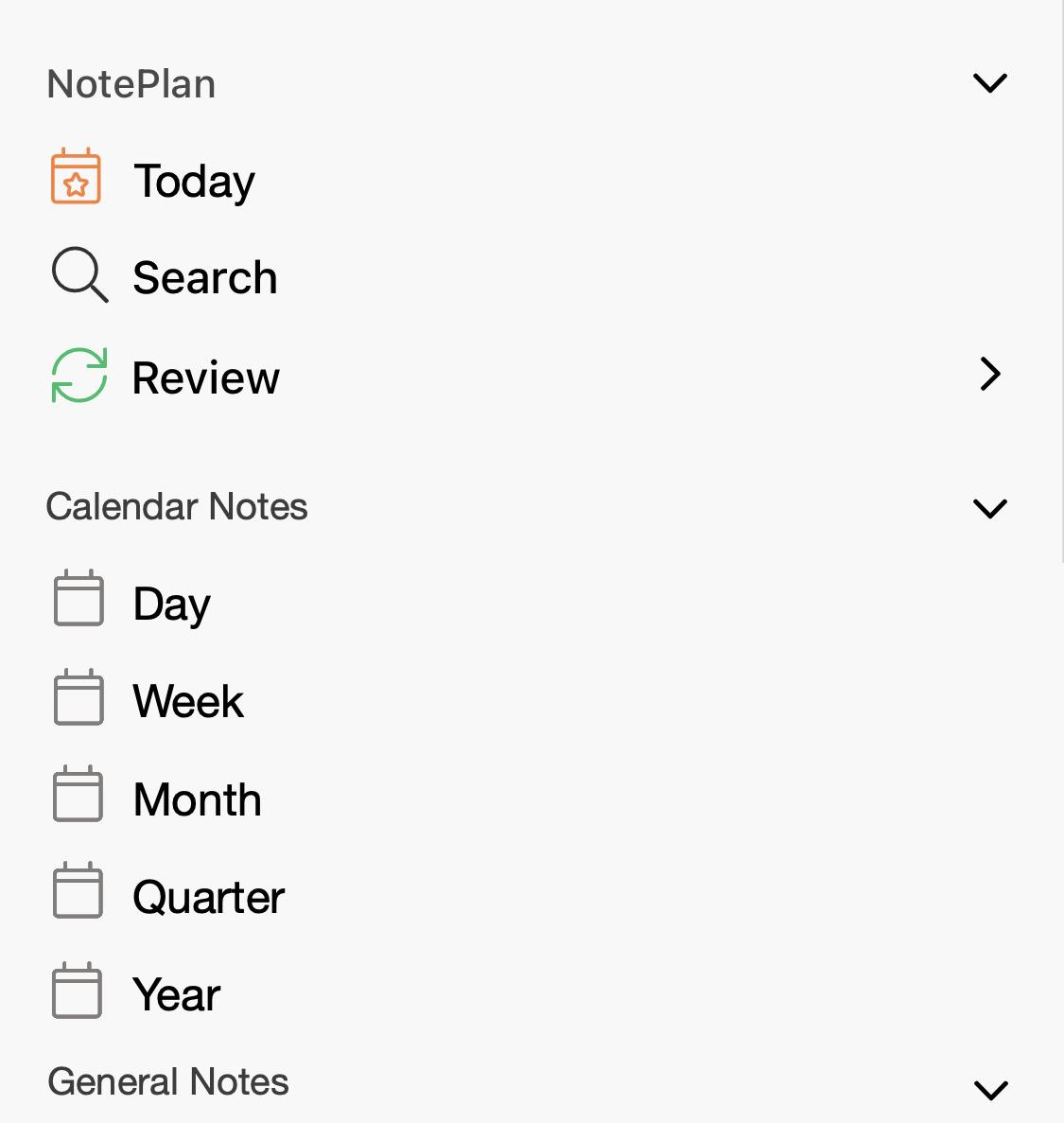
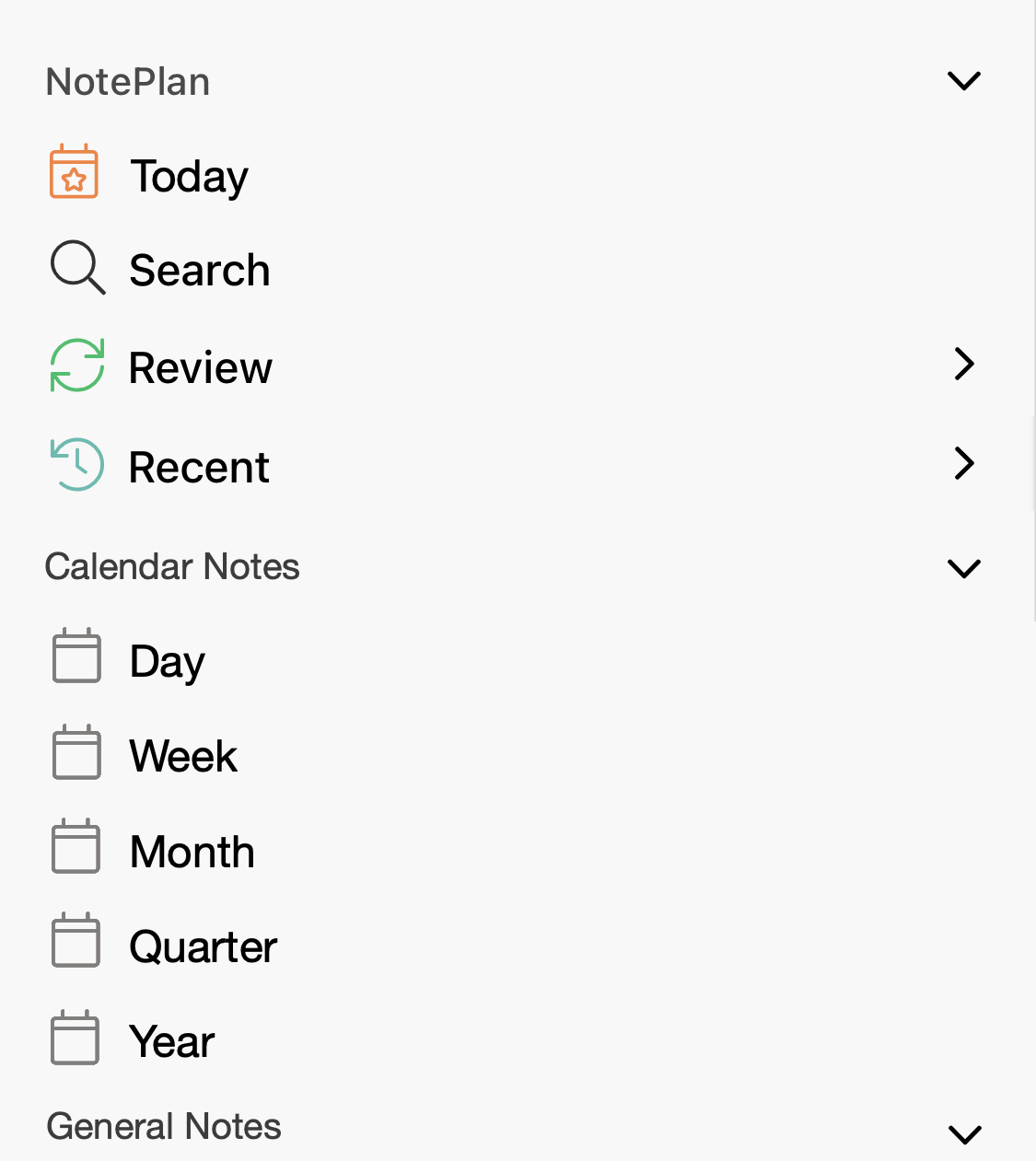
I think this can be considered fully completed! The beta has now monthly, quarterly and yearly notes (turn them in the Calendar preferences). The official release is also near! TestFlightL: https://testflight.apple.com/join/fm9q4OjE
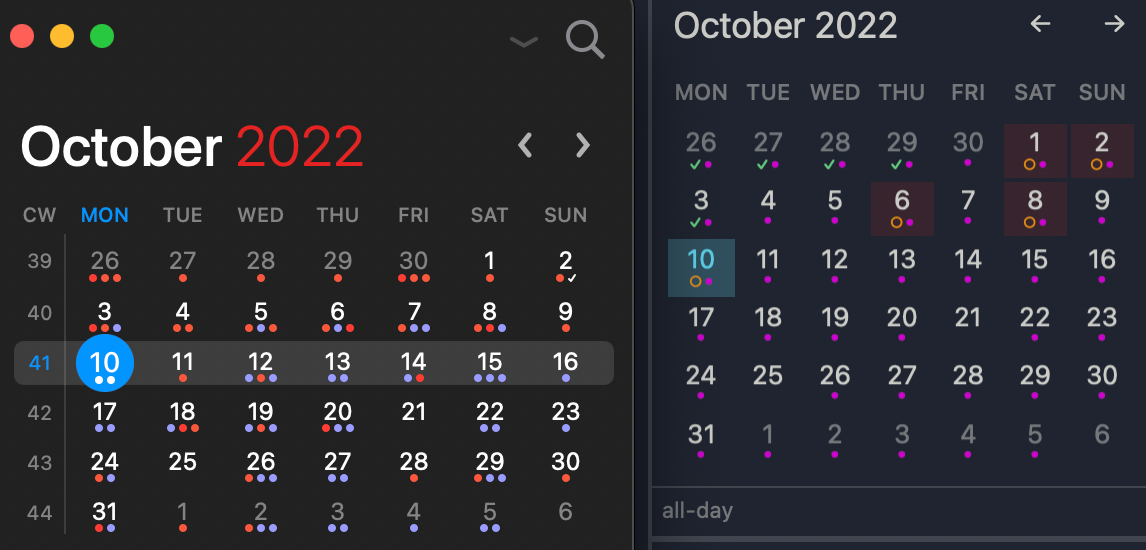
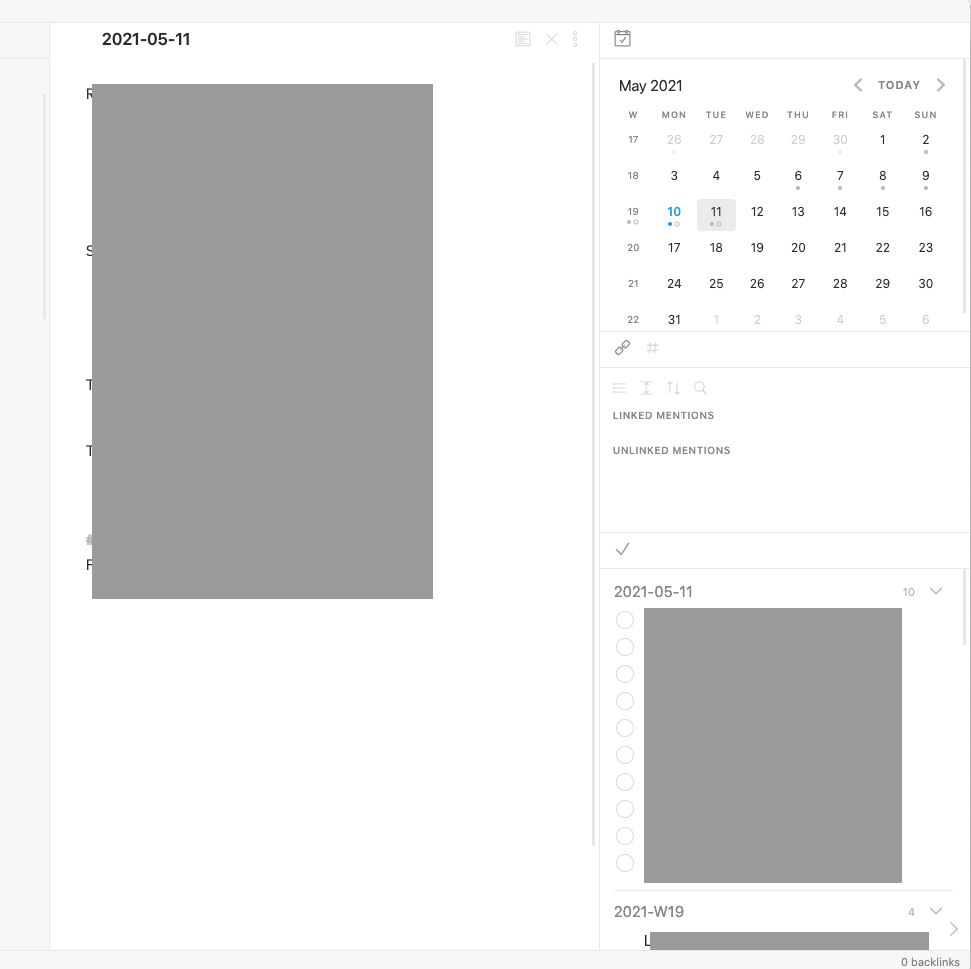
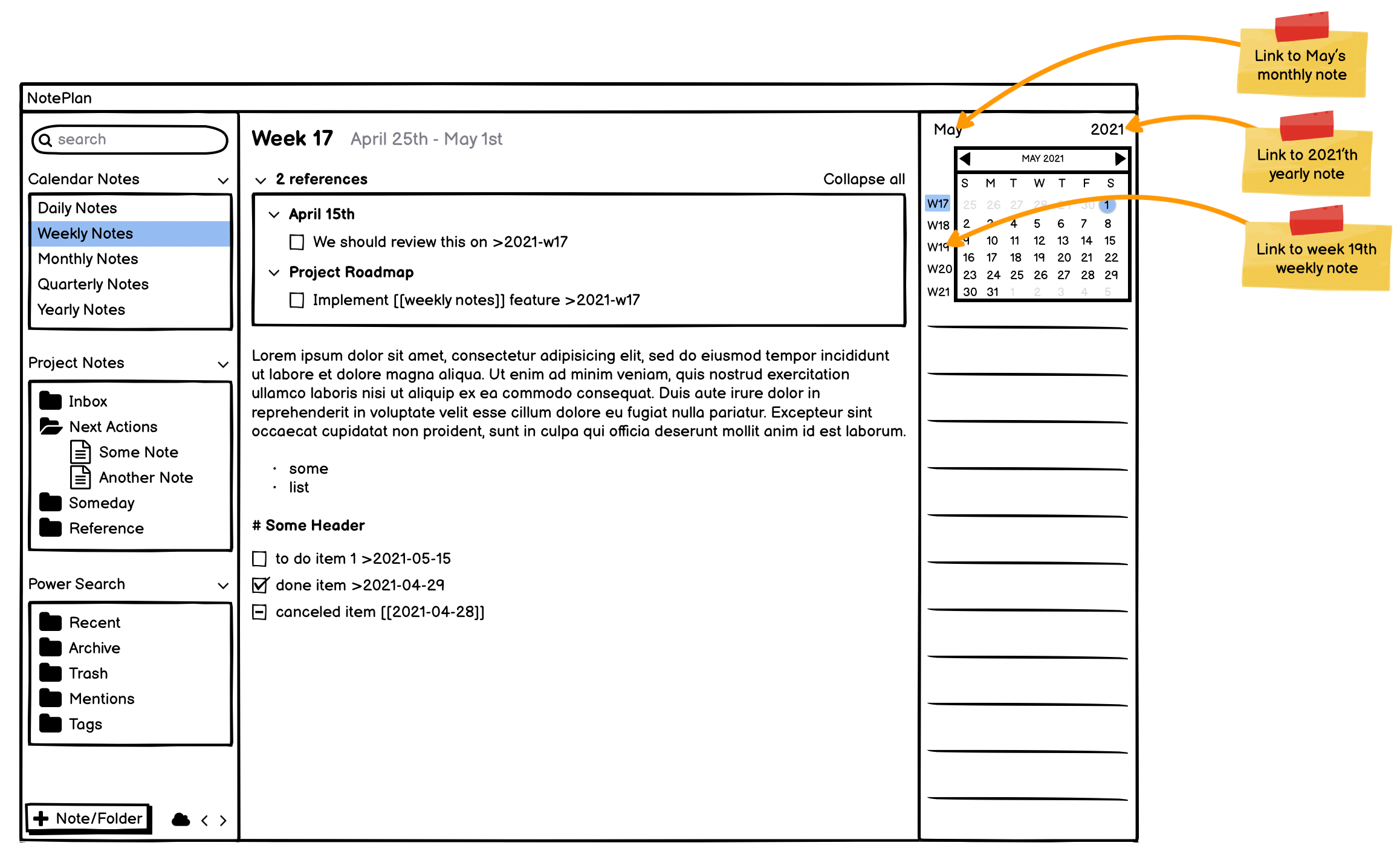
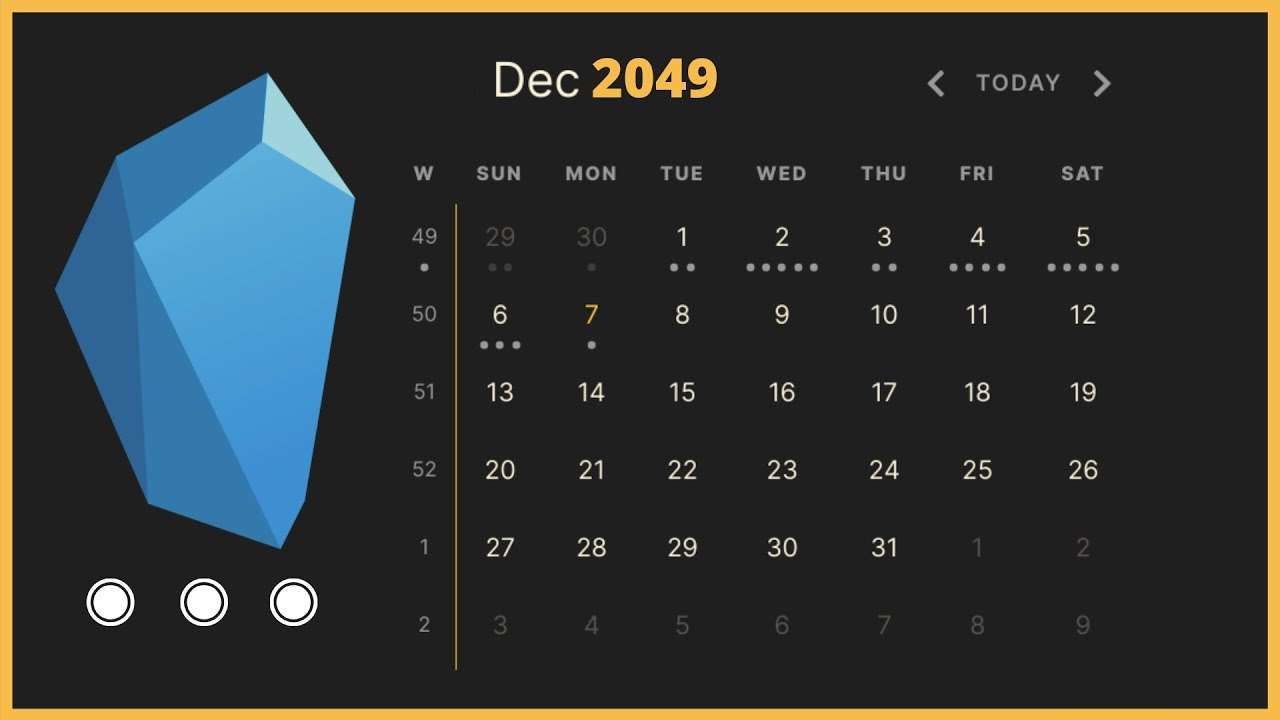
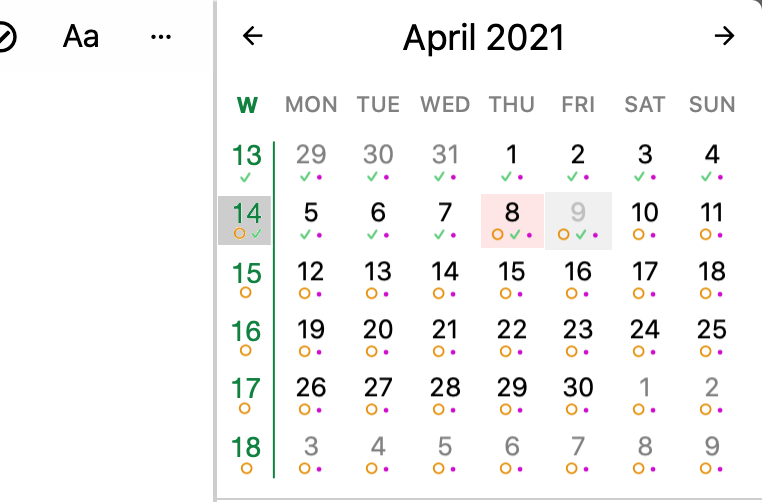
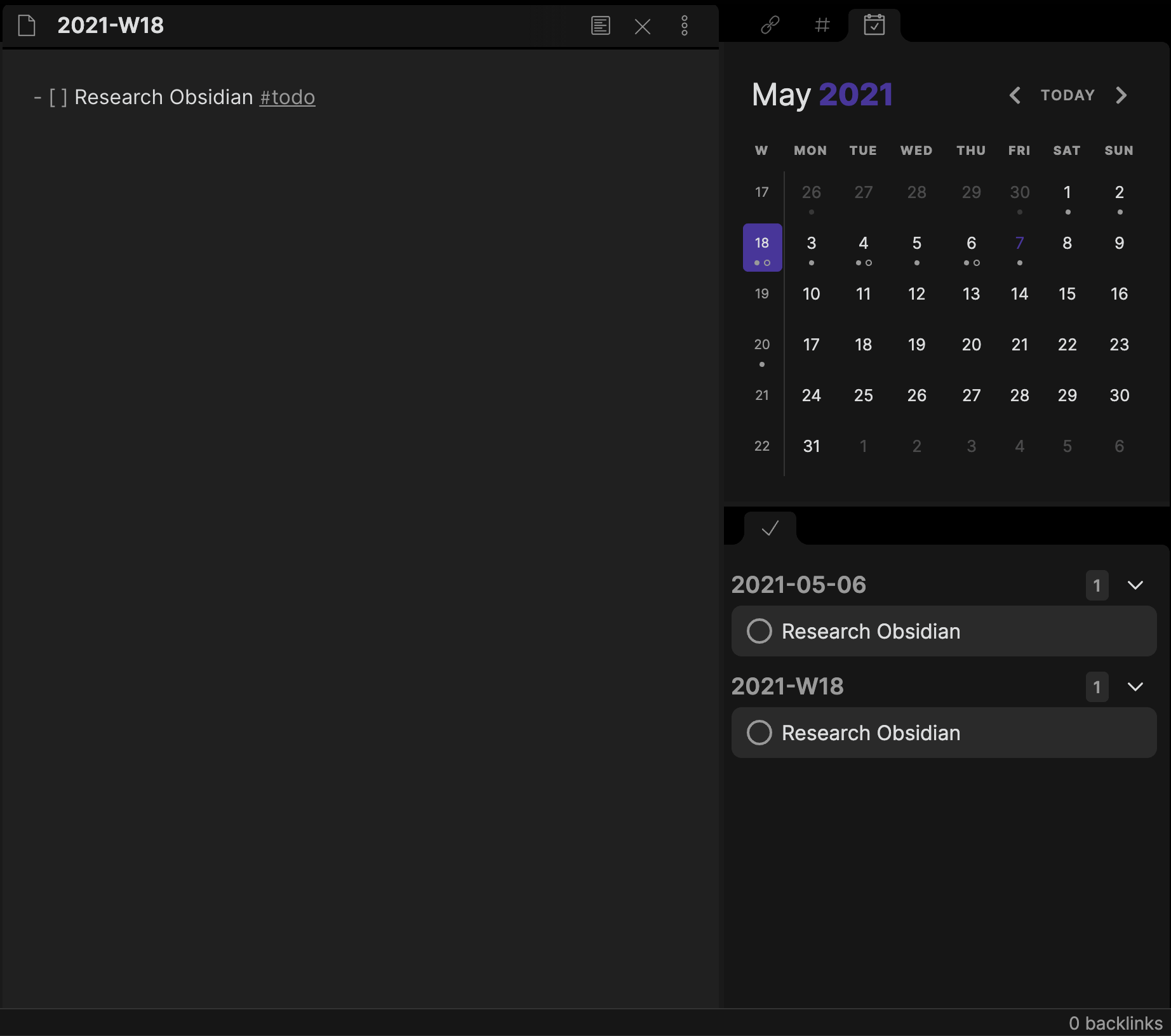
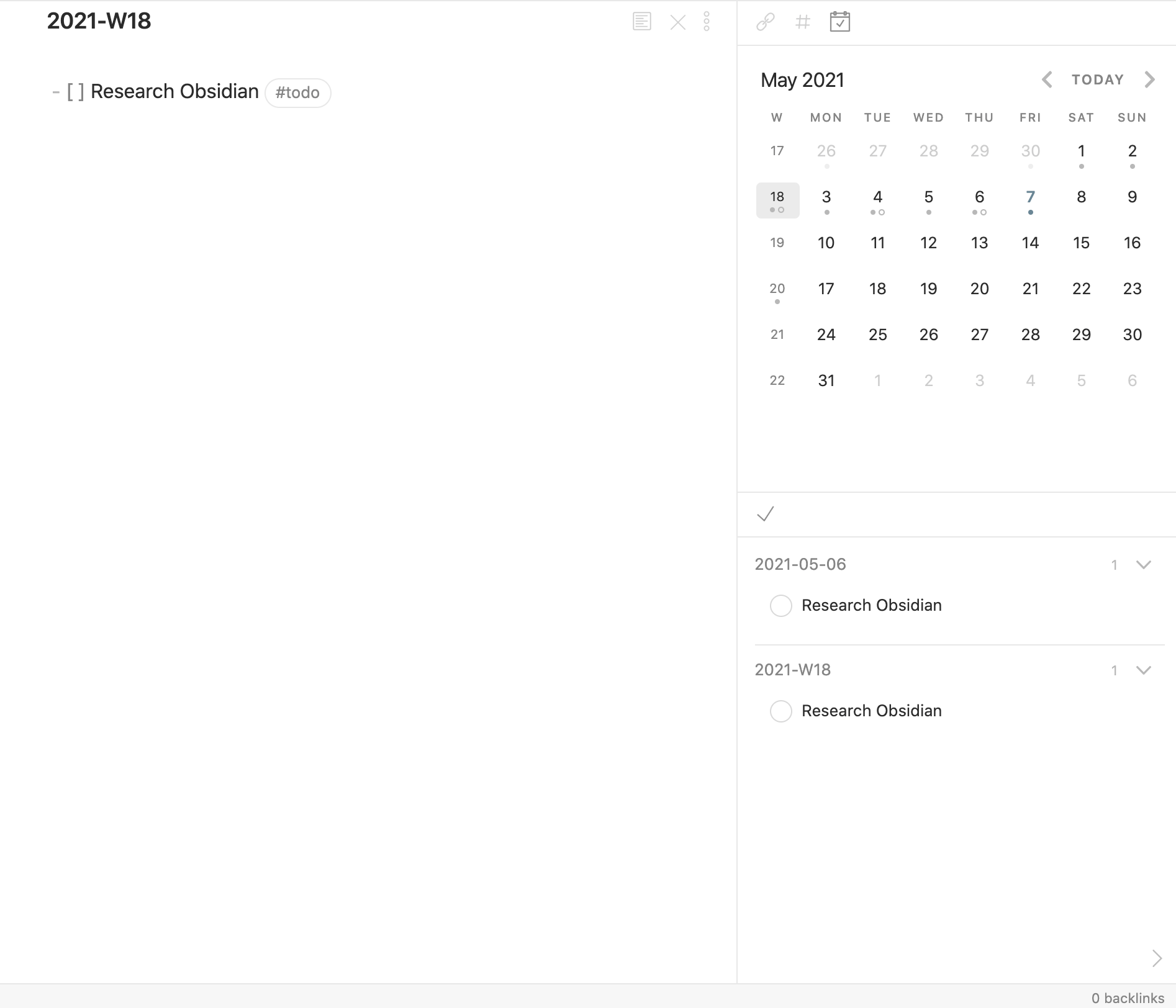
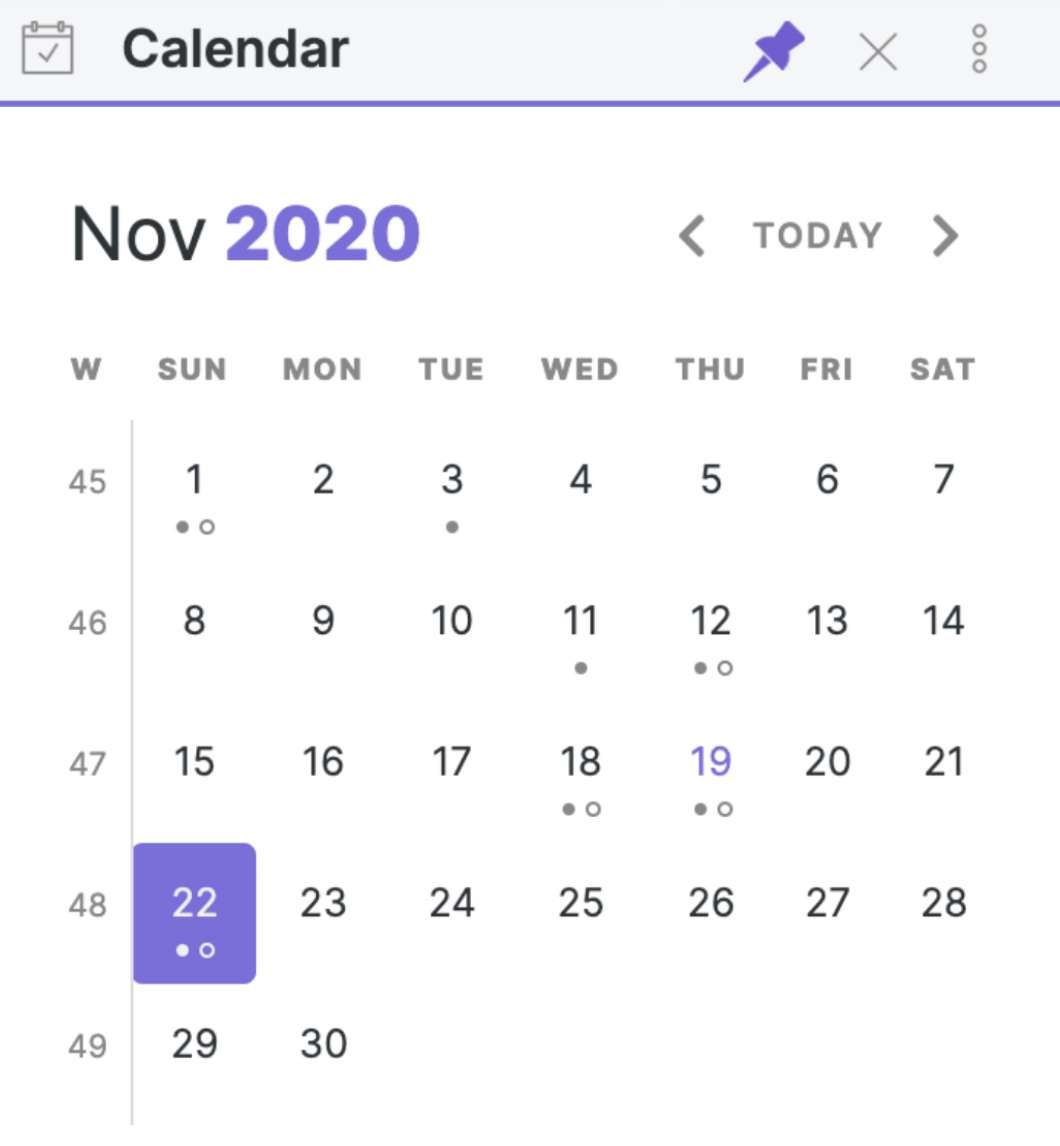
Very keen to have CW numbers in the mini-calendar, as per Fantastical. Click on the CW and it'll take you to that weekly note. Also makes it easier to remember/lookup what week a date falls upon. See side-by-side comparison below.
This feature is already so useful. One thing that would be even more useful, would be a special ">thisweek" link that could be associated with a task or bullet item, to place that item in the week view "references" and would behave in the same way ">today" does for daily tasks. So many of my tasks (from either daily or undated notes) have to be done "soon", but don't need to be in my face every day... seeing in week view instead would be a nice balance. NOTE: this is diffeeent than say ">week-W41", because it wouldn't disappear from view at the end of that week, but be still visible in the view of the next week when it arrives
It would be great if drag’n drop from the weekly note / other backlinked notes would create a synced block. In that way we don’t loose the context of the task. 👌🏼
Tor-Einar Rogn: This works if you press CMD while dropping the dragged reference
Eduard Metzger: Yes, but not on iPhone?
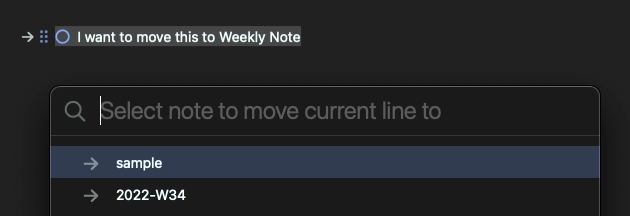
As I continue to refine my processes, I too, feel it would be helpful to either have dates in the "move to weekly notes" command instead of just 2022-W35, or add week numbers to the calendar on the right side.
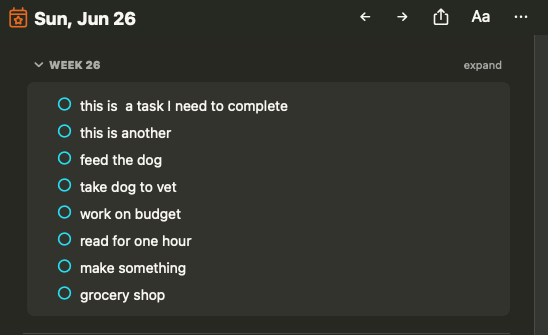
Would it be possible to show only todos and not bullet points in the weeks overview in a daily note? Basically skip/hide them just like text paragraphs are not shown. After making weekly review every daily note has full review outline on top of it (1.5 screen of bullet points). Attaching simplified example.
This also drives me crazy, I already created a separate issue for it, but it did not get too much attention yet. -> https://noteplan.canny.io/bugs/p/week-note-task-sub-items-ar… Over the week when i check all the todos, the today view becomes more and more unusable.
On iOS, it would be really helpful to have a way to jump from viewing/editing a weekly note to a daily note. Like if I click in the calendar while in weekly notes, it just jumps to the note for that week. I think it would more intuitive to see Week #s listed down the left side of the calendar, and you access weekly notes by tapping the week # and daily notes by tapping the day. Then you wouldn't even need a Weekly Notes view, you could access weekly notes from the Daily Notes view.
Jason Hunt: I agree. That's how i have my calendars setup and would love to see that carried across here.
Jason Hunt: agree that this is cumbersome, and you have an elegance one-tap Solution. A workaround for now is to have ">today" link at the top of your weekly template. Of course, you will need to remove this once you move on to the next week, but I only do this when the tasks in the prior week are cleaned up (else they remain in my daily "References" to bug me until I do so!)
It seems that moving a task from a weekly view to another day (using move will make it disappear from the "weekly" block on top of daily notes, however it is still visible from the weekly menu. I suggest it should be visible everywhere.
Looks like a great start. I am excited to see this feature in the works. How do you move notes from one week to another? I tried dragging a note from this week to the next week, but nothing happens. Also, it would be great if you could drag daily tasks to the weekly note even if the weekly note doesn't yet exist. Currently, it seems you can only drag once you've gone to the weekly note and added something. For example, could you always show the weekly note reference even if the weekly note is blank/doesn't exist?
Hi, in the meantime, i started using the beta version and migrated my old "manual" weekly notes over to the new system to try it out. - What i miss the most is linking to weeks via `>2022-W27`, but i guess this is on the roadmap already. - For me, it is a bit cumbersome that the calendar pane (on mac) does not show week numbers as an additional column on the left. This would be an easy way to switch to the week-note, show that the week-note is selected (current background color on all days would be appropriate for the 7-day-view), and also work as a drop-target for moving tasks. - On the phone, I find it hard to go from the week-note-view to the today-view again. The tap on the top area is used to go to the current week (what is normally today). Not sure what the best way is here, but i would need some today shortcut. Anyhow, I already like a lot of it and am happy that this is coming to life now. Thank you for your work!
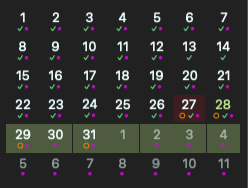
Frank Epperlein: If there was a week number column in the calendar, this could also show any unchecked tasks similar to how daily notes work. I would like some visual indicator on the calendar of incomplete weekly tasks.
Eduard, Thanks for the beta release! After a quick use, I have a suggestion, and there may be a way to do it that I'm overlooking, but I believe it would be helpful to have the linked week at the top of the 7-day page. I often have a list of tasks that I place in days of the week when I do my weekly planning. Screenshots attached and thanks again! -Victor
Update: The beta is out! ➡️ TestFlight (iOS & Mac): https://testflight.apple.com/join/fm9q4OjE ➡️ Mac AppStore: https://noteplan.co/download/NotePlan-3-Beta-797-AppStore.… ➡️ Setapp: https://noteplan.co/download/NotePlan-3-Beta-797-Setapp.zi… (missed to update the build number, but they are the same version as the TestFlight build)
Update: iOS is ready and the Alpha is out. Getting early bugs out of the way for the beta phase in a few days!
The first iteration of Weekly Planning is almost done on Mac. Planning to move today to building out the UI on iOS (the "backend" should already work). Once iOS is usable, I'll upload a beta.
While I like this proposed solution, in terms of a flexible solution, allow notes to be tagged against time periods would be helpful. e.g. >2021-03-14|2021-03-20 could associate that note with that arbitrary date range. Weekly date tags would be VERY helpful.
I've just started using noteplan and I'm loving it. Switched from a physical bulletjournal to noteplan. This feature would be amazing to have a digital bullet journal!
I just wanted to point out that this feature is the most important for me as I plan generally my task each week. I am waiting for this feature to start using Noteplan. Any news about the implementation?
Anything we can do to get this moved forward? This is one of two most crucial items I need from Noteplan and are both DAILY workflow items for me. They will 100% increase your engagement with the app as well. I would be willing to _pay more_ for Noteplan if it had these features.
Nick Giovacchini: good question, as it doesn't seem to have moved in 6 months. However, I think the answer will be 'no'. I think it would require too wide a knowledge of the existing code to easily bring in another dev for this, even if we ponied up the $ ...
I cannot tell you how happy I am that this is planned. I currently use a #thisweek tag and this will be so much better.
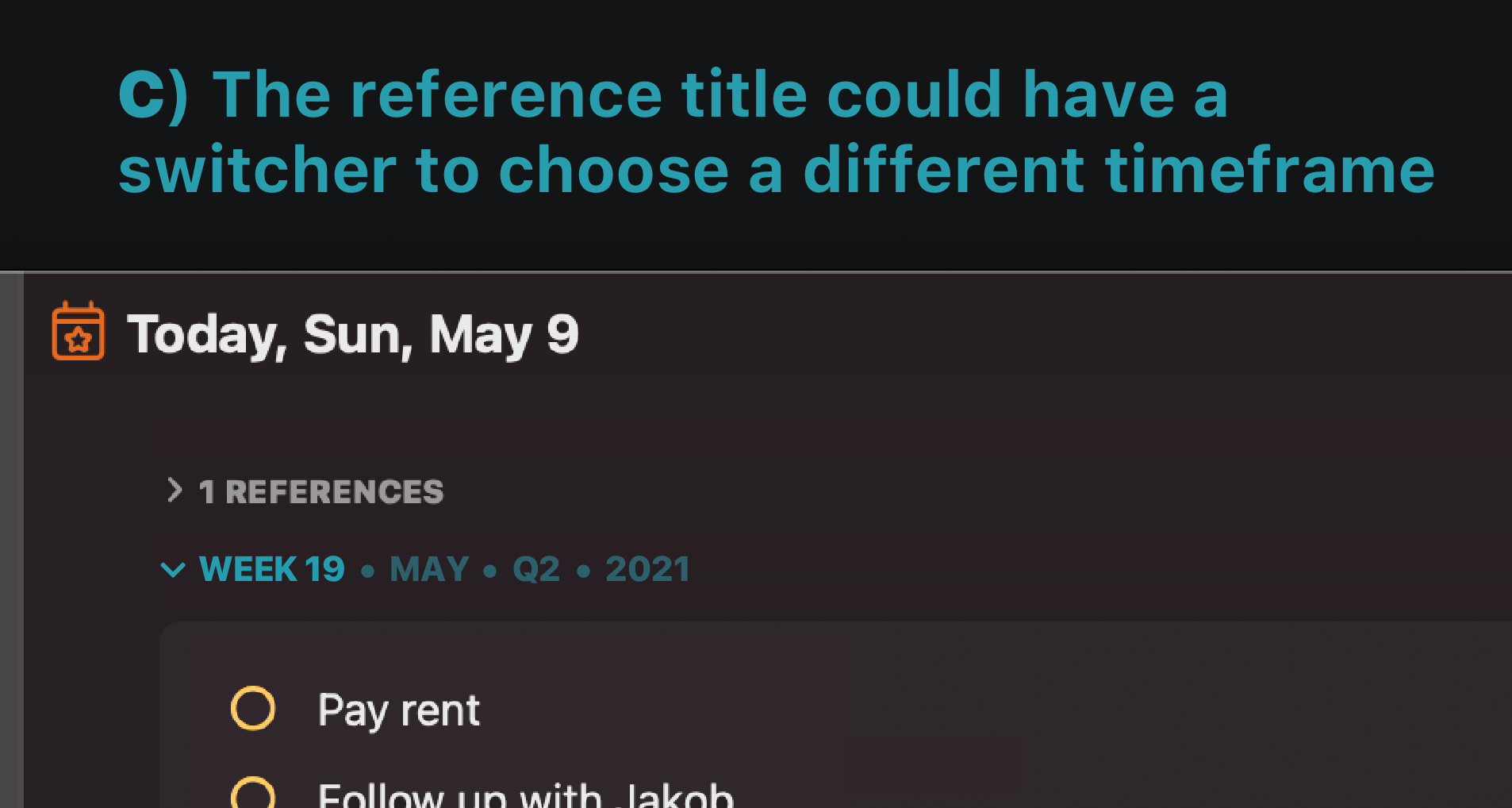
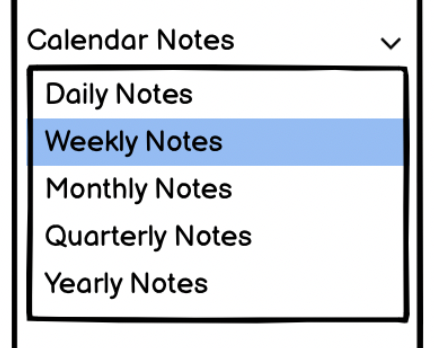
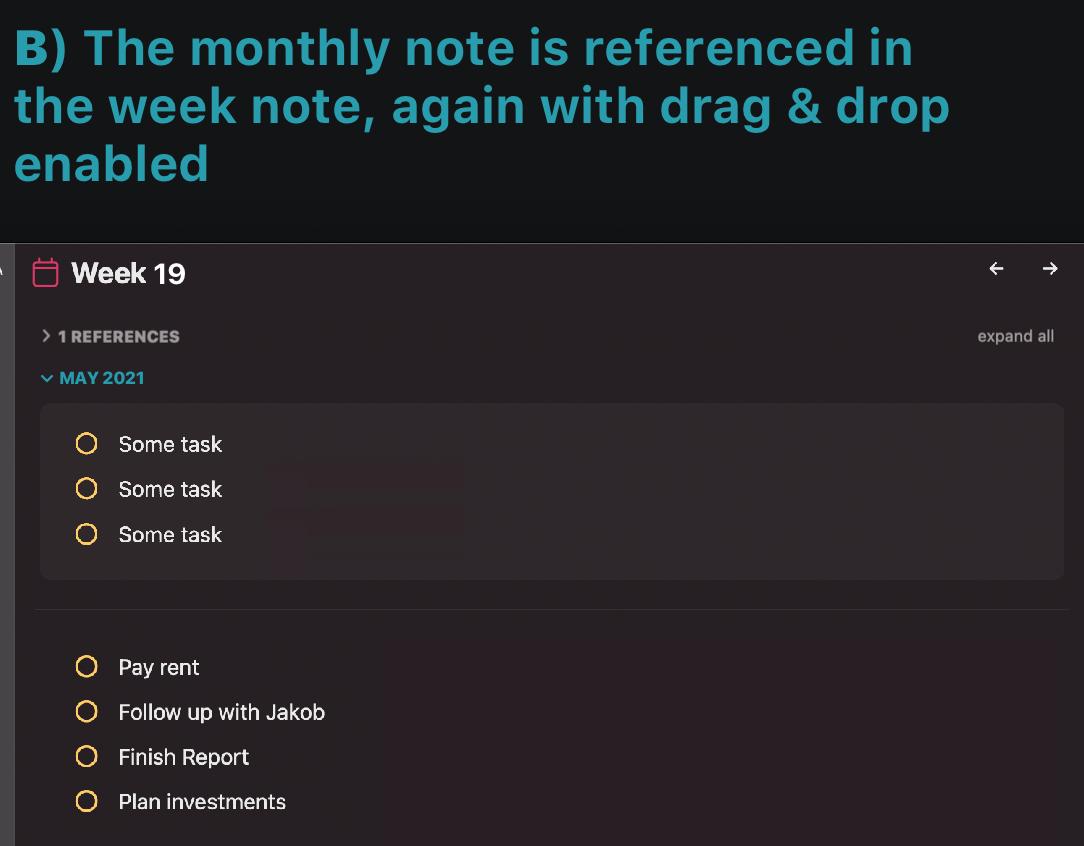
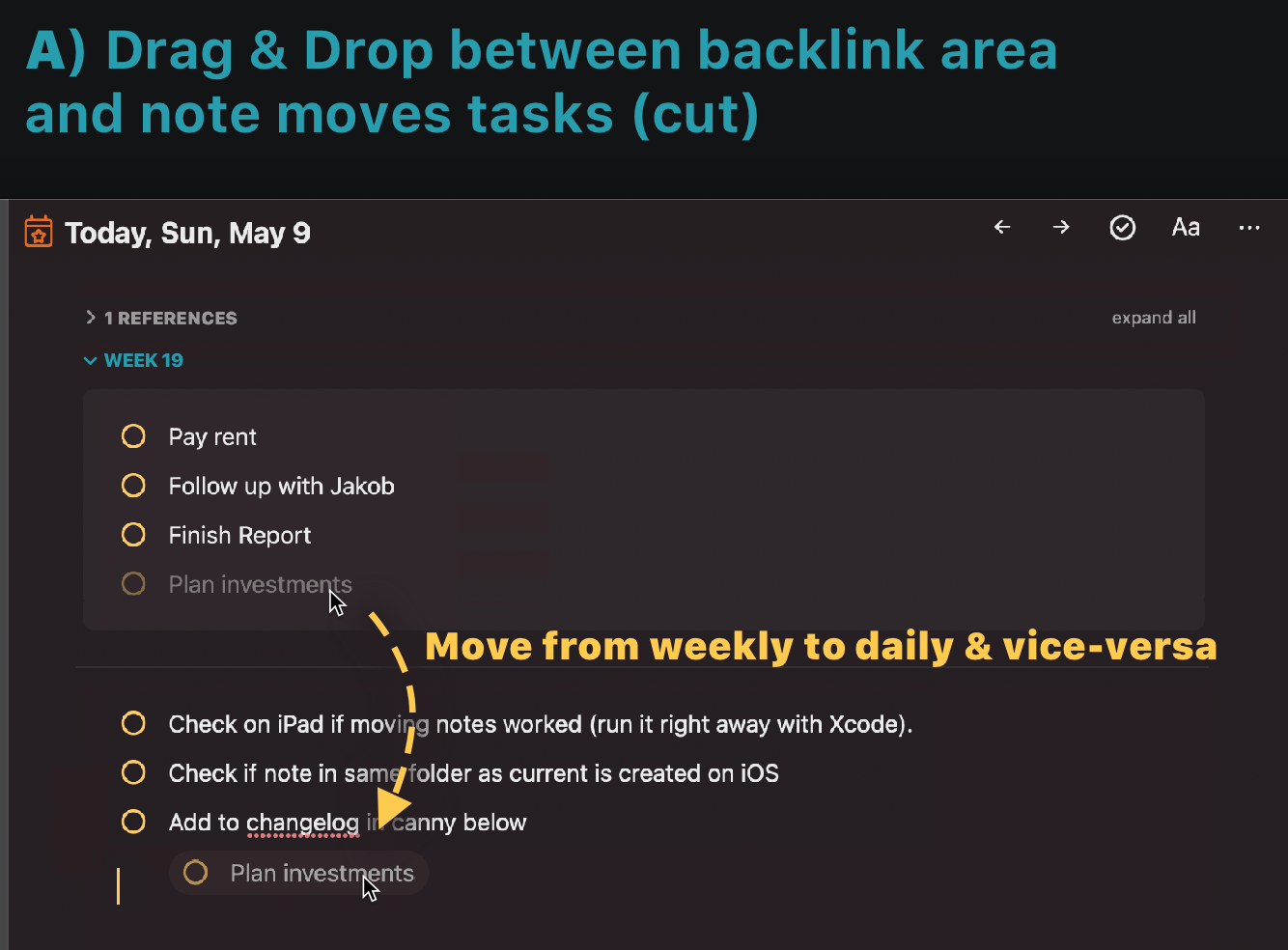
I love this workflow! The switcher and two-way drag and drop between link area and note are brilliant; such an efficient and contextual way to work with time. Very exciting! A cut and move when dragging would definitely be my vote. Could the dates for quarters potentially be customised?
John: Interesting point on quarters. I learned [here](https://ux.stackexchange.com/questions/119823/is-there-a-sta…) and [here](https://www.investopedia.com/terms/q/quarter.asp) that some companies have their own definition of "quarters", depending on fiscal or business needs. For example, Apple's fiscal quarter `2020-Q4` [ended](https://www.apple.com/newsroom/2020/10/apple-reports-fourth-…) on September 26th, 2020. That means `2021-Q1` started on September 27th, 2020.
Rhubarb: I’m also thinking of other sectors and ways the year might be divided. Eg - in education, working with 4 academic terms (or potentially 3, semesters, trimesters, etc). User adjustable dates for quarters would give a lot of flexibility here and even allow cheating into fewer than 4 periods by pushing some to the very end of the year, for example.
John: I hadn't thought about these division, although they determine so many people's lives, especially in education (and for parents with children in school). I can imagine use cases like "things to do in the fall semester" or "things to to in the final trimester". The question is where to draw the line between Calendar Notes and General Notes. Maybe Calendar Notes should only include periods that are determined by a universal calendar (like the Gregorian calendar) and not by local, personal or communal circumstances. So the easiest solution would be to start with only Day, Week, Months and Years in the Calendar Notes. And I have to admit, it's tempting to explore more generalized mechanisms. :-)
I'm loving the new workflows! - The switcher C) is an excellent idea. It provides context (Where am I?) and simple interaction (one click) and choice (Y/Q/M/W). I like it! - Drag 'n drop A) and B) could work, if the number of tasks isn't that large. (I could imagine that I'd rather open the weekly note in a separate window for drag 'n drop) With the number of entries in the reference section increasing, I'm wondering if the reference section should stay on *top* of the currently viewed note. I like in Obsidian that I can have backlinks in a separate column/pane. Or maybe [place the reference section at the *bottom* of the work area](https://noteplan.canny.io/navigation/p/move-reference-sectio…)?
Rhubarb: I thought about it. But wouldn’t the references be pushed down way too much in longer notes so they basically disappear? Technically we could separate both types of references.
Eduard Metzger: Good point. That's a tough one. I think my favorite solution would be a two-pane layout. Center pane for the note, backlinks and scheduled tasks from other notes in the right pane. (That's how my experimental setup works in Obsidian.) Stacey had a similar same idea: see her [video](https://drive.google.com/file/d/1qslLoT2lVpvlK_0oz3hTbnGXH-g…).
Rhubarb: I really like this right-pane alternative, in *addition* to the references section (still necessary for single pane phone UI). I wonder if it could use the same switcher "week.mon.Q.year" but also "all", to reduce screen clutter and overflow
Rhubarb: I know this is a bit old, but maybe even a table or kanban board the same way Obsidian does it? One can dream... :)
Great stuff! Quick note - in your example for week note, did you mean >2021-W07? That would be more consistent with ISO https://en.wikipedia.org/wiki/ISO_8601
Rob Grace: yes certainly ISO. Have corrected it.
Came up with a mockup (based on the really great mockups already posted to the discussion) and a workflow I can see being really useful and creating a tight relationship between different timeframes (Daily <-> weekly <-> monthly...).
Obsidian's "Periodic Notes" plugin might provide some inspiration for weekly and monthly notes. https://github.com/liamcain/obsidian-periodic-notes
Some idea Stacey sparked with the Monthly Page suggestion. A new option in the sidebar called "Month(ly Notes)" in addition to "Week" could show a vertical scroll view with the 4 weeks of the selected month. Similarly a "Year(ly Notes)" item in the sidebar could show all 12 months of a selected year vertically scrollable (and later collapsible). Would this be a solution? In addition to Rhubarb solutions for displaying the relationship between month - week and day using the backlinks.
Eduard Metzger: Not sure if I get the idea. Do you want to introduce "monthly notes" `2021-04.md` and "yearly notes" `2021.md`? Do you want to design a View that can display hundreds of open tasks a time? Or should "month" only display "weekly notes", and "year" only "monthly notes"? And how would you *move* a task from one note to the other? (Move in the sense of moving a line of text from one text file to another.) Personally I don't even think that "weekly notes" `2021-W42.md` are such a good idea. It was easy to draw the mockup. And I can imagine how to use them with manually edited Markdown. But I have a hard time imagining how to schedule tasks from/to weekly notes with a graphical user interface, when we still need to figure out how to handle basic scheduling between daily and regular notes.
Eduard Metzger: Personally I do not find week view very useful right now. Current week view is a “read-only” list of tasks, quite similar to “review”. You cannot drag-and-drop tasks. You cannot add new tasks to any day. I don’t think that scaling this concept to month or year view would do any better job. The request, as I understood it, is not displaying daily notes all together in a vertically scrollable list, but rather have a separate weekly notes. For example, when you do GTD review, you have those “perspectives”, when you think about you weekly / monthly / yearly / lifetime goals. They are not 500 daily tasks put together, these are separate lists. You use them when you plan your daily tasks, but not by putting lifetime goal into a daily task but by making sure that your daily tasks correlate to that broader perspective. When you have OKR methodology, the idea is the same. You have your yearly OKRs. Then you plan **separate** quarterly OKRs that correlate to those yearly ones. Same for monthly and then weekly OKRs. Of course, you **can** create a project note for that (and I actually started creating notes for tracking weekly goals for me and my team). But if you integrate it more deeply into the calendar, it would just make so much more sense. As for the implementation: 1. Seeing your weekly / monthly / (quarterly?) / yearly tasks in a collapsible “kind of a backlink block” above daily note seems very convenient approach. But they should be displayed not because you reference this particular day in them but because they just include that day (e.g. if in a 17th week I have any tasks, then they should be displayed in all 7 days of that 17th week, in a collapsible block above the daily tasks of the corresponding day). 2. “Week” section should display not the scrollable list of daily tasks but a separate note for the selected week (same as daily note for currently selected day). All the markdown and backlinking works the same as in daily notes. And yes, monthly / quarterly / yearly tasks could be displayed in collapsed “backlink block” the same way as described above. 3. Same for the “month” and “year” sections (and “quarter”, why not?).
Eduard Metzger: Sounds great. In my opinion a monthly section would really make sense, and even the yearly one could help in some cases (this was even part of my initial twitter-dm about this more than a year ago). From my perspective this all would be best with having separate files (for weeks, but maybe even for moths and years) and not only sections with a virtual grouping. It's part of my workflow to go through those lists every month and maintain the planning. This would allow me to move this into Noteplan. I also don't see it as a barrier for people with different workflows. Moving a task is simply: If you are in a daily/monthly/weekly note, you really copy the task to the new file with a `<`-reference. If you are in a note, you change the `>`-tag. Just like it is now.
Eduard Metzger: I think that I did not explain what I was looking for well in my original post! I have added some more details as a reply there, but I'm really looking for a blank page to set monthly goals. This is where I can add big ideas and also tasks for the month that do not yet have a specific date attached. Personally, I do not feel a need for additional review pages beyond what already exists.
Anton Sklyar: I like your idea. It's compatible with the current approach to display backlinks. Existing tasks written in weekly/monthly/quarterly/yearly notes are *displayed* in a frequently used and relevant context, the daily view. It's also compatible with Stacey's idea, that weekly/monthly/quarterly/yearly notes are somehow accessible through the calendar, because when I pick a date, I also see the tasks in the corresponding weekly/monthly/quarterly/yearly notes. What's still missing is a mechanism to *access* these notes and *enter* new tasks when they don't contain any open tasks. Any ideas?
Rhubarb: Accessing these notes seems straightforward to me: - command bar (w17 or week17 / may / q3 / 2021) - calendar month view on desktop (like on the mockups in previous comments: click on a week number to see a weekly note, click on a month to see monthly note, click on a year to see yearly note) - dropdown agenda menu on ios (I mean where you have “show week with agenda” and “show month with agenda”, one could have “show weekly note”, “show monthly note”, etc.) - left sidebar (where you have the “Daily Notes” and “Review”) could have “Weekly Notes” “Monthly Notes”, “Yearly Notes” sections that would be **very** similar to the “Daily Notes” section, except that navigation puts you not 1 day left or right but 1 week/month/quarter/year left or right, respectfully.
Anton Sklyar: Thanks for your reply! - Yes, a command for the Command bar should be relatively simple to implement (and to change if it doesn't work out). - Currently a click on the month resets the calendar to today. Weeks should be easy. Not sure about quarters and years. Is there another app, that we could use for inspiration? - Yes, those [Action Sheets](https://developer.apple.com/design/human-interface-guideline…) in iOS should be quite easy to modify - Yes, the sidebar looks like a natural home. (See attached sketch.) Related: ["Today" as top item in sidebar](https://noteplan.canny.io/navigation/p/today-as-top-item-in-…)
Anton Sklyar: What do you mean when you say the Week view is "view only"? I can do everything within the week view (add/complete/schedule task)
Stacey: Drag-and-drop tasks from one date to another is the first thing that I would expect from a week view if it displays multiple days at once. This is just intuitive when you want to move a task to another day. Hotkeys (cmd+ctrl+up/down) could also work for that (like when you're on your last task for Monday and press "cmd+ctrl+down" and it moves to Tuesday), but that does not work either, task movement is limited to one day only. As for the ability to add new tasks, I realized that it was unclear for me up until now that I can do that in the days that already have anything in them (I need to put the cursor to the end of the last task and press "Enter"). An empty line at the end of the note with the same message "Type something, like a task or bullet" would be helpful, I think.
Rhubarb: Exactly! As for the calendar month clicking behaviour, I don't think it's intuitive right now anyway. Changing that behaviour to open monthly note instead would be a good solution, I think. More than that, above the name of the month Eduard Metzger could add current year and quarter, and on click they would open corresponding yearly/quarterly note.
Anton Sklyar: Would you mind drawing a little sketch? Doesn't have to be pretty. ;-) Just a screenshot of Noteplan's calendar with a few annotations.
Anton Sklyar: I'd really like to be able to use the hotkeys to move between days, too! I added that to my request here: https://noteplan.canny.io/navigation/p/week-view-jump-to-cur…
Eduard Metzger: Dedicated weekly, monthly and yearly notes would be awesome, accessing via clicking on the relevant components of the calendar. Having this also reflected in the side-bar navigation would be ideal. Most of my tasks don't have to be done on a particular day (just soon), and I find without a weekly note to work from, my daily notes become a long list of 'incompletes' that follow me from day to day, obscuring anything that is critical for that day and cluttering up daily space that should be free for logging things, reflecting, etc. I currently use the Sunday note for weekly planning (rather than a project note) so that I can schedule tasks to particular weeks, but that's not ideal. I think the case for monthly and yearly notes is equally strong. I'm managing these with non-calendar notes but then don't have the scheduling functionality or the same sense of where they take place in time. They'd provide a really valuable space for goal setting, review and reflection. I'm not a big fan of 'someday' lists because I find that they go unchecked too frequently when your list of current items is too long to get through as it is. Committing tasks to a time helps address this, but having some broader time periods to commit to (a particular week, month, year, rather than needing to choose a single day) makes those sort of decisions a lot more possible. Choosing a daily note as a way to schedule tasks that are only loosely related to a particular time always feels too-precise-too-soon and generally leads to further deferrals when the time arrives. A task being able to progress down the planning calendar hierarchy from year, to month, to week and a day would be really powerful. I also agree that having the relevant calendar hierarchy displayed as a collapsible section at the top would be very useful. Eg - when planning a week, it's helpful to see tasks you can draw from in the monthly note. If you could drag from that section into the current note, that would be amazing! An incredible app - well done!
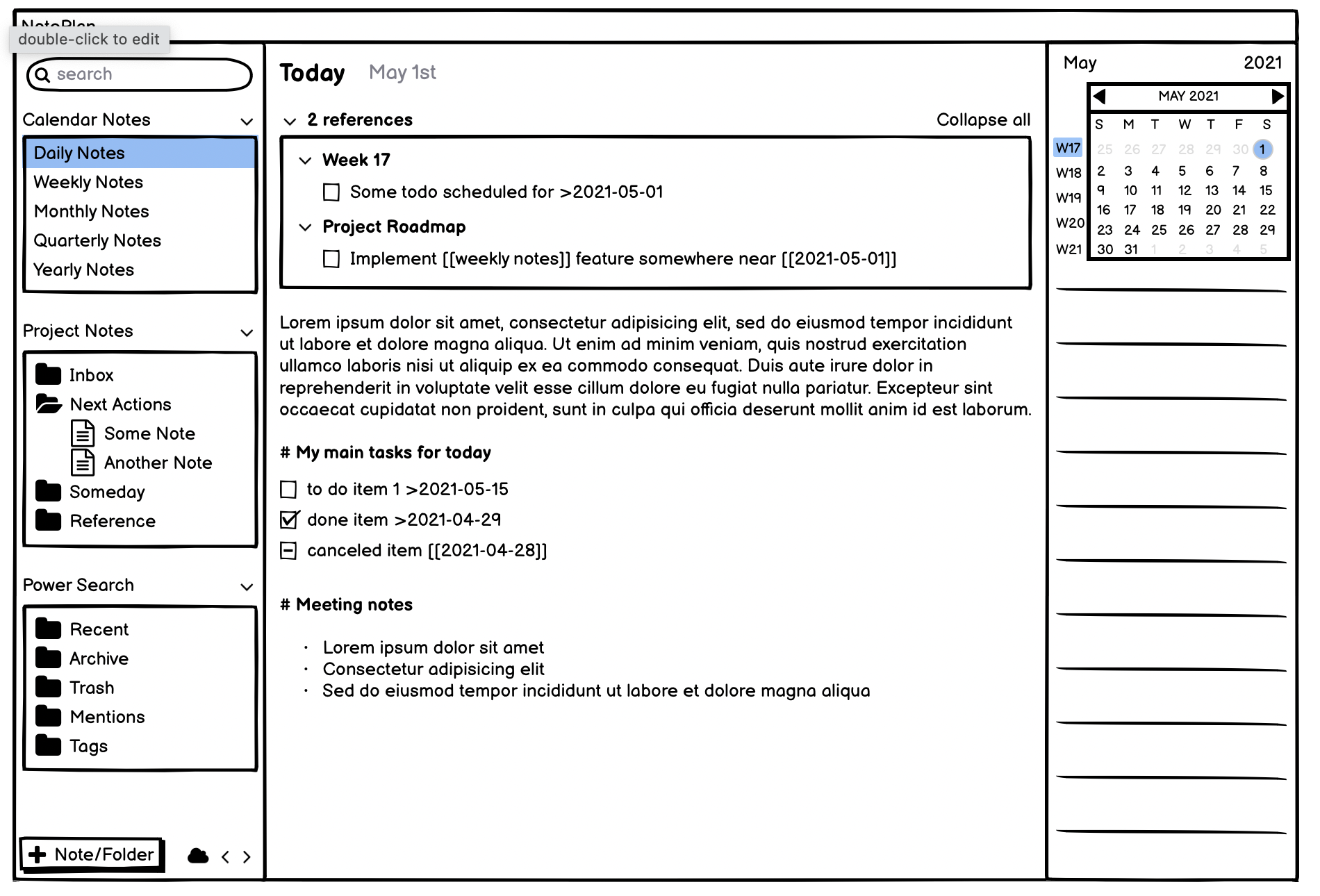
Rhubarb: Sorry for the delayed reply, got a busy week :) Here, I've drawn some concept how weekly note could look, and a daily note that has a scheduled task from a weekly note. As you can see, this completely fits current NotePlan mechanics, weekly (monthly, quarterly, yearly) notes are very much similar to project notes except that you can reference them and navigate to them more easily through sidebar and calendar. Of course, rescheduling of the tasks should also work, so rescheduling dialog will need to be updated for you to be able to select not only days, but weeks / months / years - in case you want to place some to-do into the corresponding weekly / monthly / yearly note (did not draw a mockup for that yet, but have a few thoughts).
Anton Sklyar: Thanks, I love these wireframes! Interestingly, we both chose *Calendar Notes* as header for these notes. In my mind these notes are closer to daily notes, because each of the notes corresponds to a specific date (eg. a day, a monthy, a year). So scheduling a task for this date would work exactly the same for all calendar notes. An open task in the yearly note `2022.md` would be implicitly scheduled for the year 2022, like an open task in `20210501.md` is implicitly schedule for May 1st, 2021. It all depends on where Eduard Metzger wants to go with the product. My proposal would fit into Noteplan 1's simple concept of "one date, one note". If he wants to pivot away from that concept to a more generalized concept of "links", your approach might make more sense. I'm biased. I loved Noteplan 1's original concept. ;-)
Anton Sklyar: Yes, I love this! You've capture what I was imagining in my head, too. (Though I'm still not sure about the need for Quarterly. All the other note types are accessible through the calendar but I'm not sure exactly where Quarterly fits in. Since you have endless space on each page, I would be happy to make Quarterly headers on my "Yearly Notes" page.)
Stacey: I agree, quarterly notes are not needed, if we have yearly notes.
Anton Sklyar and Stacey: I’m late to this particular party, but I’m all in favour of not just week notes, but monthly, quarterly and yearly as well. Why? You clearly like yearly review points; I find quarterly works best for me. And some others will be fortunate to get value from more frequent (monthly) reviews. I can see there will need to be a bit of new UI help to get people used to the idea of these new sorts of notes. I could imagine people so used to the daily notes will land up in a weekly note without realising it, and get confused. So perhaps some UI pop-ups the first few times people trigger the M/Q/Y notes/views?
Jonathan Clark: Sure, not everyone needs those levels, so one should be able to turn them on/off.
Anton Sklyar: wow awesome wireframe. This clarifies a lot. I think we could have a preference to turn on/off specific notes. Like if you don’t use quarterly, turn it off and the sidebar point will disappear. I’m personally warming up for intervals other than daily. I’m using a clunky project note right now to get it done but definitely such an option would be better.
John: yes, DnD seems like a key part of this design, to make it most useful. One issue will become screen clutter, esp. on iPhone. Having the week/month/quarter headings come up as *collapsed* by default (or if there are >3 items on the list?) would mitigate this, but then the headings themselves should be drop-targets (drag item from daily view to a (collapsed) week heading could "silently" append item to end of week without expanding that view (unless it were already expanded). Should be same DND behavior as collapsed Headings (and consistent with dragging notes into a closed folder in Sidebar)
Rhubarb: This would be amazing for reviews!
Similarly — I'd love a Monthly Page. Perhaps you can access the monthly page by clicking the month header in the calendar sidebar. That page could sequentially live right before the first day of each month.
To clarify my thought — I was thinking of this monthly page as something like a blank page where I can write out goals for the month, etc. I have taken inspiration from a variety of planners to do monthly goal setting, example: https://issuu.com/inkandvolt/docs/inkandvolt-planner-2019-p… (p 8-11). Personally, I'm not looking for a "month view" but rather a blank "month page"
Stacey: Why not do it with regular notes? I use them constantly for "blank page" moments and "bird's eye view" sketches. Some of them I delete later, some of them grow into project overviews with links, others evolve into to do lists. Some are wild mixtures of everything.
Rhubarb: This is what I am currently doing also. Since it is tied to the calendar, though, the navigation to it would be easiest from the calendar itself (ie: if I just clicked the month header, I could easily reference it throughout the month) and for reference if I'm looking back in time.
Stacey: Thanks, now I get it! Let me paraphrase your idea in more general terms: We need a mechanism that ties notes to the calendar, that are not related to a day `2021-03-01.md`, but to a week `2021-W15.md`, month `2021-03.md`, quarter `2021-Q1.md` or year `2021.md`. The main goal is quick "calendar-driven" access to these notes.
Rhubarb: I’m late to this particular party, but I’m all in favour of not just week notes, but monthly, quarterly and yearly as well. Why? Well, those work particularly well to drop ideas for M/Q/Y reviews, and then to capture what happened in those reviews.
Jonathan Clark: Agreed. A more generalized mechanisms should include all intervals that are commonly used. Different industries have different preferences. Supporting W and M and Q and Y should cover most use cases.
I think the best solution is to display the week number and have a note for the week in the same way we currently have a note for each day (2021-W13 or something that could maybe be configured by the user). Just like Obsidian's plugin Calendar (https://github.com/liamcain/obsidian-calendar-plugin) does it. It's so simple to create/access, just click on a week's number and you're done.
Here's an updated mockup of a week view that includes a weekly note. This could work! (I left Monday in there, because I still like the idea of scrolling through all of the week's days in the weekly view.)
Rhubarb: This will really be cool. Having the notes affected to the week + all the notes you add to the week note. Nicely done... Now let's hope Eduard Metzger can make our dream come true :p Oh, one more thing - if week numbers could be added to the calendar, I think will speed up the process of seeing a weekly note. And if that week number can also have the note indicators like the day notes, that'll be even cooler (circle when there are still tasks, ...). This way by looking you can easily see if there are some todo forgotten on a weekly note.
podiboq: One more mockup for one more thing. ;-)
Rhubarb: That's perfect. C'mon people, vote for this :p
podiboq: Following up on your suggestion, I played a bit with Obsidian. Plugins: *Daily Notes*, *Calendar*, *Checklist*. Themes: default and *Minimal*.
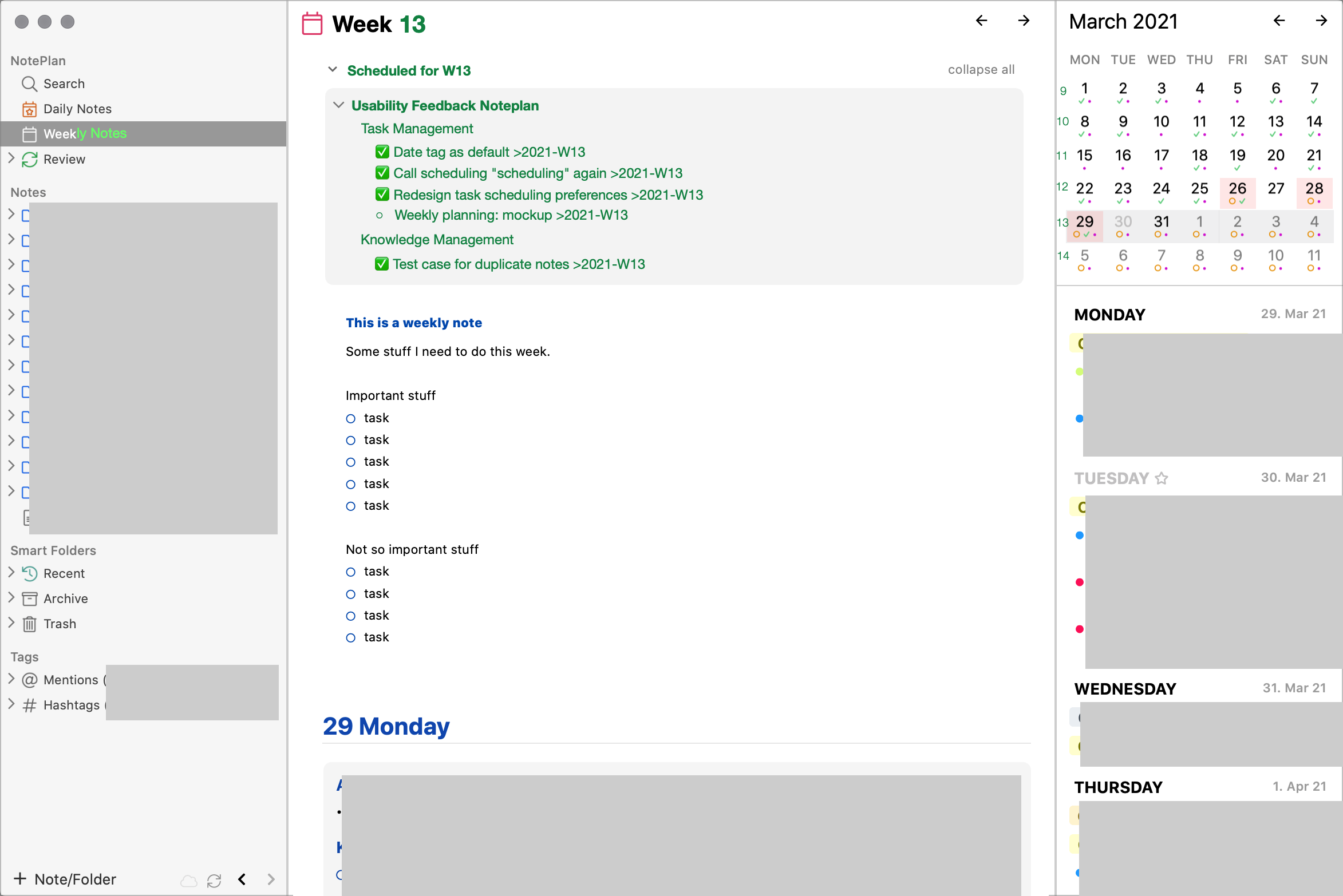
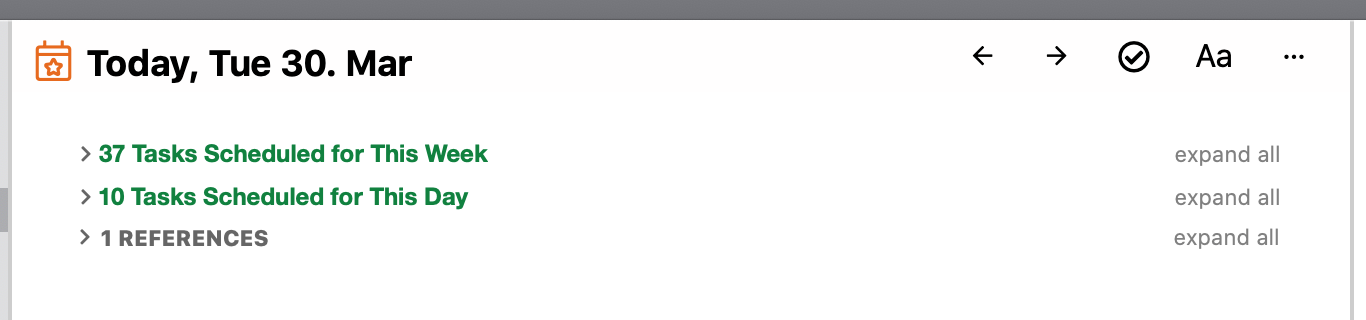
Mockup Day View: - Add collapsible section "Tasks Scheduled for This Week" - Add collapsible section "Tasks Scheduled for This Day" Assumptions: - "Tasks Scheduled for This Week" were date-tagged in general notes with `>2021-W13`. - "Tasks Scheduled for This Day" were date-tagged in general notes with `>2021-03-30`. - "References" are back-links. This section shows notes that contain the link `[[2021-03-30]]` *anywhere* in their text. This link does *not* assign a task to a date. This link is a reference to the *daily note* with the filename `20210330.md` that is stored in Noteplan's Calendar-folder. - Empty sections will not be displayed. If the user doesn't use date tags for this week, the week section will not be displayed. If the user doesn't use date tags for this day, the day section will not be displayed. If the user doesn't link this day's daily note, the reference section will not be displayed. Related: [Distinguish Scheduled Tasks from Note References](https://noteplan.canny.io/task-management/p/distinguish-sche…)
Rhubarb: Ah thats an excellent idea, I just wanted to ask how it all connects together, daily, weekly notes. I like this!
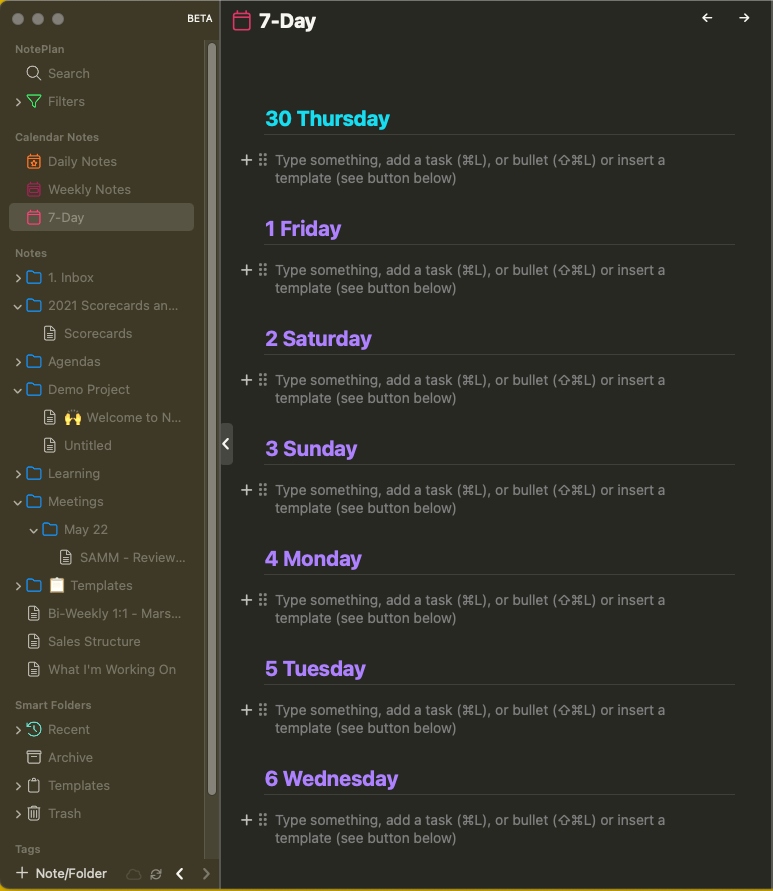
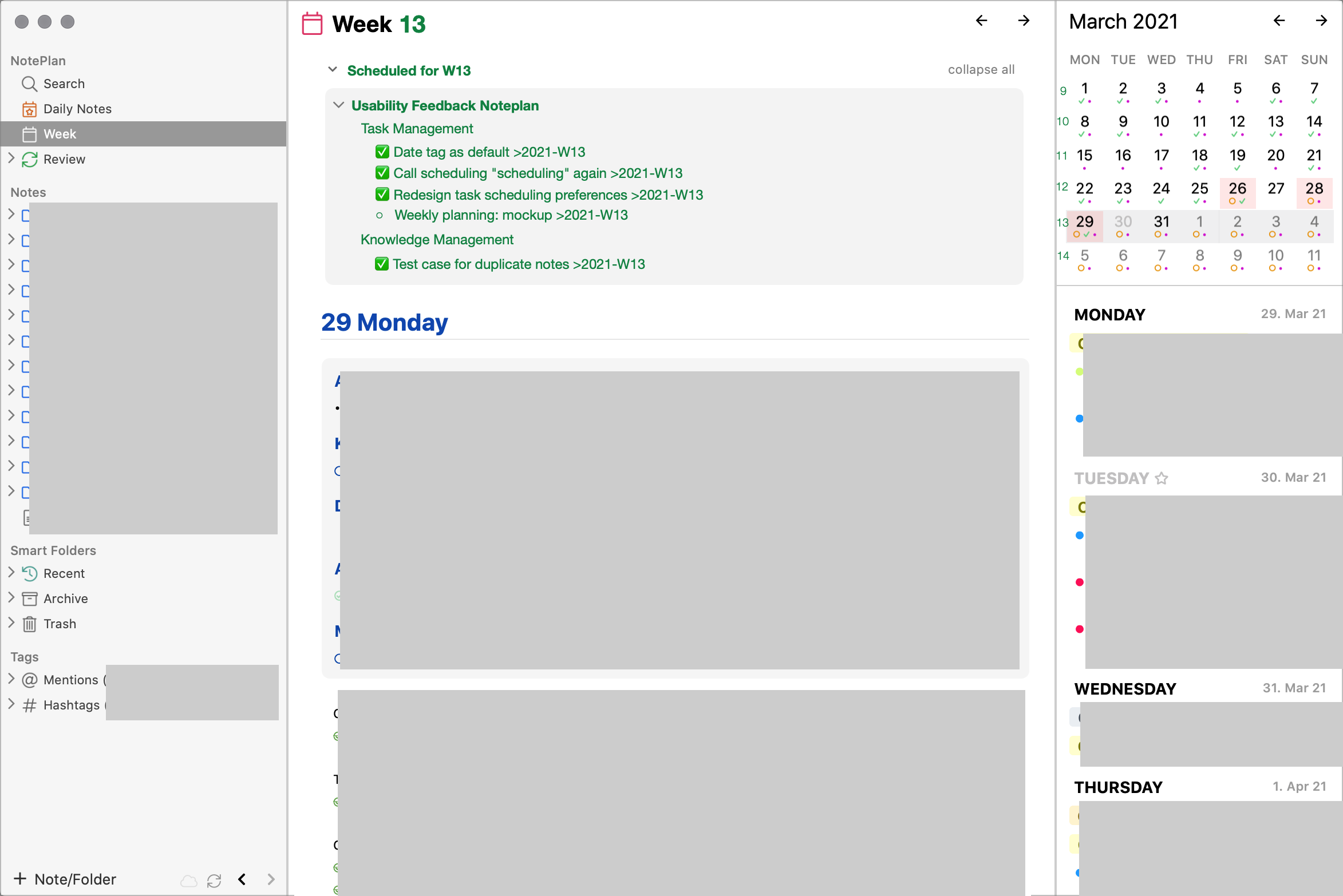
Mockup Week View: - Add displayed week's number to "Week" → "Week 13" - Add week numbers to calendar - Add section "Scheduled for W13" that shows all tasks from general notes that have the date tag `>2021-W13`. (Similar structure as the current implementation of "references", although this is not a section with back-links from a *weekly note*, which doesn't exist, but a *view* that filters tasks by their date tag.)
Inspiration
I think my idea is related someway. https://noteplan.canny.io/search-review/p/today-or-next-thin…
Upvoting this one. Weekly planning is the thing I miss in any task manager. All of them seem to be focused on the daily planning. Expanding it a bit further, why not thinking about “eagle-eye” perspective and have monthly or yearly notes too?
I think of day-view and week-view as tools for scheduling. Scheduling means that a task is assigned to a specific date. I'm aware of many industries where it's common to schedule by week. They don't say "let's do this June 15th" but "let's do this in Week 24". Month, quarter or a year are important intervals for time-planning, but might be a bit too coarse for scheduling. It's more like "let's push this this to Q3" or "let's revisit this in September or October" or "maybe next year". I'd handle such a bird-eye perspective with general notes and a reminder. The reminder could be a task like "plan phase III of project X", that I'd schedule it with a date tag for a day or a week.
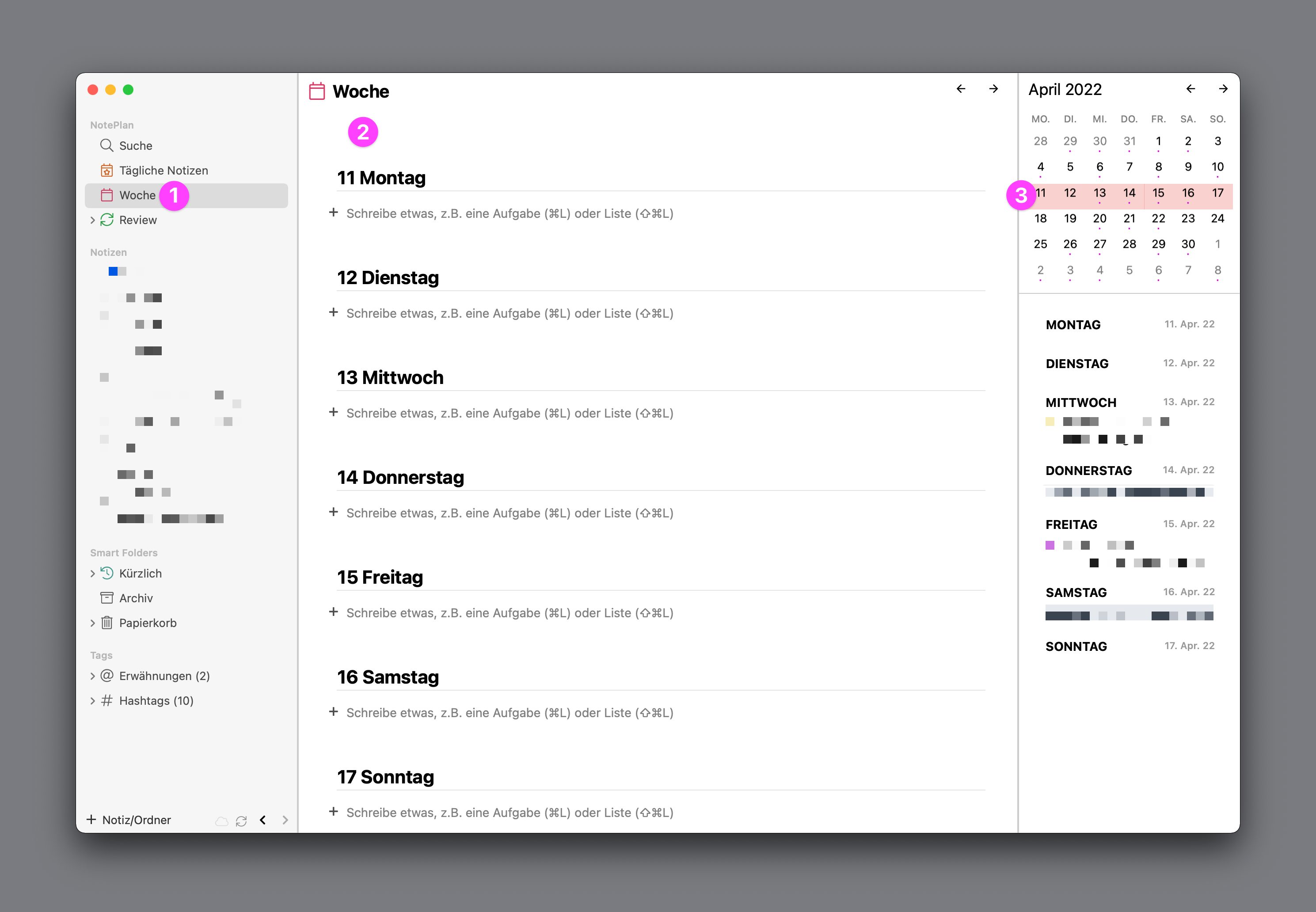
Since the request originally came from me, I would like to describe in more detail what I mean. I often plan tasks that are not to be done within a day, and it’s not relevant when exactly things will happen. It’s only important they happen within the week. Just like the daily files where time is not essential, for weekly files the day is not essential. On top of the week view (currently macOS only) [1,2], NotePlan could show this new file created for every week, together with references to this week (like “>2021-W45”). The daily files are listed under it just like now. When moving a todo, users could select the week number in the picker (alternatively to the date). Also, a click on the week number in the picker on the right side [3] would open the week view. Not sure if this is useful but NotePlan could even show the week’s todos as references on top of the daily files within this week to make sure they are not forgotten. Also, the menu point to open the current day in a new window could open the current week in a new window for meeting situations. Manually creating weekly files is a workaround, but suffers missing integration when moving tasks, and also it’s a hassle to create and organize it manually. Plus, as it’s not shown in the week view, users still do not get an overview about the week.
Frank Epperlein: I like this idea. **Scheduling by week** is common practice in many professional environments. - The notation `>2021-W45` makes sense to me. I'd love to use it as date-tag in regular notes. (I use NP with the setting *Only add date when scheduling in notes* enabled.) - The *Week* view in the sidebar (1) also makes sense to me. But I think the mockup misses a section for tasks (2) that are scheduled for this week as a whole. - Higlighting the whole week in the calendar (3) makes sense. - A week picker for the scheduling command (4) makes sense. Related: [Distinguish Scheduled Tasks from Note References](https://noteplan.canny.io/task-management/p/distinguish-sche…)
Rhubarb: Maybe that was not so clear, but the picture is not a mockup. It is a screenshot of the existing interface with added annotation to make it easier to reference places like where the week-related task should go (2).
Frank Epperlein: Thanks for pointing that out. I hadn't noticed that there was already a week view. Now I want this new date tag even more! :-) It would fit so nicely in the current UI.
Frank Epperlein: Thanks for sharing the explanation. I have this feature a long time in my notes. I'm a bit struggling to find an elegant way to integrate them into the daily notes. They could possible appear as a collapsed bar above daily notes - each week corresponding to the day it belongs to - and another idea was to expand the linking system to support weeks like you mentioned too.
Eduard Metzger: I'd prefer the approach of adding another section to a calendar-based *view*, but not into the daily *note*. I don't like the idea of Noteplan going full Roam/Obsidian/Bear/Wiki by trying to create an all-encompassing linking-and-transclusion system. That would be different product. Noteplan 1 got many things right. Markdown meets scheduling. Tasks are first-class citizens. Calendar-driven. This product idea made sense then and it still makes sense today.
Eduard Metzger: I do not find it super necessary to show week-tasks in the day-view, unless they have a link to the day (`>YYYY-MM-DD` style). Showing the day-tasks in the week-view is probably sufficient. But I agree it could make sense for others. I personally do not like config options, but here it could make sense to have one to show all week actions in the reference section of the day. Another approach could be to use the style from the current week view, where NotePlan has sections for every day of the week. There could also be one section for the selected day and one for the week in the day view.
Frank Epperlein: I thought that request is more oriented on the « calendar view » rather than adding different note formats - monthly and yearly notes. I'm not a developer, so I don't know if it's technically feasible, but with the daily note format [Y-M-D} we can use it "like in Excel" to create "other views." For example, in the other PKM tools like Roam, Logseq there are "query" features, I don't know if it is possible but it's great to visualize notes with dedicated tags or specific dates. What I understand in the request (and also my wish TBH) is to work on the calendar view (currently monthly view) to create a weekly view. TickTick or Ampelnote could inspire us: We should create a weekly calendar view and have the tasks next to it to drag and drop them into the calendar to plan our week like/or weekly time blocking. See below for examples: - Tic-tick: https://www.ticktick.com/about/features - Ampelnote: Shu Omi created a great video about his workflow on how he plans his week. I think it's a sum-up/ use-case about the drag and drop tasks into the calendar. --> https://www.youtube.com/watch?v=SmgU6XNlknA&t=185s - Organizedly: Start to watch at 1'25 to see the tasks drag and drop in the calendar --> https://www.youtube.com/watch?v=hJoDHaSCN98
Ronald: I also think that horizontal week view with drag-and-dropping tasks between days would replace the need for a separate week file. One could select and drop from project buckets. One would also need to be able to arrange tasks in this view, ie. change their order by dragging and dropping.
This planning system offers comprehensive scheduling beyond daily tasks, incorporating weekly, monthly, quarterly, and yearly notes. Users customize preferences to reduce clutter. Daily notes reference tasks from the weekly note for continuity, mirroring how emergency room schedules ensure seamless patient care transitions at http://topcareemergency.com/. Drag-and-drop functionality aids efficient task management. With features like automatic referencing, users maintain productivity, akin to emergency room workflows ensuring optimal patient care.