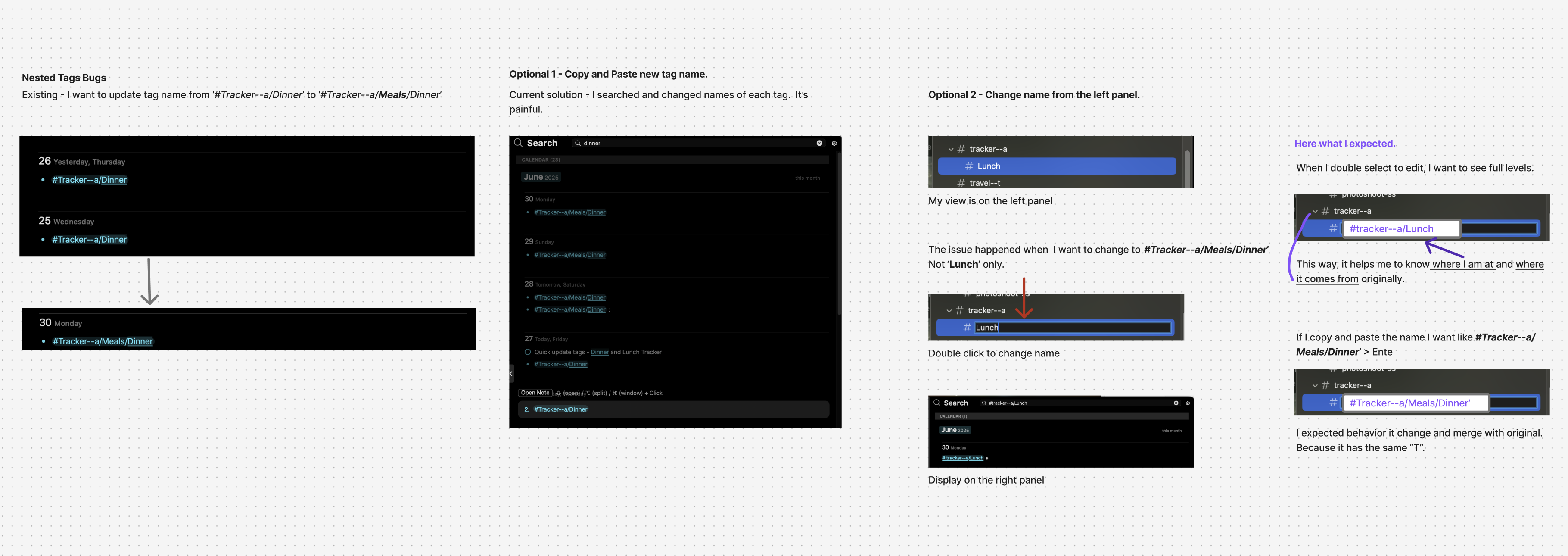
Renaming nested tags is frustrating. I want to rename '#Tracker--a/Dinner' to '#Tracker--a/Meals/Dinner', but the current experience is manual, unclear, and doesn't reflect hierarchy properly.
What I’m Trying to Do
- Rename an existing nested tag from '#Tracker--a/Dinner' → '#Tracker--a/Meals/Dinner'
- Expect all instances to update and stay organized under the same root '#Tracker--a'
❌ What’s Not Working
1. Manual Pain – Copy + Paste Each One
- I had to search and manually update each tag across notes.
- Time-consuming and error-prone.
2. Left Panel Rename is Broken for Nested Tags
- I can only rename the last part (e.g., Dinner → Lunch)
- I can't edit the full path like #Tracker--a/Lunch
- That makes it hard to restructure tags clearly.
3. No Hierarchy Context While Editing
- When I double-click to rename, it shows only 'Lunch'
- I expect to see full context like #Tracker--a/Lunch
→ so I know where I am and what I'm editing.
✅ What I Expect (Ideal Behavior)
- When editing a tag, show the full nested path (e.g., #Tracker--a/Meals/Dinner)
- Allow full path editing and support merging into existing tag structures
- Example: Changing #Tracker--a/Dinner → #Tracker--a/Meals/Dinner should automatically update/merge all linked notes under the new structure.
📌 Why It Matters
- Tags are my system for organizing thoughts.
- I need a fast, clear way to restructure and rename them—just like folders.
- This would reduce friction and keep my notes clean as ideas evolve.