
Mar 3
Markdown Tables (v1.0 released, now v2.0 work-in-progress)
Completed
Just released markdown support for tables on the App Store!
Eduard Metzger Congratulations on another terrific feature release. I love it!
Craig Pinegar Thanks! This one was especially consuming. So many small moving parts.
I am testing out NotePlan to supplement/supplant Obsidian. I was hoping to generate a table like this in NotePlan and can't since links don't work within a table. Looking forward to the update that will include these features!
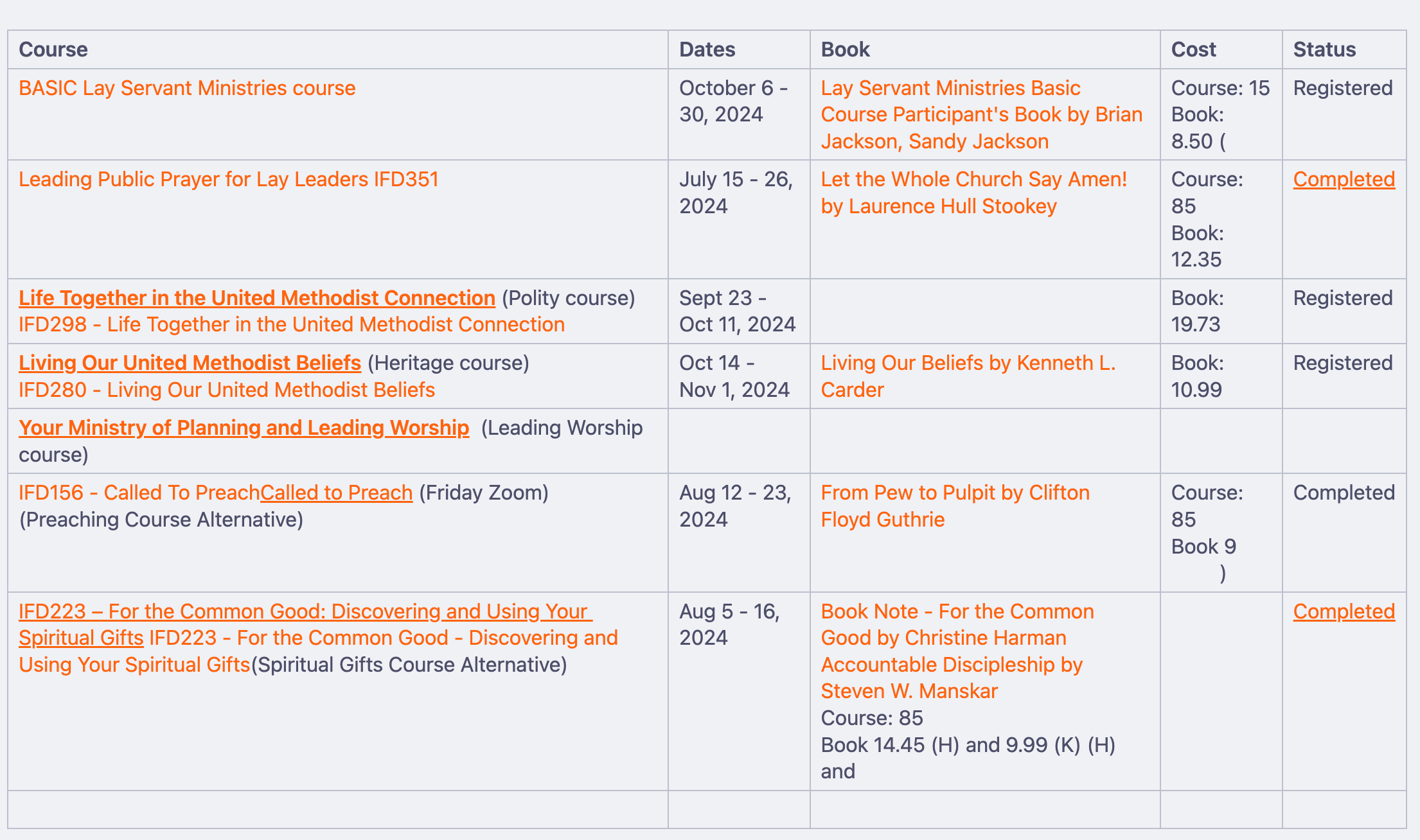
Really looking forward to theming within tables (bullets, links, indents, font sizing, etc.)
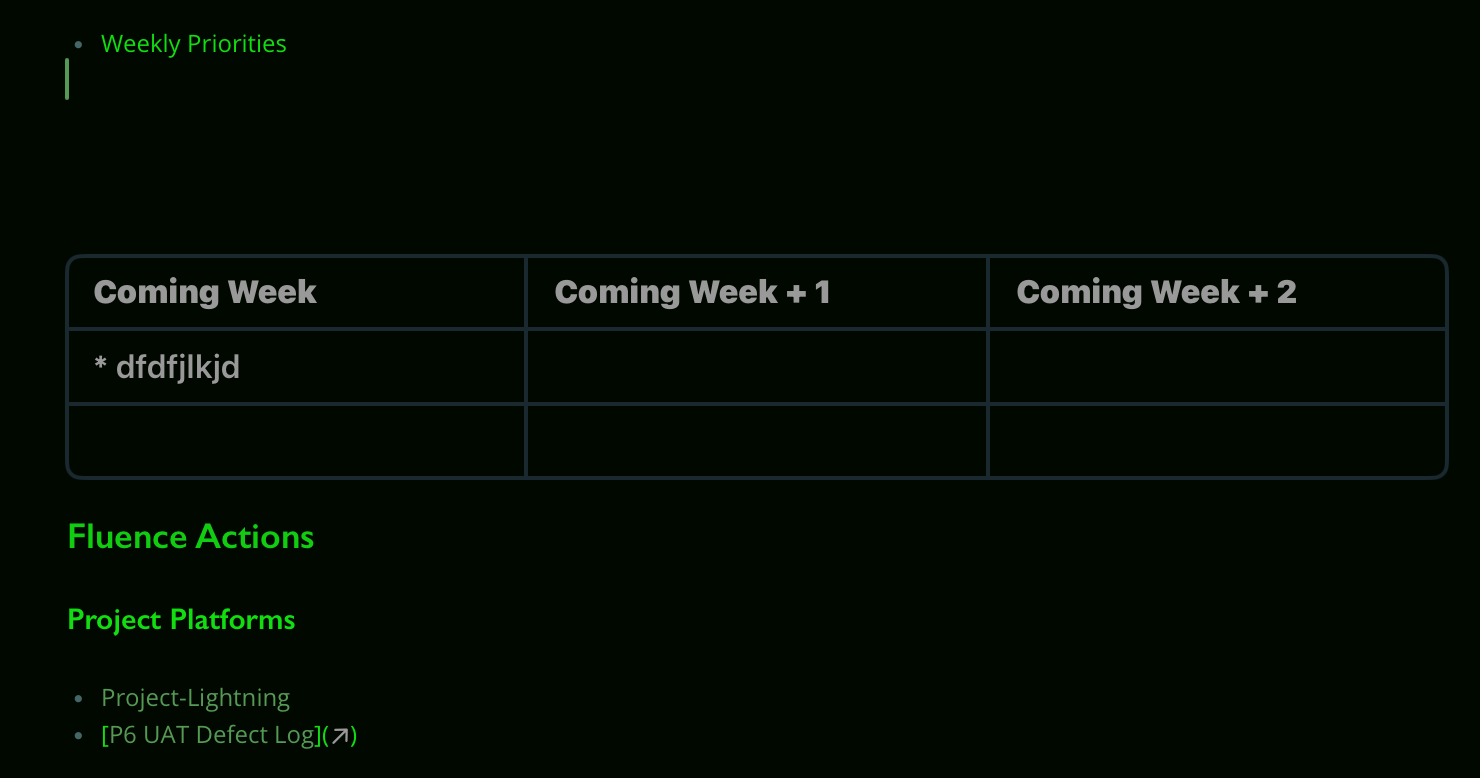
Craig Pinegar Agreed! I am hoping to do some contact management in a table, and rendering of at-mentions are essential for this.
Hi Eduard Metzger, thanks for the awesome work with NotePlan! I've mostly switched from Evernote + Bear + Obsidian to just NotePlan. Could you please add support for full-width tables? Currently, wide tables are hard to read in NotePlan. So far, only Evernote has an elegant solution: wide tables are displayed full-width and are scrollable. Regular text content confined to the regular content width for comfortable reading.
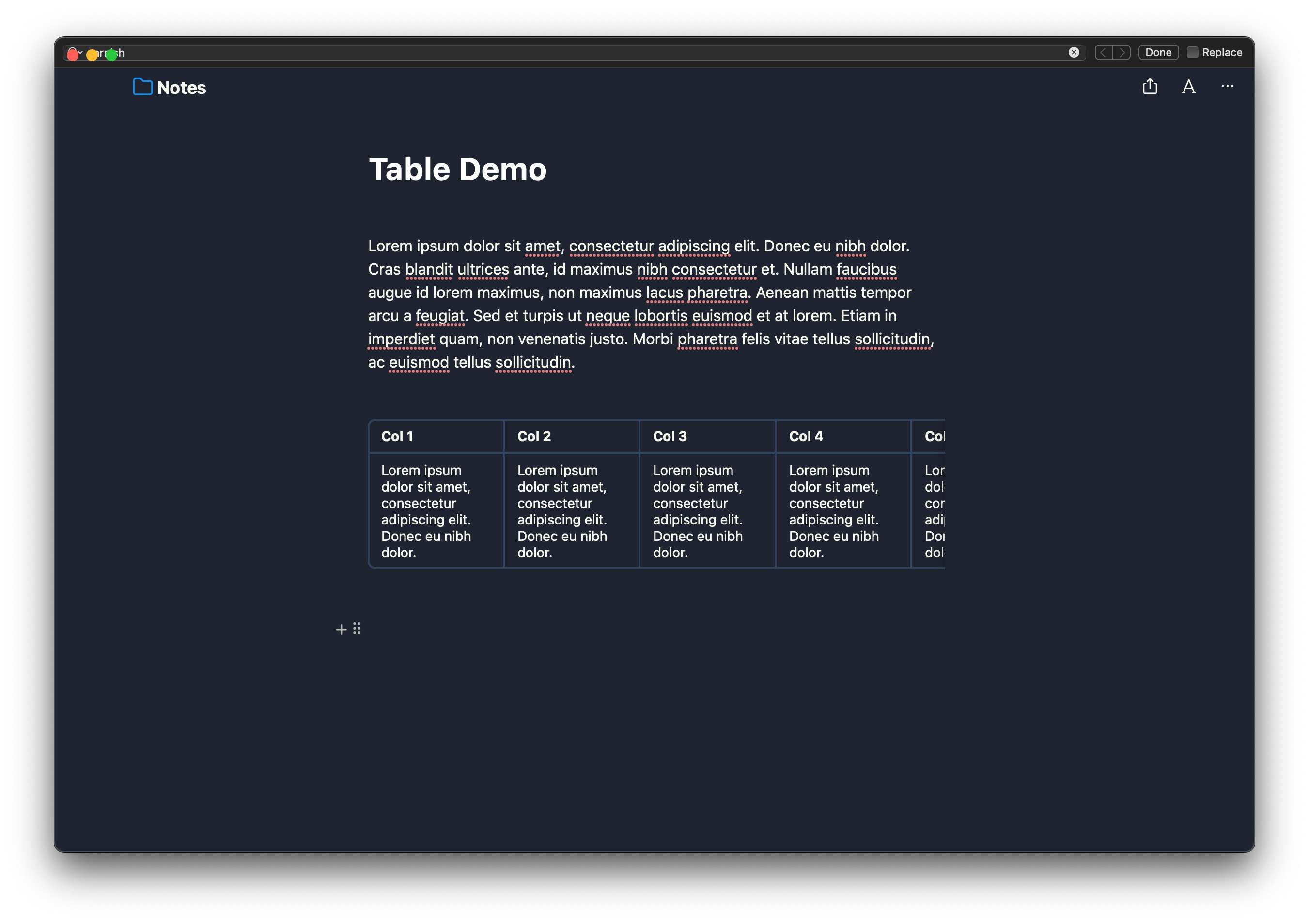
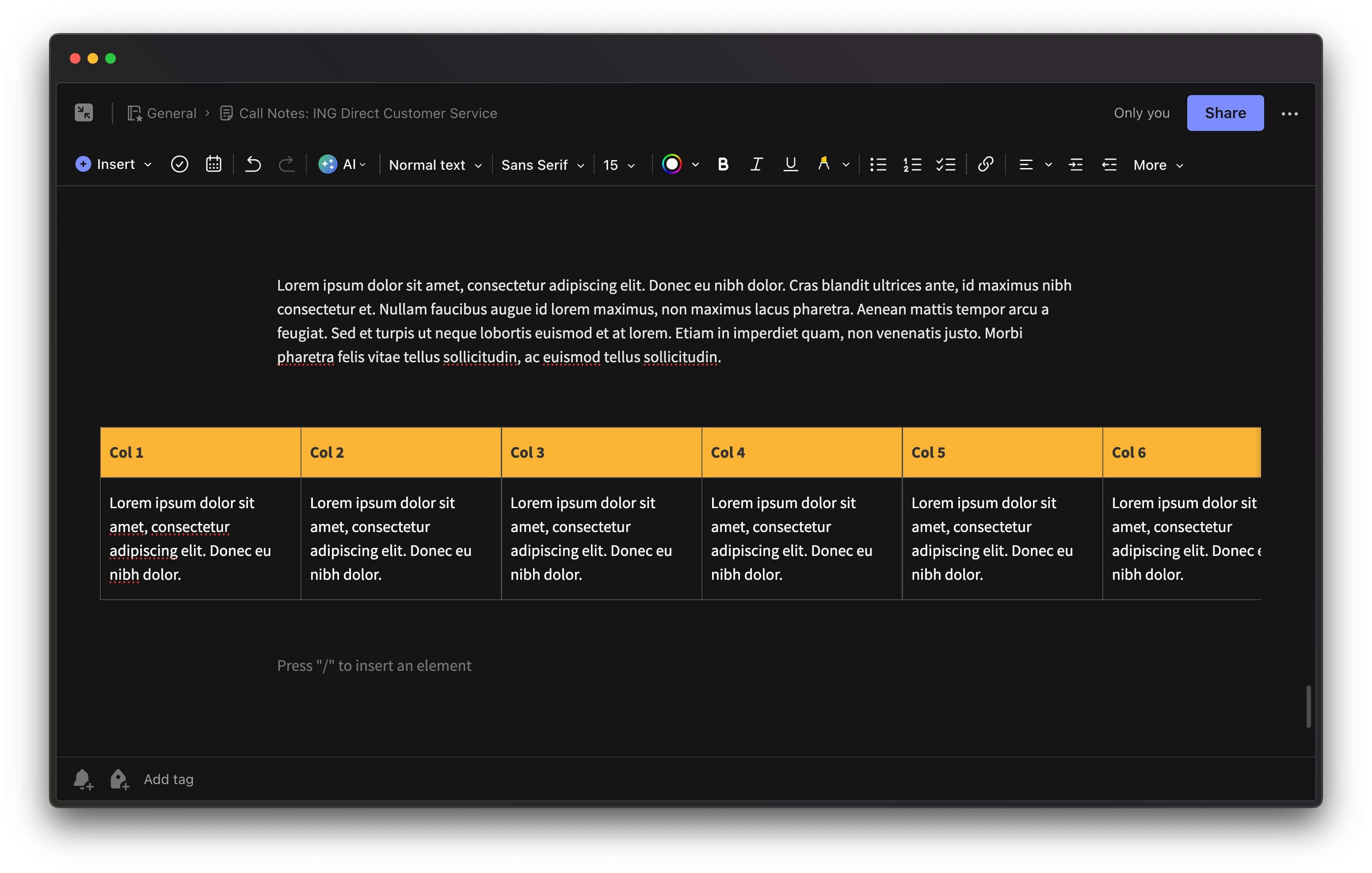
Dorian Iten Thanks for sharing, I really like this solution. Very elegant. Have noted it!
Similar to the other feature for HTML/RTF export please allow the copying of the table such that the table can be copied into other apps like emails easily. So copy and paste of table in this case should drop right into email app with RTF etc. Of course things like background colors etc would be great too. Thx!
I just made this Tables related request, then discoverer this Post. So linking my request to here: https://feedback.noteplan.co/general-feature-request/p/add-t… It's great to have tables support in Noteplan. Thanks for adding it in, and continuing to improve it. Very handy.
I would like to please request the ability to sort tables. For example, if there is a date column, sort by date. Or sort alphabetically. Thanks!
Please consider providing functionality for tables to auto resize based on length of text in each cell. Can you also teach how to use custom theming on the tables and their contents. thanks!
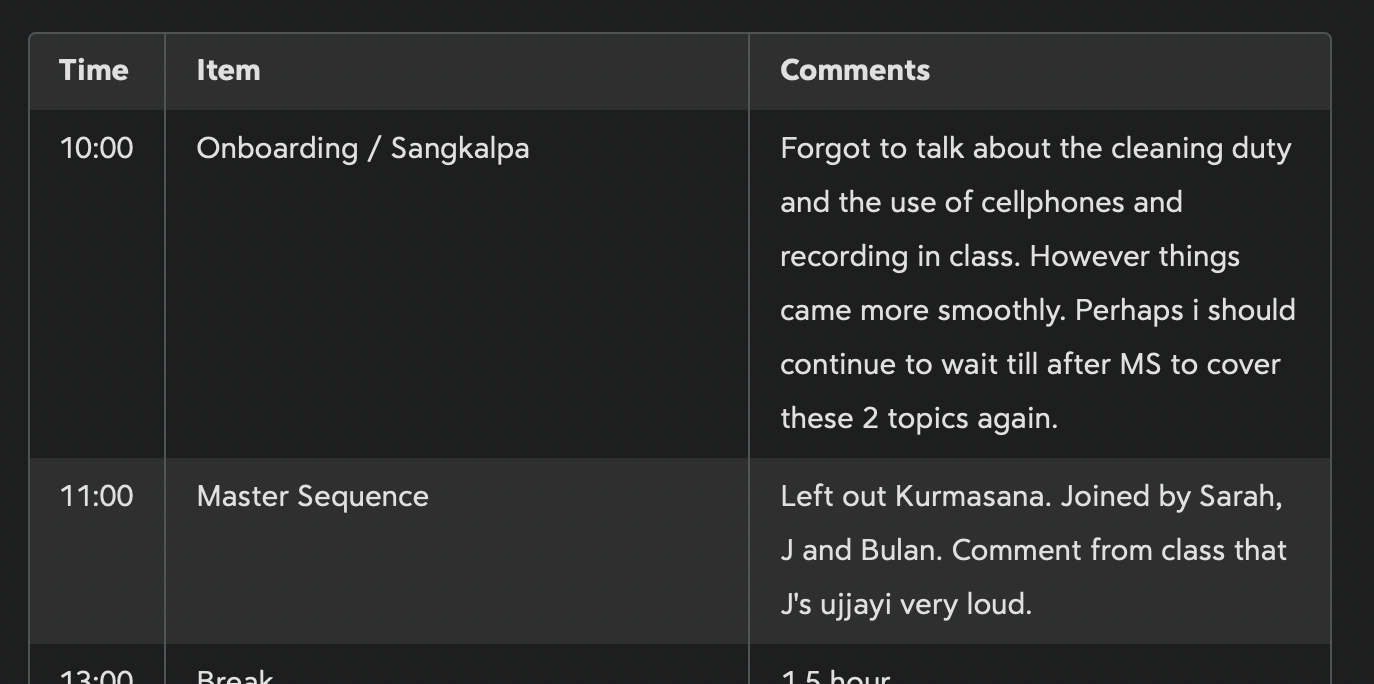
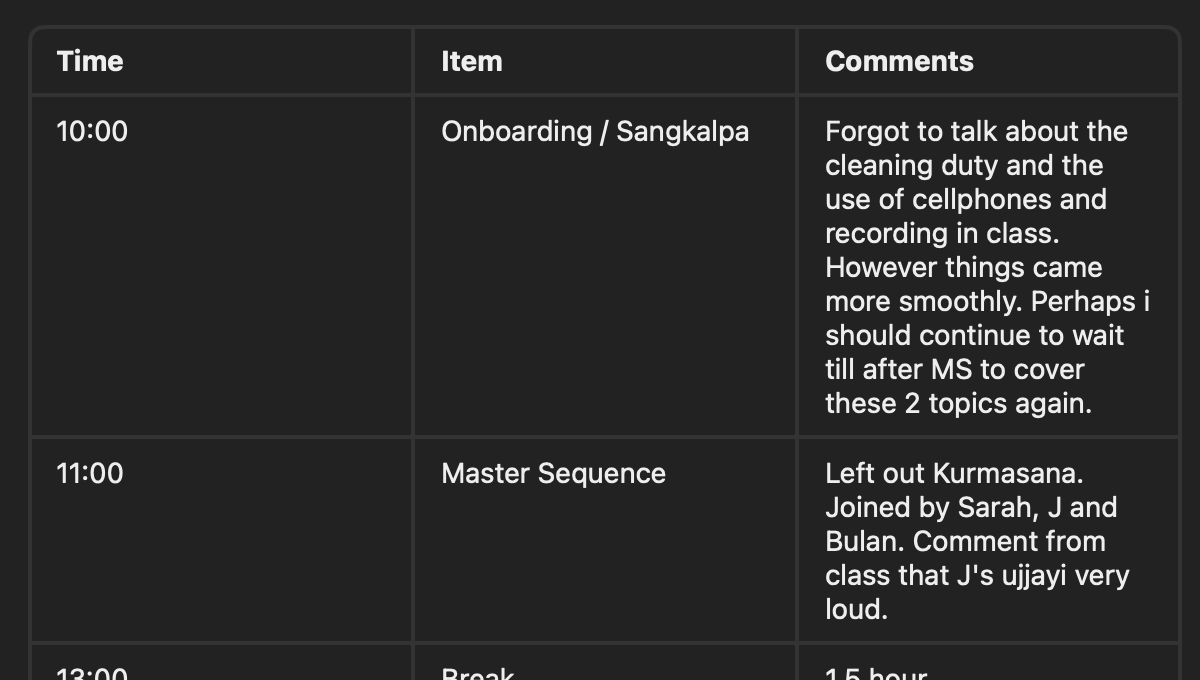
What's in version 2.0?
Damian Roskill: Improvements mostly like formatting support, support for links, etc.
Any plans in the future for tables to support use of tags, links, or markdown links within cells. Right now it looks like only plain text supported.
I try to replicate this table, but I can't format the headlines of non-heading cells.

I'm very happy to have this feature now; but I seem to be missing something. What is the Markdown for a table? I see how to do it using the menu; but not how to just type in the Markdown for it.
David Forrest:
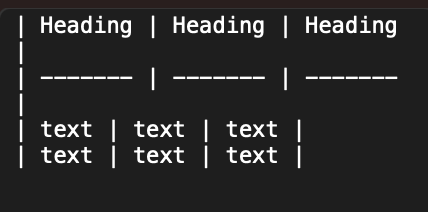
Paul Sydney: That's what I was expecting, but when I type it nothing happens
David Forrest: I've had some issues transferring md tables I made in other apps. Most of the time, maybe all the time, it was because I had a stray tab in place of a space somewhere.
tf: I wasn't typing in any tabs, but that gives me an idea: I may have some autocomplete that could be interfering - will check for that
The tables update is up on the AppStore and Setapp! Will keep this ticket open for improvements.
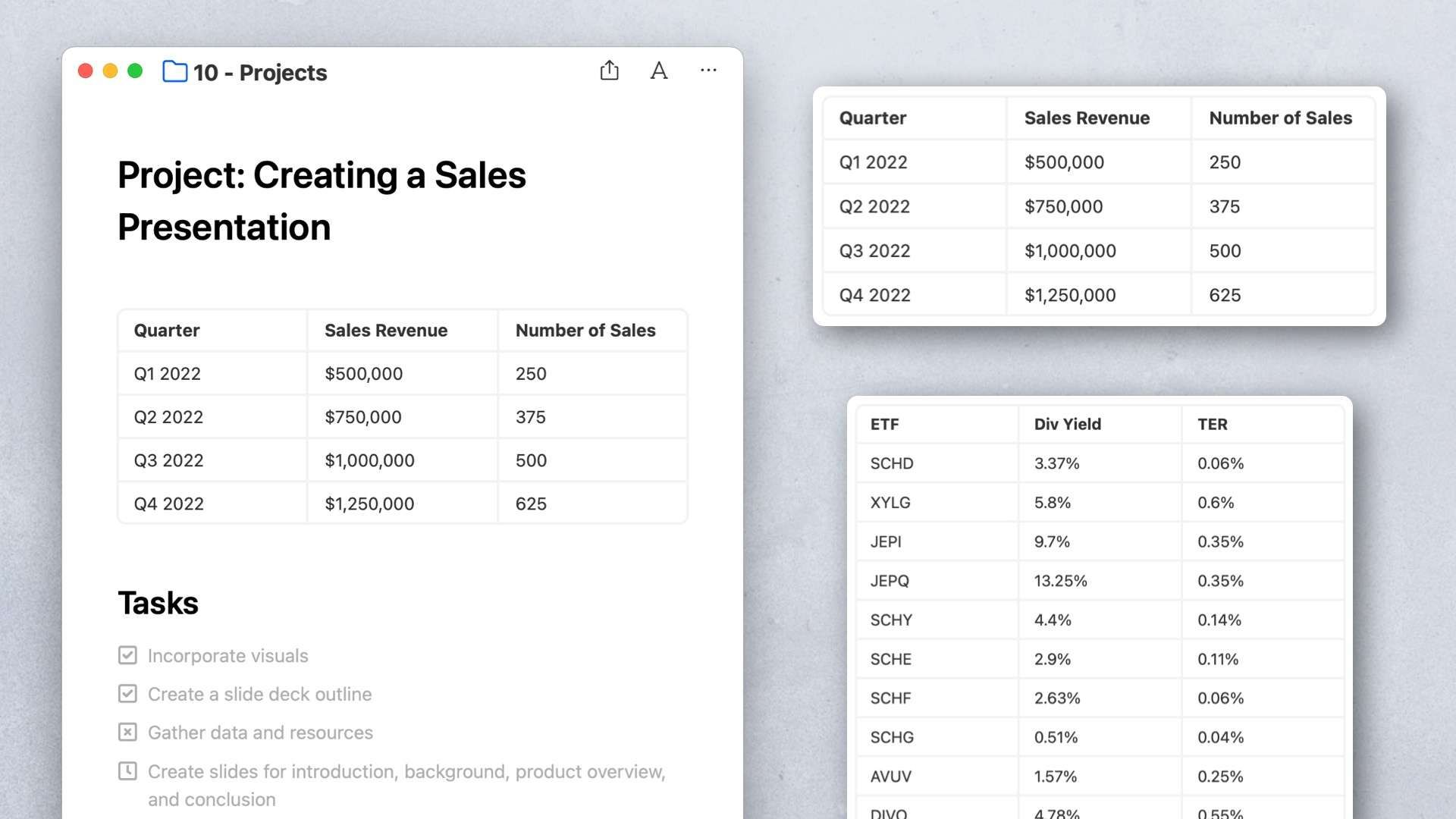
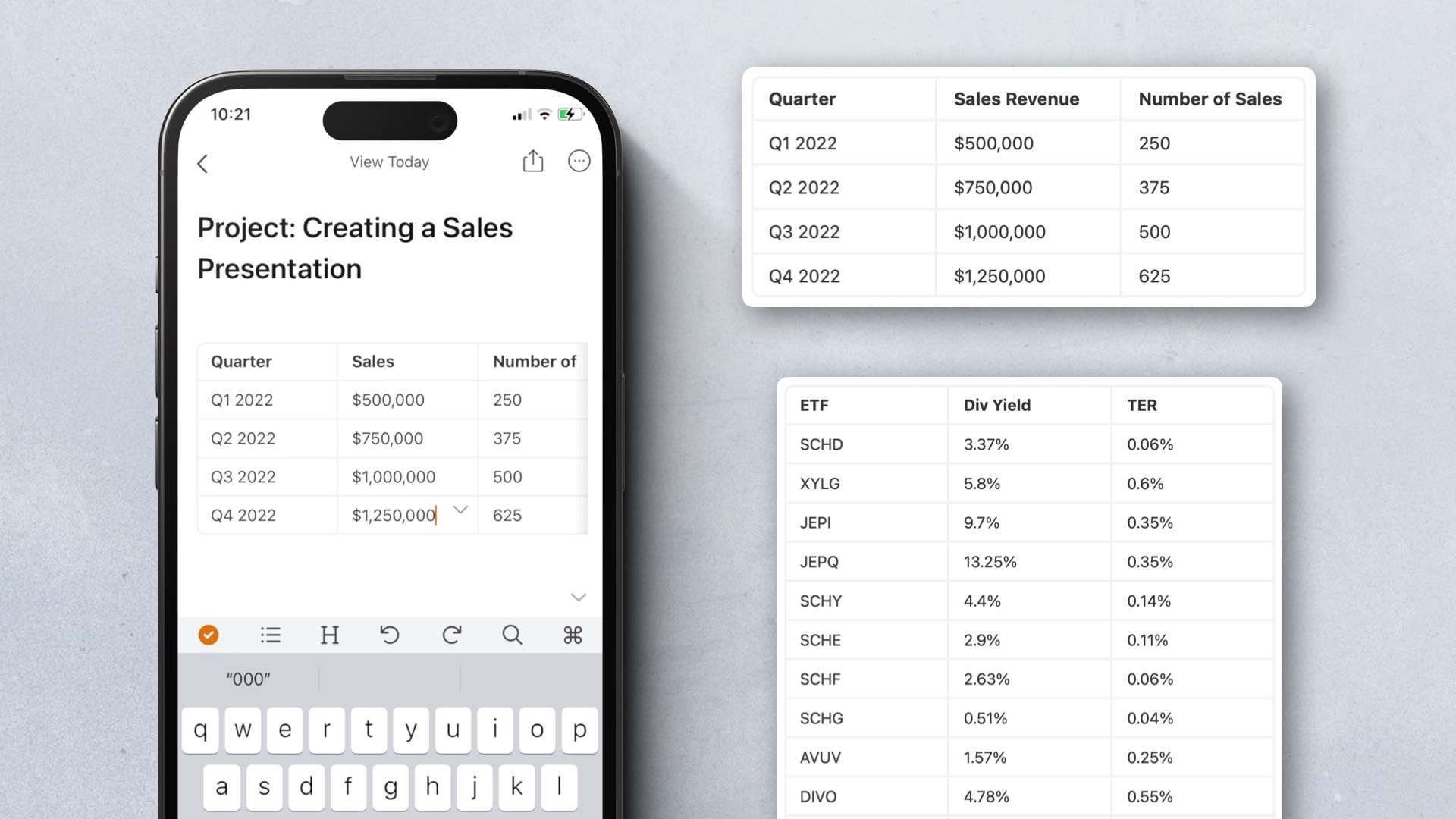
Eduard Metzger: now NP is more than perfect 👍. A question though: table support for published note any time soon?
Eduard Metzger: link within cells don’t work.
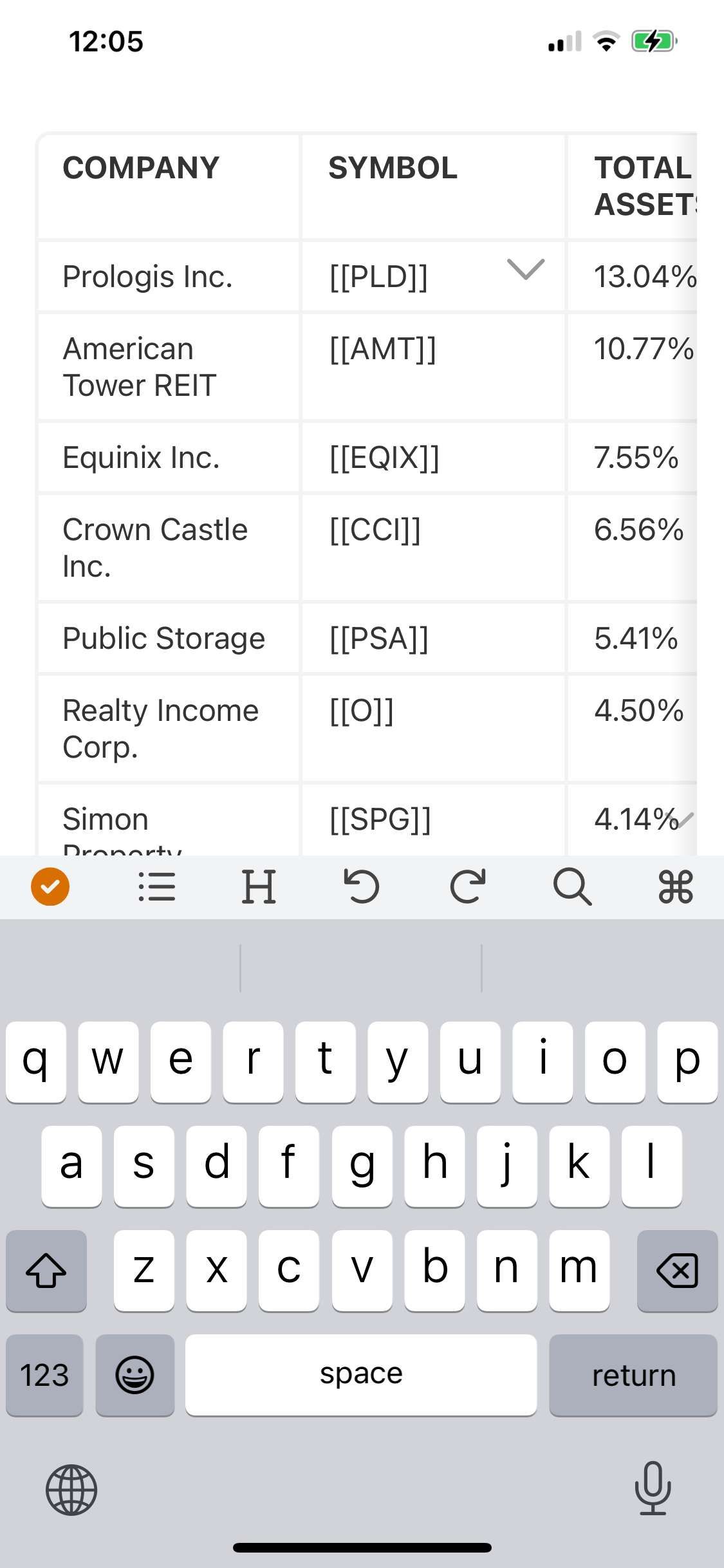
New Update: **FIXED** - Drag table vertically - Long pressing the cursor inside a cell of the table - Undo/redo when making changes to the table - Theming issues (light theme in dark mode or vice versa) - Cell resizing issues - Scroll up when selecting a cell in the table - Couldn't open a note with the command bar when search was opened (Mac) - Improved turning on/off periodic note types (weekly, monthly...) - Couldn't scroll when the mouse was over a table (Mac) - RTF export didn't work on iOS if you had a slash in the title
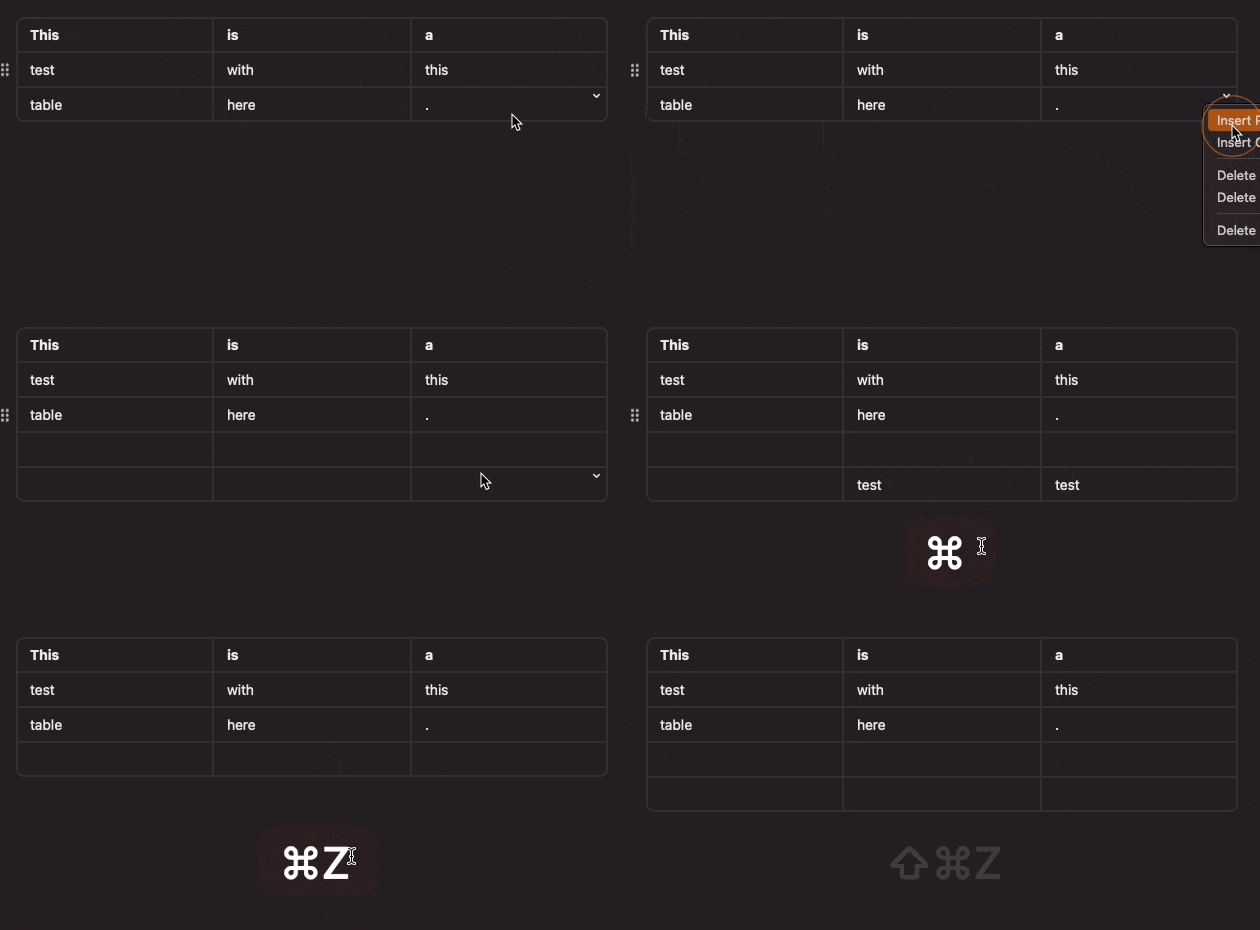
All looks good to me on tables!
Update uploaded: **FIXED** - Tables on Monterey partially didn't appear. - The table height on Monterey didn't adjust - The table position was sometimes incorrect. - Tasks from regular notes didn't appear in filters. - Table row/column deletion was incorrect. - Crashes when deleting rows or columns. - Timeblocks were not detected in languages other than English (such as German) **Improved** - Navigate through cells in tables with arrow keys (on Mac and iPad) - Create new row or navigate down in tables with the return key.

Hey bud, Sounds good, I will wait for the next version and give it a whirl. I am thinking of all the ways I can use tables, can’t wait!!
Mike Erickson: It's up with the fixes!
I am still not able to get it to work (using Monterey) -- Using 673 build Since it sort of works on iOS (more on that below) using the same theme, I have ruled that out. On macOS, selecting a 3x3 table not happens On iOS, selecting a 3x3 table draws the grid but I cannot enter into any of the cells. Further, it places the table over existing text in the document AND I am not able to delete the table, so my only recourse is to recover from the most recent revision
Mike Erickson: Thanks for the follow-up! Monterey has to wait for the next update. Found one more place where I forgot to take away the if macos < Ventura 🤦♂️ I'll skip the multi-cell selection for now. Will iterate on that. It's a bit tough to add that, but will planned for tables v1.1 Placing table over text: Saw this issue as well, I think. And fixed it. Coming in the next update!
Eduard Metzger: THIS IS REALLY GREAT! The first thing I want to ask is whether there are (or will be soon) theme elements to control the font, color, font, size, spacing, etc. of table contents?
Eduard Metzger: Well done! I'm sure it was a lot of work getting these implemented. Quick feedback from using the beta on Mac: - Up/down arrow keys don't move between cells as expected - Can't drag mouse to select multiple cells - The +/:: menu on the left of the table was initially confusing. I thought it was there to select/move a row, but it's for the entire table. - Right-clicking in a cell doesn't show table options in the menu; table options are only available via the tiny white dropdown I know this is a v1, so perhaps it's better to ship than get these things right, but most of us are used to these features in tables so it feels incomplete without them.
Craig Pinegar: Thanks for asking! In tables v1 not yet. But we can iterate on that in the later versions.
Brian Morykon: Thanks for pointing this out! I'lll add some more shortcuts, but I think I'll have to skip the cell selection for now and build it in the next iterations. Building out a fully spec'ed table is quite a lot of code. We got to start somewhere and see what feedback comes my way :)
Hello Eduard I see the menu item, but when I select it, nothing happens. Is there some theme adjustment that needs to be made (I use a custom theme)
Mike Erickson: Sorry, I figured out the issue. It was only working on macOS Ventura. I tweaked it so it works down to Big Sur. That was probably the issue. Took be me a little to figure that out. New beta is up!
It's coming soon! Great progress so far. Squashing the bugs now and then comes the beta release.

Eduard Metzger: looks cool, thanks!
Eduard Metzger: hooray! I might finally have to try the beta!
Eduard Metzger: good news!
Eduard Metzger: 👍Looking forward to it!
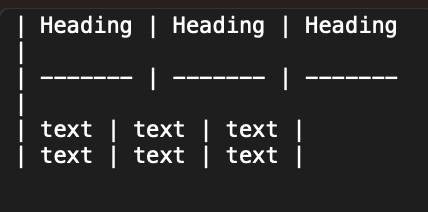
Eduard Metzger: This is awesome. How will the table be represented in markdown text?
Paul Sydney: As a Markdown table, see screenshot. I'm using the default way to save it as text.
The only missing feature to avoid other markdown editors.
Just adding another +1 for Table support. Even just supporting on macOS would be a huge win.
I love NotePlan and am considering switching much of my work over from Notion. They have an intuitively similar feel but the calendar and reminder integration is a huge advantage. But I need tables!!! I see lots of great ideas for how it could be incorporated. Markdown as the approach by users seems like a great way and generally done [this way]( https://www.markdownguide.org/extended-syntax/#tables) when supported. I'll quit my job and be an evangelist if you provide it! OK not really. Maybe. thank you!
Eduard, this essential feature would be a smart addition to your great application. I personally miss it very much for my work. Pleeeeaaase!!
@Eduard I was thinking about your React/HTML in a webview pane idea and was thinking this would be a great solution to one of NP's biggest missing features -- tables. Would be awesome if you could have a MD doc underneath and a webview with the MD TABLE rendered in HTML (and editable in React/HTML with data passing back to the underlying NP Markdown doc). Typora does a pretty nice job of this (obviously would work differently in NP, but you get the idea).
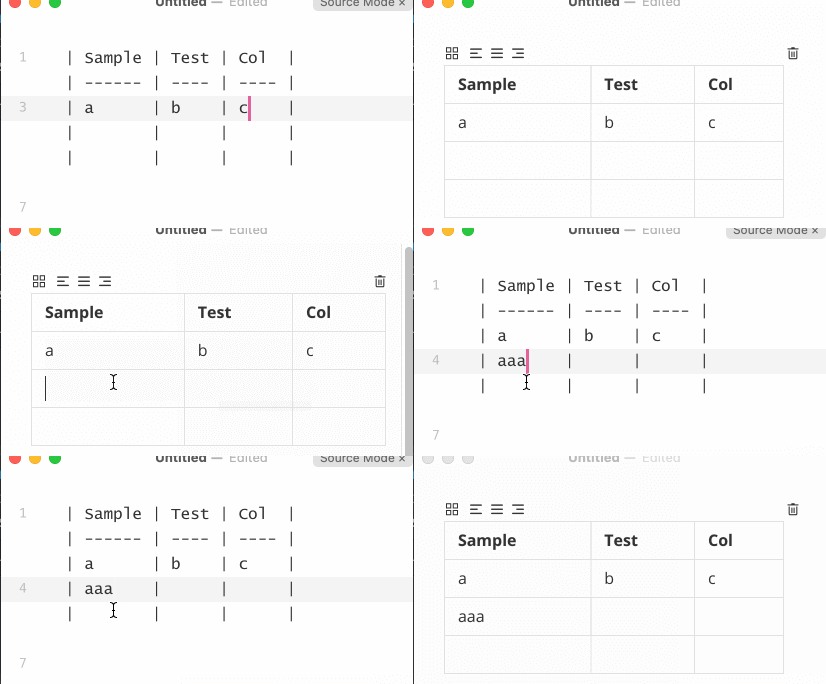
David Wertheimer: That would also pave way for other rendering requests and plugin opportunities; also syncing ios osx representation would be easier no?
Please!
I recommend some compromise methods to help those in need. Mac: [TableFlip - Simple Table Editor for Mac](https://tableflipapp.com/) iOS: [Markdown Tables](https://apps.apple.com/cn/app/markdown-tables/id1476068521?l…)
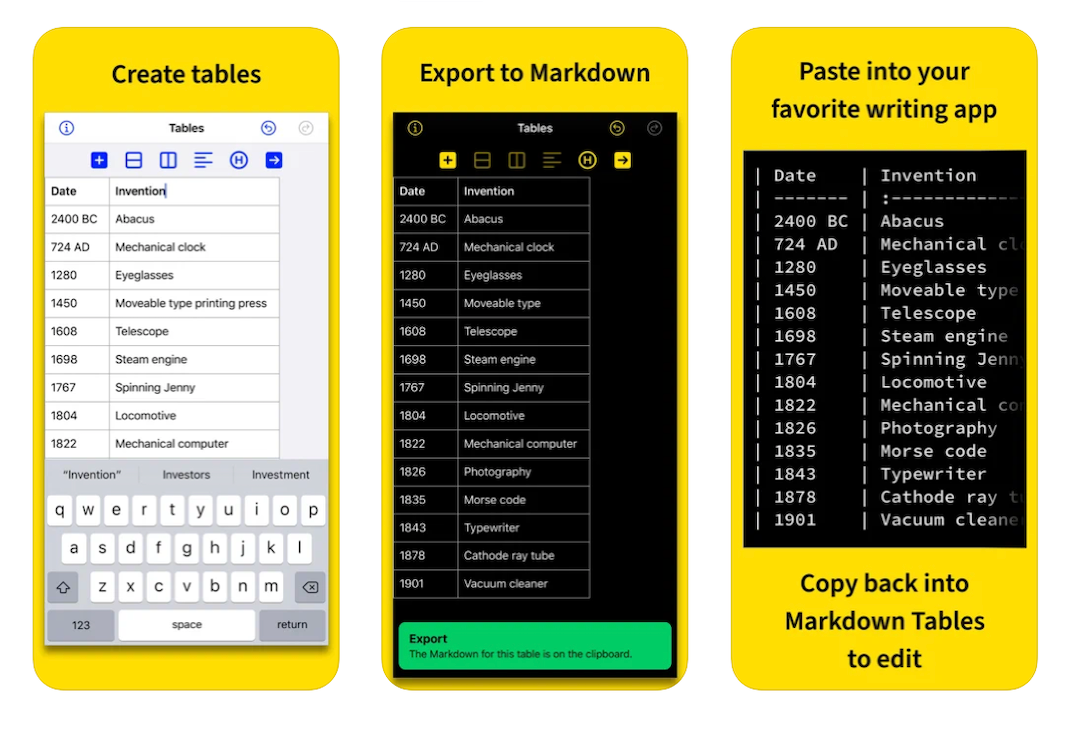
Pan: pity you can't drag and drop a note from NotePlan into TableFlip; that would make it a lot more frictionless.
Eduard Metzger you‘ve probably already seen it. But in case you haven't ... you should REALLY check out the table editing in Panda (the new editor beta for Bear) https://bear.app/alpha/
Luca Schultz: Yes, I saw it!
I just came to write the same thing :)
This is a must have, Eduard. Every other note application supports it and it is essential to my (and many others') workflows. I'm having to do an annoying workaround, editing the files in Typora and/or Obsidian to get what I need. I'm almost thinking of moving away from Noteplan due to the lack of tables. It's only because everything else is so excellent that I stay!
Jon: Interesting! Yes, it seems they are important but also tricky to build :D
Eduard reported earlier today in the #plugin-dev channel: "I have checked this a few weeks a go, it's really difficult I think. There is no built-in support for interactive tables where you can add columns and type into the cells like in Apple Notes which is supported both on Mac and iOS. It needs some custom implementation, so this might take a while."
Jonathan Clark: Thanks for sharing it here. I talked with an Apple Engineer during WWDC about this. I got an idea how to implement it and he confirmed that this is probably how every other app who has tables is implementing it. So I know technically “how”.
something simple like agenda will be enough for me. Add column and row that it
related reddit post: https://www.reddit.com/r/noteplanapp/comments/m1ffnw/tables/ it would be nice if, just like the image support, the table would be nicely rendered while keeping the markdown notation behind the scenes
Luiz Filho : Yes, that's what I would try, some kind of "live rendering". Not sure how yet, though.
Would it be greedy to also request for tables to support custom styles in themes?
Andrew Ford: Haha, yes! Let me figure out first how to do tables on iOS. On Mac I know how, but iOS...
Are there any plans to support selecting entire rows or columns to apply formatting to multiple cells ?